Hello
Got namron edge and namron touch installed.
Looks like these aren’t quite right in the app. They turn off the app but don’t turn it on again when they should. Any chance to look into this?
Have also submitted a report on these.
Hi,
I have installed a new thermostats that is not included in Piggybank. Is there any chance you can add Elko One Matter in the app?
This app is great, thank you!
All the best
/Joakim
After the frient app update, the frient energy meter dont longer report to piggy. Is it possible to fix that?
Yes i know a fix is going for a flow, but i like when piggy does everything itself
A new developer has taken over the MQTT Hub app, and the app has gotten an new app ID.
So MQTT meters readers (like AMS-leser/Pow-U) are not being detected by Piggy when installing this version (which is the only one available in the app store now).
New app ID: org.mqtt.hub:device
Old app ID: nl.hdg.mqtt:device
Would it be possible to add a checkbox (or any way) to enable and disable the cumulative property?
As it is now (for me) both the piggy charge controller and easee app report the same power usage, and that causes Homeys Energy overview to be inaccurate since these two apps report the same power usage.
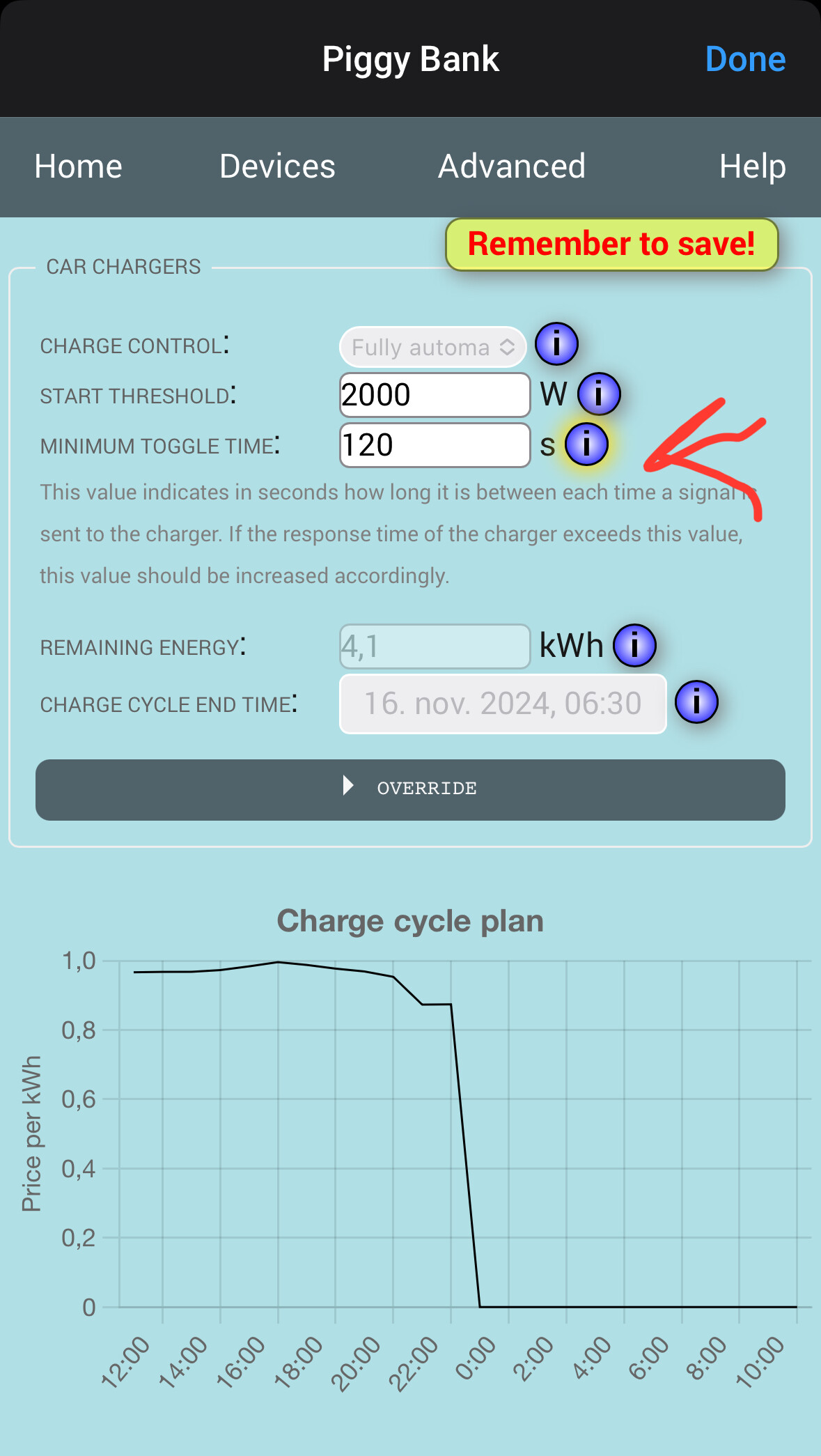
@frodeheg Is it possible to reduce the time wait between the commands as now its quite long when I charge my car via Easee charger.
Could you also make it so that an mqtt reader with capability “meter_power” is compatible with piggy as well. So it will look for either meter_power or meter_power.day.
Just meter_power is more standard and will make the mqtt device work with other apps as well (without having to make two identical capabilities on the device with different name to fit the need for piggy, and i.e. power by the hour app).
Are anyone expecting any issue with car charging?
After latest Easee app update the dynamic charging current are not changing depending of max limit, it starting and stopping based on plan.
So two times now I have gone so much over, so I almost went up two capacity levels ( Norway).
Homey. Homey pro 2023
Homey sw: 12.1.2
Piggy bank: sw: 0.21.14
I have it on 90s and this is the lowest you can go.
Yes it happened to me once and I crossed my 10kw limit 
Hi, I haven’t had any issues like this. But I am using the latest test version of the Piggy app v0.22.14 and the dedicated charge controller device.
I am getting these errors. The only device I have is Easee charger.
+20:26:56.688: Failed to reduce power usage by 3279W (number of forced on devices: 1)
+20:27:6.731: Failed to reduce power usage by 4315W (number of forced on devices: 1)
+20:27:16.792: Failed to reduce power usage by 3344W (number of forced on devices: 1)
+21:1:57.045: Failed to reduce power usage by 3527W (number of forced on devices: 0)
+22:0:3.103: Failed to reduce power usage by 4528W (number of forced on devices: 0)

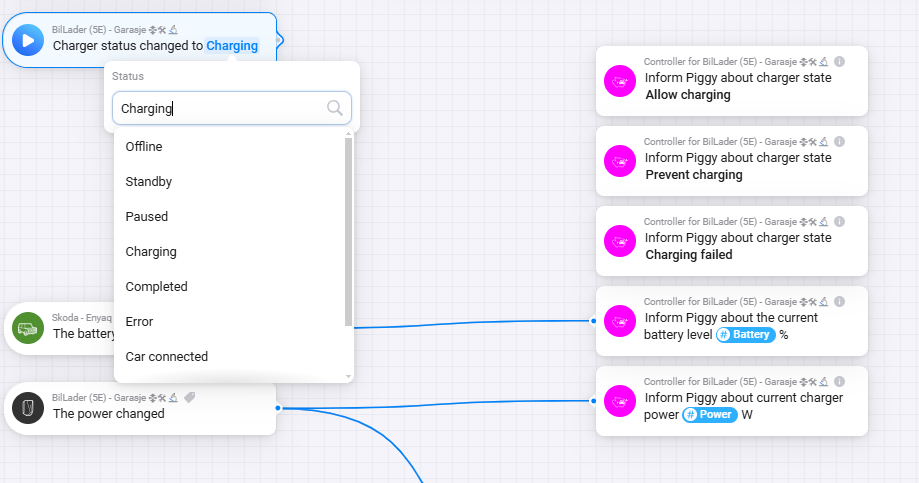
With the Easee charger, you don’t need all the status flows, it is detected automatically after the validation process.
So you only really need one flow, to start charging, if you want it to schedule the charging.
This is how I do it, others may do it differently, but this works well for me.
I have two cars, a Tesla and a BMW that uses the same charger so I have some additional flows to detect which car is connected to the charger, but if you just have one car you can use Easee charger status changed to standby as trigger point.

Then calculate how much it needs to charge
(@dooniem have a good post on how to calculate kWh here)

Then finally start charging schedule

Thanks for crediting my kW “tutorial” 
Just like to add that after changing my tariff from 5kW to 10kW, Piggy set’s the average expected kW’s pr. hour higher than what my charger can produce in 1 hour, making the initial order completely wrong leading to picking less optimal “extra hours” during the re-calc every hour.
So I added an extra step converting the needed amount of kW into hours using my own “expected kW’s pr. hour” variable.

Maybe some of you are better off using hours instead of kWs as well…

Maybe you have added your charger to Tibber or similar that also can control the charger?
If you use the Easee app, you can go there in the charger settings and change operator to i.e. Easee to disable influence from other places. (it can then not be controlled by i.e. Tibber)
Sorry about the late replay.
I’ll try to do this some time during christmas.
This is normal operation of heating appliances, even my oil oven turns on/off several times each minute, so I don’t think it will damage the thermostats.
This is normal when you have set the mode to emergency off. Please use the mode “On” instead, and it should turn on again.
I’ll try to get it done during the Christmas holiday
Thanks, I’ll look into it during the christmas holiday
Thanks for the info, will add it into the christmas update
Hi have had a big problem lately with the control of my setup.
Usually I have had no issue with keeping it below 10 kw/h, but the last month I have hours that is all the way up to 17.5 kw/h
December and a colder month is coming and I am eager to get this resolved within this month so next month capacity level can go back to 10 Kw/h and no more month with 20 Kw/h


Setup:
Homey Pro 2023 - SW 12.2.1
Piggy Bank app . V0.22.14
AMS reader: Pow-U+, esp32s2 app Mqqt Hub V3.5.5
11 x Heatit Z-TRM6 app V3.9.1 (resolved TX error issue)
Easee charger app V1.7.7


Charger setting:

In addition I have smart oven’s that report state so by flow I increase the reserved power.
Lately when overload I see that the floor heaters Z-TRM6 are not toggling down to 5 C as they did before and the dynamic charging current are not changing, it is starting at 11 A and do not change through the hour.

First hour I did try to alter the Dynamic charge current but next time it started i went straight to 11 A and did not adapt despite overloade.

Has anyone any input?
Any chance you can take a look @frodeheg
