Before 1.3.3 I never had errors, with 1.3.3 - 1.3.5 I had connection errors that were resolved after a restart sometimes for a few minutes and sometimes a few hours. From 1.3.6 till now a had no errors anymore. In the log on my unify system I see in the log that the wf-rack disconnects and connects every time aprox one hour has passed.
Hi Edwin,
First I like to thank you for all the effort you are putting into solving our problems! 
As you know I have 4 airco’s.
All 4 have fixed IP and are active and connected to the WiFi according to my Fritz! box. All AP’s in the mesh wifi network are also Fritz! All co can be controlled bij the MHI smart M-Air app.
After my last reaction and some of your most recent updates two of them (68 and 70) became completely unreacable (almost) all of the time. The other two I get status updates from when tey are operated bij RC.
As you know, from other reports, I have trouble controlling them, Homey somehow was, and still is, lost as one of the controlling devices of the AC unit.
Because I was waiting to see if your last fixes for that problem worked I have still not yet reconnected them to Homey to solve this problem. I can still control “70“ though(!).
All of the Homey devices have the static DHCP IP filled in at “Handmatig IP-adres“. This is at this time the same as “Huidig“.
To try and get all AC’s back online I toggled the main power of all the airco’s.
Now “68“ came back to live and as far as I can see still reachable. (f8f3028f-46d9-4faa-8143-45a0d6b893bd)
Of three of them I now get status updates from (but stil can’t controll).
So this part of the fix seems to have worked.
Only “70“ is still completely unreachable from Homey. This should be the only one I could control from Homey,
I restarted the app (ad31a9bc-a9b9-4ddb-a16d-0b5e719c7231) but stil “70“ is unreachable.
At last I tried to turn all devices on by Homey and OFF bij remote controll to generate some logging (8caaf716-2684-4c54-96e4-5582ee42ceab).
By chance I saw that after te last restart “70” had an IP “x.160.x.x“ in “Huidig“. That can’t be richt! I have no network in that range. After app restart the iP is OK. One last report (397a06d5-7243-4209-943b-a52483200ce2).
UPDATE: About 20 minutes later I see that “70“ became reachable and controlable again!!
I don’t exactly know what happened, went wrong the last time or helped solving the problem, but it is working now!!
Perhaps there is also someting in my story above to help others fixing there problem
One last report: 46dc9c3d-cebd-42e0-968e-cc46237cee99
A whole lot of text on this last day of christmas 
 .
.
I hope you can find something in all the logging that is helpful to help fix this/our/my last problem.
Kind Regards,
Marco
I am using the Mitsubishi Heavy Industries SRK63ZR-W. They won’t show up. But it’s using the right WiFi module. Did they change anything that needs to be updated in the app?
Hoi Edwin, is het niet mogelijk om het temperatuurbereik groter te maken? Bijvoorbeeld vanaf de 15 graden. In de M-air app zit een mogelijkheid om de instelling op leegstaand pand te zetten en dan kun je vanaf 12 graden instellen. Het zou een mooie optie zijn voor als je een tijdje niet thuis bent.
Ik hoor graag van je.
Loek
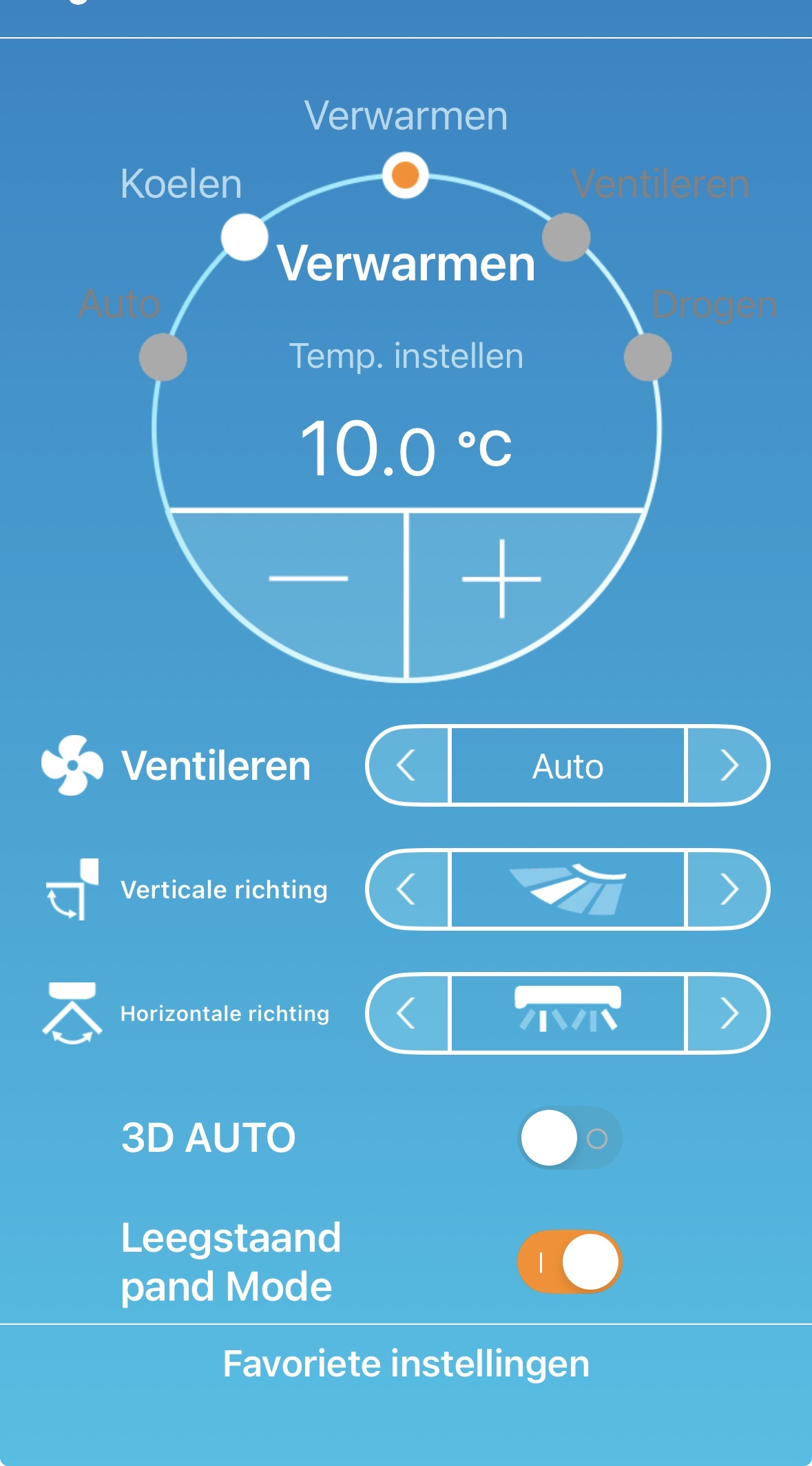

Ja, het zou fijn zijn want dan kun je het ook gebruiken in je flows. Nu ben ik nog altijd afhankelijk van de M-air app en dat is niet de beste.

Hoi Rob, zet je daarmee de airco iedere keer aan en uit? Als ik het goed zie gaat hij aan bij een temperatuur kleiner dan 13 graden en uit bij een temperatuur groter dan 15 graden.
Dat is natuurlijk een oplossing, maar zorgt er wel voor dat je verbruik veel hoger is dan wanneer de airco op een laag vermogen het huis op 15 graden kan houden. I vind het toch vreemd dat die optie niet oproepbaar is in de app. Het zou echt een mooie aanvulling zijn.
If you could please keep the conversation in English as much as possible, then more people will be able to participate and help you. Please translate your post into English, otherwise it will be deleted in three days to keep the thread in just one language as stated in the forum rules Welcome to the forum!
Please do also check out the categories in other languages:
If you need help, because depending on the trust level of your account, you may have limited permissions, please PM me or another moderator or reply to this post.
Pls read Multilingual on the Homey Community
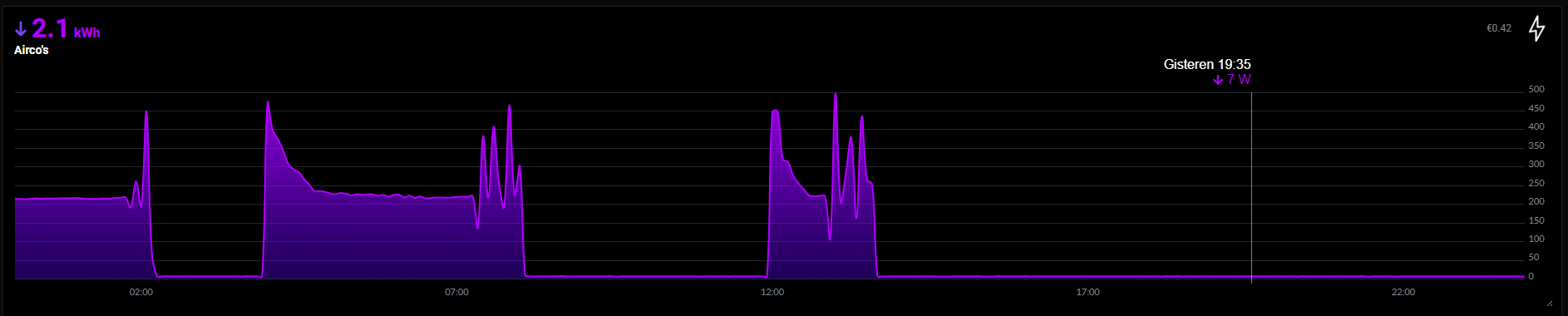
That’s not too bad, but I have a large living room and the house isn’t particularly well insulated. If I were to do that, it would cycle on and off every half hour.
Hi, I finally managed to connect my second airco again. Many times I removed and added the incomplete airco with no connection through the app on my phone and tablet. It immediately lost the connection and restarting the app was also no solution. This time I added the airco again using Homey on my pc and the airco appeared and kept the connection. Now also all the fields in the : advanced settings” where filled. No idea what the difference is now. I wonder if the connection will remain intact now, just as it used to be. But now everything is working fine again. 
I had some problems with units not being available some times. But setting it up with fixed ip’s (in router and app) helped so far. And don’t use the mb-air app. The wifi module can only handle a few connections.
Hi, yesterday I saw that the airco again lost the connection, but after restarting the app it was connected again. The difference with before is that now the “advanced settings” were filled. So it seems that the cause of my problems was that when removing and adding the airco again the “ advanced sttings” were empty. What causes this is a mystery to me.
Hi everyone, I have a question. I’m trying to connect my Homey Pro Mini to my Mitsubishi WF-RAC,
but I keep getting the message “Device unavailable.” What’s wrong,
and where should I look to see what I need to change?

Hello developer. I Will send you this: 9349ba55-e3f4-460c-b0b3-5996613f4490
I hope it helps you to figure out why my Homey can’t operate the Mitsubishi Airco. Is this a setting that I have to change or is there a problem with my airco or is it something else? I hope you have the time to look into it.
This is the latest one: b2e5775f-90bc-4775-bd0b-58fd4cf89854
Hi @evdpol, where do we put our feature-requests?
Or put it on github so we can clone and maybe send a PR?
Hi @evdpol / community,
Since last week i have a strange behaviour. I have 6 airco’s onboarded to homey . It was working fine for months . The issue I have now is that I can’t do any set operations any more . So turn on , set temp and so on . However I can still do read operations , like see if the airco unit is powered on or de current inside or outside temp …. So strange !
See dump report : bcaca1dd-0be6-4741-bbcf-555a2517c4a6
Any idea ?
Hallo Edwin,
Verleden week een Mitsibushi SRK35WF laten installeren en geprobeerd deze toe te voegen aan Homey (via Smart-M-Air). Apparaat wordt wel herkent maar, als ik de het apparaat aan/uit wil zetten, krijg ik de melding “Apparaat is onbeschikbaar”. Heb wel een static IP toegekend.
Toevoegen aan Google Home is wel gelukt.
Zou het kunnen dat de SRK35WF wifi module niet compatible is?
Bedankt, Ron
