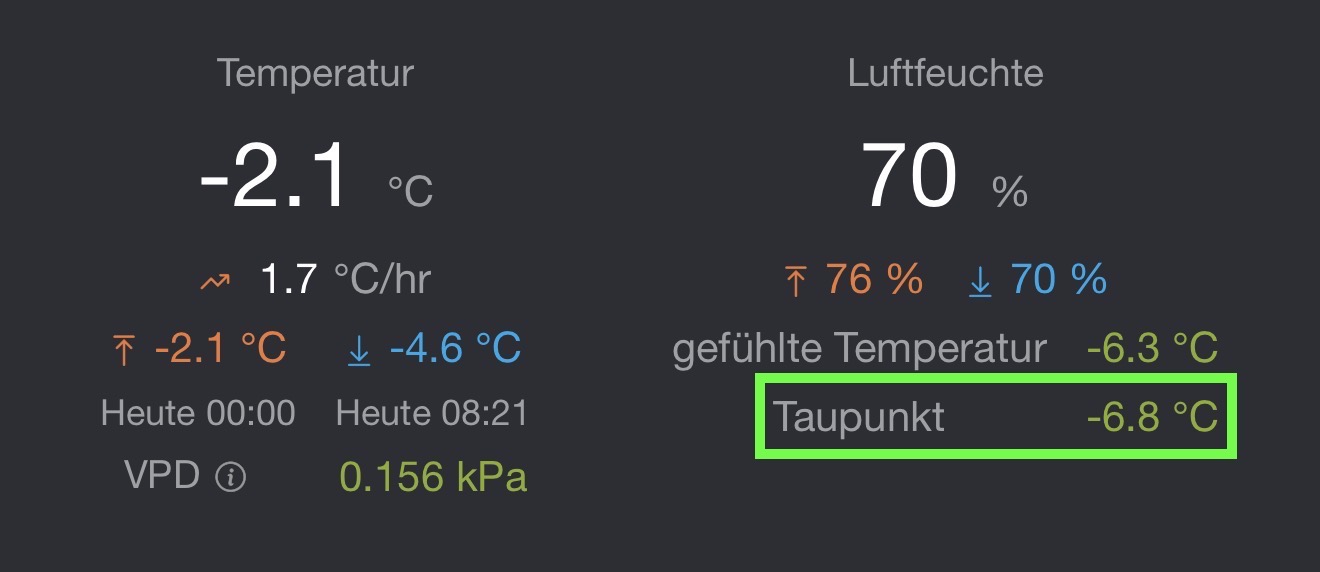
@Adrian_Rockall, why do you calculate the dew point in your app at all? The WittBoy WS90 provides the value itself, for example. Is the dew point value not transmitted via the API?
Yesterday, I connected my WS90 to Home Assistant for testing purposes, and it displays the same dew point as the Ecowitt smartphone app.
So the conclusion is, that the calculation of the dew point seems to be wrong in the Homey Misol and Ecowitt app.
jes, but only a smal mistake in the calculation because it is only with negative values. so i guas (i don’s now what) if you place the right part of the calculation between brackets that it wil be fixt.
i have somewhere in my flow also a dewpoint calculation, i wil compaire them and if i find something i wil let it know
i don’t know how it happend but my calculations are wrong as wel for the negative decres(good to know). i think we found the same calculation on the internet.
EDIT:
i just ask the AI modus on google and it gave me this to put in a java script, i did not check it yet:
const T = args[0]; // Temperatuur tag
const RH = args[1]; // Vochtigheid tag
const a = 17.27;
const b = 237.7;
const gamma = Math.log(RH / 100) + (a * T) / (b + T);
const dewPoint = (b * gamma) / (a - gamma);
return Math.round(dewPoint * 10) / 10;
According to Code Pilot this is the revised more accurate Magnus formula:
            // Calculate Dew Point
            relativeHumidity /= 100;
            var temperature = (temperatureF - 32) * 5 / 9;
            var dewPoint = 0;


            if (relativeHumidity > 0.01 && relativeHumidity <= 1)
            {
                var a = 17.625;
                var b = 243.04;
                var alpha = Math.log(relativeHumidity) + (a * temperature) / (b + temperature);

                dewPoint = (b * alpha) / (a - alpha);
            }

            dewPoint = Math.round(dewPoint * 10 + Number.EPSILON) / 10;

            if (dewPoint != this.getCapabilityValue('measure_temperature.dewPoint'))
            {
                this.setCapabilityValue('measure_temperature.dewPoint', dewPoint).catch(this.error);
            }
I have published a new test version with this revision, but I’m not sure when the temperature will drop below 0 here, so I havn’t been able to test it fully.
Thanks for the great app — it’s exactly what I need to start monitoring and automating my kitchen garden once it’s up and running.
I’ve read through the entire post and tried all the recommended settings, but Homey still isn’t detecting the gateway or the weather station. I updated the suggested settings and waited a bit before trying to connect, but Homey simply can’t find the devices.
Data shows up fine in the Ecowitt app — the weather station and two moisture sensors are all reporting live data. It just doesn’t show up when I try to add a new device in Homey.
Am I missing a specific sequence, or could there be another issue?
Hi Adrian! That is correct, IP is the Homey one. They are both on the same network indeed. The gateway is wired, to a mesh node (which perhaps could be the problem…) and the Homey is wireless, but since I have access to the data through IP and App, I dont see the problem of sharing it in the network directly to the Homey.
I figured out the initial problem. It was my network setup, somehow my Homey ended up on our guest network which doesn’t have WAN access. I was able to find and add the gateway and weather station but returned this error (see screenshot). After a reboot of the gateway, everything seems to be working accept for the soil readings. I had to add all the devices seperatly now. At first it detected both weather station and gateway in one go. But it works! Pfew
I have successfully installed Ecowitt Weather station (WS2910: WS69+7 inch display) and GW1200A gateway. Works great, but I realized that the Indoor temperature of the LCD display is not available in my Homey Pro 2023.
How to add the Indoor Temperature device to Homey?
I am getting “No new devices have been found” when I try. And I’m pretty sure that it isn’t already been added. Outdoor temperature of type “Temperature and humidity meter” have been added earlier. That is the temp & hum from Weather Station.