I just got everything lined up as well with the WS90, Homekit integration for the Velux windows control etc. etc. - so - yeaaahhhh - I would love this feature enhancement as well for “rain-start” rain-stopped" - would multiply the value of my Homey flows to control the Velux windows!. Thanks Adrian for all your work on these integrations! How do we buy you a good coffee?
1 Like
New test version is in the store that has a rain started / stopped alarm and related Flow triggers.
6 Likes

1 Like
Sorry for me English
The rain will last a while in the Netherlands
In the mean time I have a question about the WH51 bottom sensor, it randomly passes on data sometimes every 10 minutes and sometimes 8 hours. That’s pretty awkward, can I set that up somewhere? Thanx
There’s nothing in the app to configure that as the gateway pushes data to Homey.
I needed to replace my weather station (W380) because it was defect. So now I have a new W380 and thus a new device in Homey with a new DeviceID in the Misol and Ecowitt app.
Is there a way to replace the DeviceID of my first device so I can adjust the original weather station to the new one instead of adding new weatherstation?
This would allow to save historical data in Homey.
Unless the w380 is a combined hub and weather station (I have searched and can’t find that one), then Homey will be unaware of the change.
Basically, each hub has a serial number to identify it and the parameters are then identical for each device within that hub.
You’re quick! 
It is this one: Ventus W830 Slim Weerstation Kopen? | We ❤️ Smart! | ROBBshop
So a display and outside sensor. The display is the hub (I assume), so it is seen as new DeviceID. Which is correct.
But would be nice to leave the original device in Homey, the flows also remain untouched in this case.
Hmm, OK, so currently there’s no way to change that via the app, but I will have a think about it. The hub id is shown in the Advanced settings of the device, but is currently read only, so I will look at changing that so you can update it.
These data are only updated if there is a change in the soil moisture. If the soil moisture doesn’t change, no data is sent.
Have you ever compared the Homey data with the data in the manufacturer’s own Ecowitt smartphone app?
For me, the data in Homey are updated at exactly the same time as in the Ecowitt smartphone app:

A small time deviation may occur, as Homey interpolates the Insights data more and more with increasing time periods.
Ok, I can imagine this does not happen often, so totally understand if it’s too much work to implement for maybe a few similar cases
@fmb If both devices have the same capability’s, maybe you can changes the ID’s with this script.
Small change if it works, just a idea.
Or ask the maker of the app if it could work.
https://community.homey.app/t/how-to-pro-cloud-tool-to-fix-advanced-flows-after-removing-and-re-adding-devices/65018
1 Like
I have had a look and it won’t be possible to change the gateway for old devices as the PASSKEY used to identify the gateway is store in the device data during pairing and there is no way to alter that as Athom have made it read-only.
Thanks a lot for having a look and reporting back so quick!
Good to know, now I can swithc to the new device without kooeping in might I might need to switch back.
yesterday +/- 25 degrees celsius, it took about 6, 8 and 12 hours before the data was updated. It seems unlikely to me that in 12 hours with radiant weather the humidity does not change.
however…the data from the WSView Plus App is exactly the same and these are updated. Could it be that the data change time is not being passed on correctly?
The gateway pushes data to Homey, normally every 15 seconds. Homey only updates the time stamp when a new value is set, so setting the same value that’s already there will not change the time stamps.
The app has no control over the frequency of updates from the gateway.
Do you use other Ecowitt devices besides the WH51 soil moisture sensor where you can check the data report interval?
I assume that the change in soil moisture can be strongly influenced by external factors, e.g. where the sensor is installed and how deep, when it last rained, is it windy or not, etc.
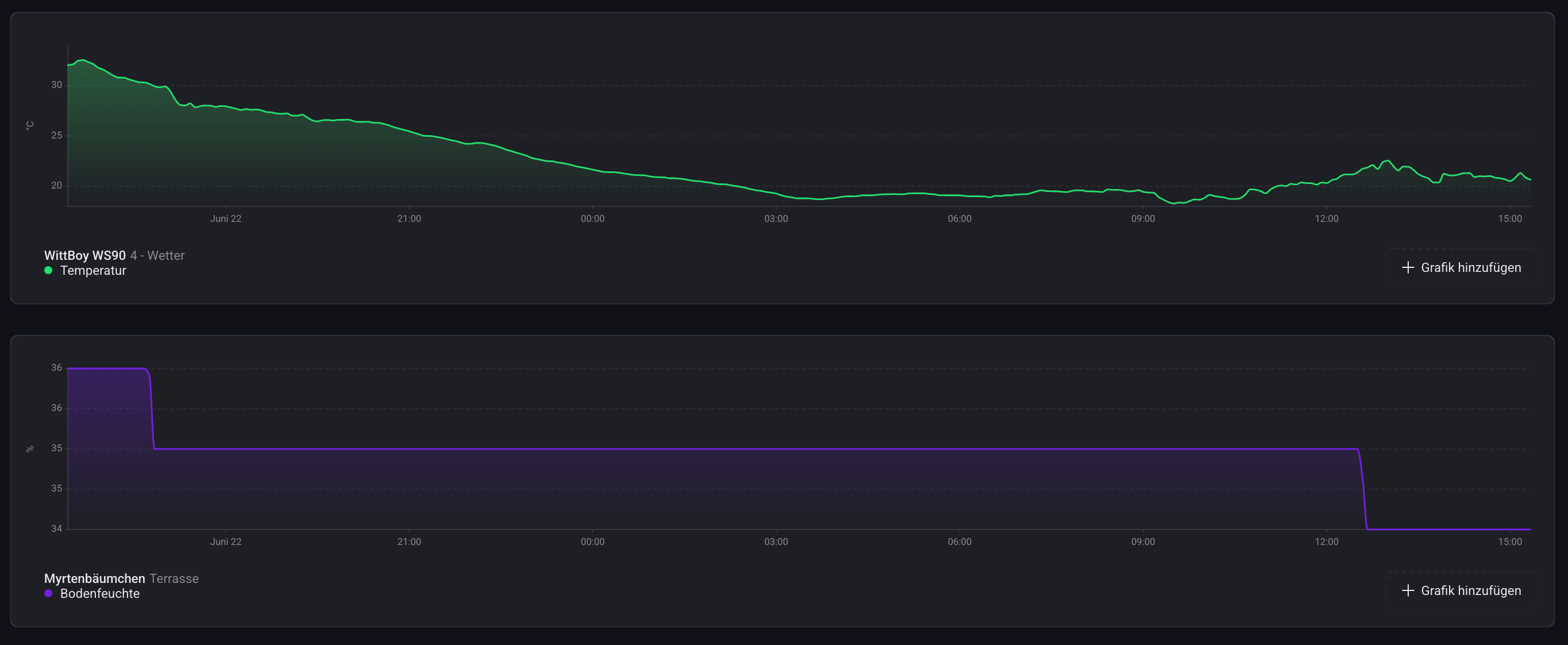
Even with my WH51 sensors, it sometimes takes several hours before a new value is reported. However, this has nothing to do with the sensor or the data transmission interval, but with the soil moisture itself.
The moisture level of one of my sensors didn’t change for about 19 hours either. But the temperature interval on my WS90 is sometimes shorter than 1 minute:
Hi - Sorry to break-in. Are you using a gateway for the WH51, or are your Homey recieving data directly from 433Mhz??
Using a gateway.
2 Likes
Good morning,
Thanks for your response. I have a sensor that was already 9 hours on the same value put in a bucket of water and within 2 seconds the value changed! Then I dried the sensor with a cloth and again within 2 seconds the value adjusted.
Thanks again!
1 Like
