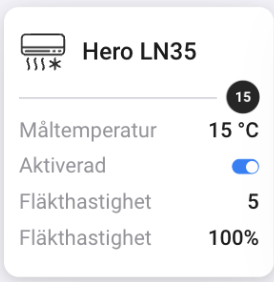
Indeed these cards don’t work the same way than the main card because they are generated differently by the system (it’s a “sub-capability”), so the source value cannot be selected.
Then it’s working as expected but I will correct the labels and remove the “till”.
I have been using the “Current FAN speed” as an indicator that my Hero is working/heating but now it seems to be at 100% all the time, is this correct?
Problem is that I have no Android device to test with, and on iPhone it works well.
What I can try to do is to add a setting to disable the animations.
Anyone else encountering any issue with the widget? I’ve been using it for some months (because I created it in my dev environment quite a long time ago, while widgets were released to Homey 2016-2019 only this week), and never encountered any problem.
The app regularly stops working, showing the red error sign in the tile of the climate unit.
I need to reset the app more the once a day, which was NOT the fact 1 week ago.
For some reason the test version is not available. I tried the link you sent me by mail, it simply goes to the live version, 40.0.2. Any chance the test link was deactivated?
Hi, There is a problem with memory use on the 40 version of the app. I am running 2 Homeys with 3 Heaters/AC on each. One 2019 Homey and one 2023 Homey. After release on version 40 and upwards the 2019 crash the app during the nights due to excessive memory use. the 2023 Homey survives the memory use without crashing the app. When the app crashes on the 2019 the heaters just keep on heating and the house is just like a sauna. Can you Please put a new version without the new features until its memory problem is fixed. Included is the screen dump from Homey 2019 and 2023. The one with massive peaks are the 2019 Homey. BR Kjell from Sweden.
unfortunately it’s not that simple to roll-back on Homey, because it would roll-back for every user, and it would be a mess because of breaking changes
the possible leak I’ve identified was on the widget, but since it shouldn’t happen if the widget is not set up, that would mean there is another one, and I don’t know yet where it is located…
also the fact it works well on Homey 2023 and not on Homey 2016-2019 could point out that the issue is due to obsolete node version or buggy architecture on this product, and since I’m not Athom it’s complicated to investigate and by-pass.
I’ll try my best, but again I do it on my free time, so please be patient: you can see I’m always reactive and take into account every request which is raised to me, but if I cannot reproduce the issue myself it’s complicated.
Hi Oliver, I fully understand your position regarding the development. So I have not setup the widget ( don’t now how to ), so the other memory leak have occurred after the push of +40 widget version. Does the widget work on the 2019 Homey or just on the 2023. I also noted that since late versions i.e +39. Every time the app is updating to new versions some of my virtual devices based on “Device Capabilities” calculation fields that uses “Better Logic Library” stop calculating and I have to restart the Homey 2019 to solve this. This is not happening on the 2023 Homey.
39+ versions contained breaking changes because they took into account new Homey development features. So it could be the cause, but an app cannot be aware of the way other apps handle (well or bad) third-parties including the app itself.
The widget should work on both, but Homey code bases and firmwares are different and not aligned between Homey 2023 and 2016-2019, and I have no visibility on that.
I’m investigating what could cause such leak.
The widget should not work unless it’s explicitly set up.
After having read some documentation, it seems that it’s related to the way ESM is run by Homey 2016-2019 (node 16), and could be fixed by adding a parameter --max-old-space-size to be sure that old objects free the space quick enough, but since the app is run by the Homey Pro, I have no control on it (as far as I know). Someone requested this from Athom some days ago and it hasn’t been answered: Lack of memory · Issue #371 · athombv/homey-apps-sdk-issues · GitHub
The best solution would be Athom upgrading Node version on old Homeys, but it’s not planned at all.
So a solution would be to roll-back the whole app to CommonJS… would cost me a lot compared to the effort I’ve put in this release
OK but how do we solve this problem ?. The app crashes every night on the 2019. Is it possible to push up the 39 version for jut the old 2016-2019 Homeys ? and the 40 versions for the 2023 Homeys. Maybe give the app different names for the old and new ones. Then update works for the new one.