Does the “ends within” function also look backwards for events that previously ended within the specified time? Or, can I achieve that effect with a negative time value?
I am trying to develop a way to run a check for windows left open after a planned visit has ended.
IcalCalendar fetches only events that are currently ongoing or starting in the future (inside the time frame set in settings for the app).
So the ends within card will only check events that are fetched (ongoing or hasn’t started yet).
IcalCalendar fetches events every 15th minute (unless otherwise specified in settings for the app). Events that has ended between the last fetch and this fetch will not be available anymore for IcalCalendar.
Thanx so much for that phantastic app, working for so long. But since a few weeks I get sync errors and now it crashes on every restart of the app or homey (and won’t come up again). I wrote a ticket with diagnostic to github…
Thanx @runely@runely I saw that. I don’t have the sand behavior. I have a debug lock and crash id postet in github. Would be cool if you could have a short look on that. Maybe there is the answer why it quits in the debug?
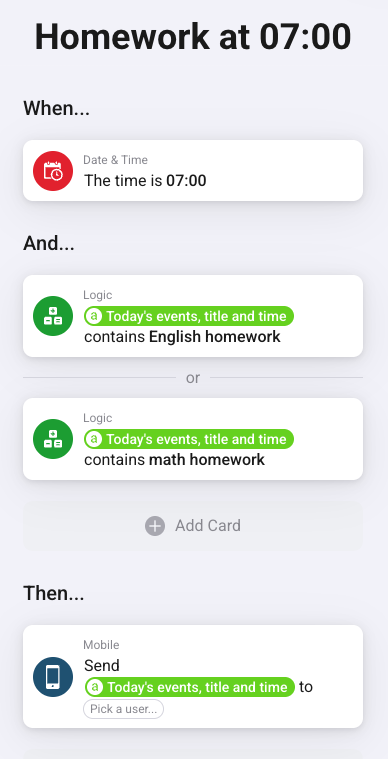
I’ve tried, but I can’t get it to work the way I want. I have the children’s school assignments in their calendars that I added to the iCal app. What I want is that at 7 in the morning a flow should run that reads out if there is, for example, English homework, math homework in the calendar and then it should be read out via “cast a text to google”. It’s the “title” itself that I want to get out, but the closest I’ve come is to get out the entire event with title and time and then just one event, not several. If anyone has a similar flow, please share.
Thanks, but it became a bit hard if I had to put keywords in the variable. I thought some card could read out the entire day’s events and send them on. But then I found the script and it became much easier. So now I run the script that reads out the day’s events and then divides them into two different people (two calendars) and puts everything together into a nice sentence that is saved in a variable.
Not sure what you mean by putting keywords in the variable.
There isn’t a dedicated card to read out somewhere to have IcalCalendar as generic and dynamic as possible. Therefore there is a variable, Today's events, title and time, which can be used in any flow card as you see fits.
This variable contains all events synchronized in that happens or are ongoing today
Ok, it’s probably just me who doesn’t understand how to build a flow and didn’t understand your example. But with the script, everything works exactly as I want.
Last couple of days I have noticed a failed to load error in the ical app. Uri errors, (calendar) : Request failed with status code 410. Is that an error on the ics calendar side or the ical app side?
@runely Hi, Since a couple of days the fantastic IcalCalender app - which was running smoothly up till now, thank you! - is constantly crashing. I have “neutralized” all flows that use the app but still the crashing behavior is continuing. Any idea what is going on? Anything I can do? I can send you a report if you want.
I’m guessing you are running the app on a Homey Pro (Early 2023) and that the app is crashing because you have more stuff going on on your Homey than before.
Homey Pro (Early 2023) has more strict RAM and CPU usage rules than Homey Pro 2019. The Athom team are looking in to these usage rules with the new RC FW candidates.
Thanks. It is true that recently I installed the Homey energy dongle (and it impacted my CPU usage significantly) on my (indeed) Homey Pro (Early 2023). Fingers crossed Athom can address the issue soon.
First of all, thank you very much for this App as it works very well
I am using it amongst others to scan the agenda of my wife and myself and if we need the car tomorrow or the day after (should the car be charged and if so, how much?)
Currently it scans the agenda and looks for descriptions that comprise ‘auto’. If so, from the ‘Next event title’ I extract the location, which location is then used by another app ‘ETA Google Maps’ to determine the total travel distance.
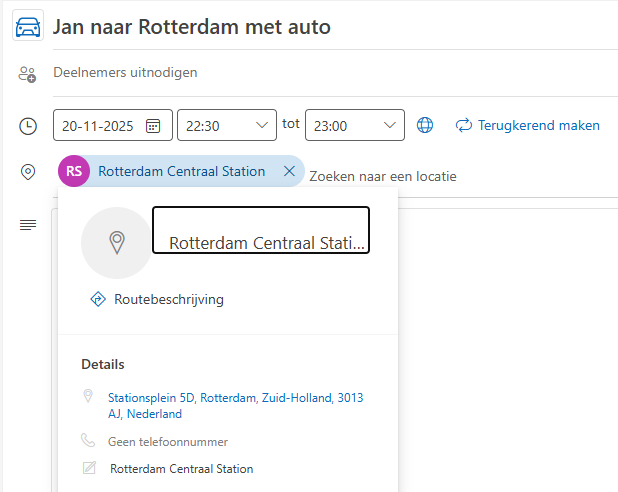
Until now I am using as description, e.g. “Jan naar Amsterdam met auto”. But in de calendar there is more information available under details (see snip below).
It would be very nice if I could extract these details, and use these as coordinates.
So far I was unable to extract the details. Am I doing something wrong? Or is this not supported (yet) by the App? If so, would it be interesting/possible to add this functionality?
Again, the flow works already very good, but as especially my wife always adds these details, why not use it?
Hope I am doing something stupid, if so can you please explain how I can retrieve this detailed information?
Based on the picture, it seems like you are hovering over a location and Outlook is conveniently bringing up additional info for this location from somewhere. I’m pretty sure those details isn’t present on the actual calendar item.
But to be certain you need to look at the raw ics event entry. There are numerous online services that can read and display your events from an ics url (search for “online ics viewer” in Google). If you don’t want to use one of these you can do it manually:
Copy your ics url from IcalCalendar settings page
Open the url in a browser on your computer (it needs to show the content in-browser or download the ics file)
In the raw ics search for the correct entry item by DESCRIPTION, DTSTART or any other property suitable.
When found, check which properties the entry item has.
IcalCalendar is importing the following properties:
Location is a token (tag) on all IcalCalendar triggers (except ‘Event changed’ and ‘Synchronization error’)
So your flow must be triggered by one of those IcalCalendar trigger cards. And from that you can get the location.
Why are you triggering the ‘Sync calendars’ card? If you haven’t turned off automatic calendar synchronization froom the IcalCalendar settings page, this is totaly unnecessary! If you have the default synchronization settings, calendars are automatically synchronized every 15th minute
Thank you again for your feedback. The reason for the (extra) ‘Sync calendars’ was just to make sure that an activity is in scope of the flow. I was just adapting the times of the events frequently, and therefore the extra sync.
This is the most basic flow I can think about :-).
In my agenda there are two events this evening (both including ‘auto’).
Activating the flow, results in the timeline showing:
JanKindergardenstreet, 30Jan naar Amsterdam met auto 21:30 to 22:00;Jan naar Rotterdam met auto 22:30 to 23:00.
In bold the (standard) location that I ‘need to’ enter to test the flow. It will look familiar to you ;-).
So the flow gets information from my agenda, but the location is not copied/imported, despite the earlier test that it is included in de iCalender File .


 I saw that. I don’t have the sand behavior. I have a debug lock and crash id postet in github. Would be cool if you could have a short look on that. Maybe there is the answer why it quits in the debug?