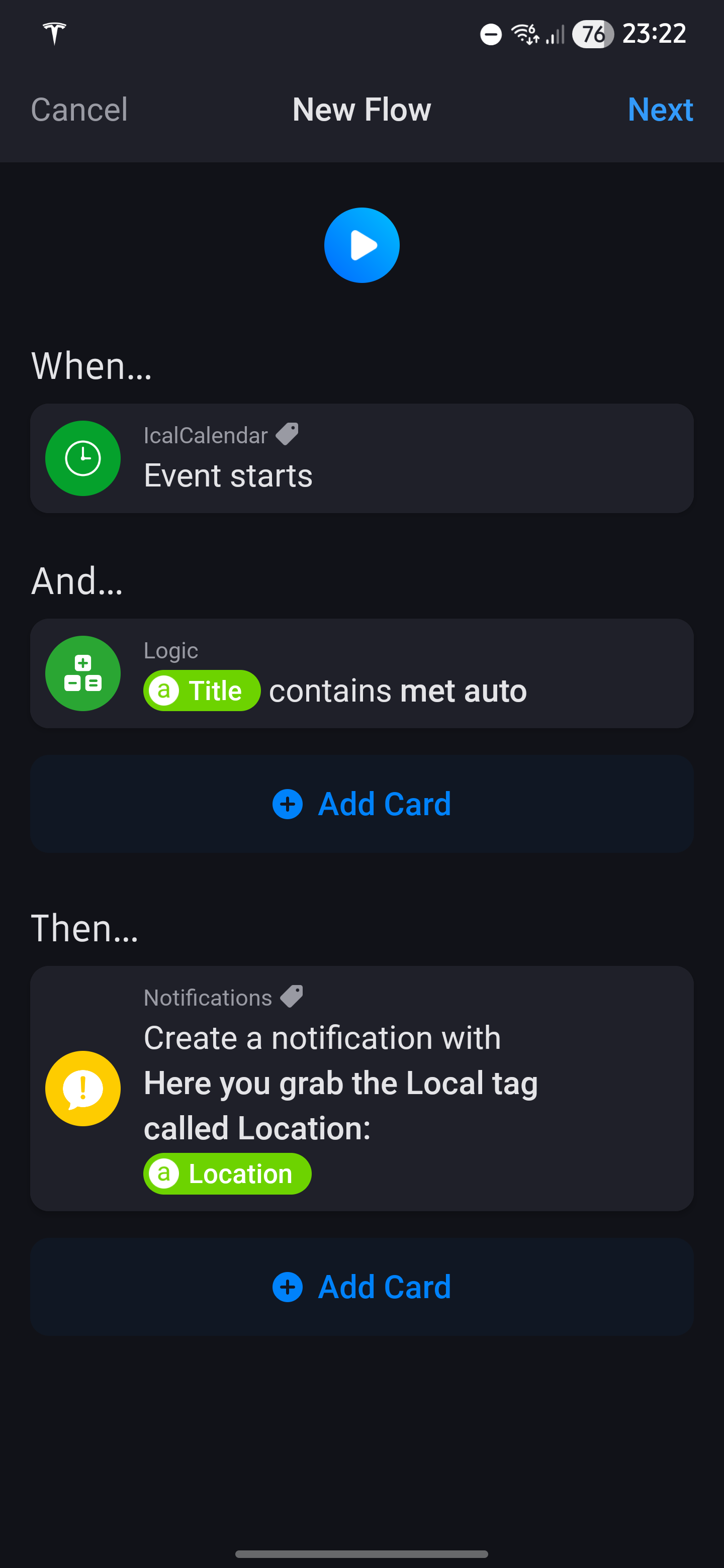
First of all, the Sync calendars card only triggers the synchronization job. The card will continue to the next step immediately after it has been triggered. So using that card in a flow triggered like this makes no sense.
Secondly, you are mixing tokens (tags) that are presented from the trigger card with tokens (tags) that are globally available through IcalCalendar.
Tokens (tags) presented from the trigger card, and reflects metadata from the triggered event, are shown in the Select tag popup under the Local tags section.
Tokens (tags) that are globally available through IcalCalendar, are shown in the Select tag popup under the IcalCalendar section. And these tokens (tags) has nothing to do with the tokens from from the triggered event!
Example of a global event you are using is Next event title
Send me a diagnostics report and i’ll check the location tag. I’m not removing anything from the location property, so it seems strange
After what i can see, all is good on IcalCalendar end. When i run your calendar through the IcalCalendar test tool i can see that it’s importing the location as it should…
Type: 'Regular' -- Summary: 'Jan naar Rotterdam met auto' -- Start: 'Thu Nov 20 2025 22:30:00 GMT+0100' -- End: 'Thu Nov 20 2025 23:00:00 GMT+0100' -- Timezone: 'Europe/Amsterdam' offset: 60 -- Location: Rotterdam Centraal Station (Stationsplein 5D, 3013 AJ Rotterdam Zuid-Holland, Nederland)
As i said in the previous post, you are mixing local and global tags.
When your flow is triggered by an IcalCalendar event, try using only the local tags.
The local tags are the tags shown first in the tag list (inside the red square)
Global tags are tags found under the section IcalCalendar. These tags will have no connection to the event that is triggered by the trigger card. Only the local tags for the trigger card is directly linked to the event that is triggered
Thanks @Peter_Kawa for your time and advise. Could you just tell me where I could do that? In the advanced settings of the energy dongle I can not find this setting. Thank you in advance!
Hi @Swiba
I expected such a crucial setting to be present, but after some investigation I now know it indeed isn’t available:
If your utility meter outputs every 1s, the dongle will pass through at 1s; if it outputs every 10s, you’ll see 10s.
But, about this:
A higher CPU usage doesn’t necessarily mean the overall performance drops.
CPU’s are throttled as much as possible to save power & emit less heat
Good news: since the update to 12.9.0 of Homey Pro the CPU load has come down again and the crashing of the icalcalendar app has stopped. Normal business resumes Thanks again:folded_hands:t2:
Thanks again for your feedback and your patience. I am still unsuccesful to get an update of the location based on my agenda.
Can you please help and show what I should do (e.g. in a Flow) to make a call to my calendar and when in the calendar information is like: “Type: ‘Regular’ – Summary: ‘Jan naar Rotterdam met auto’ – Start: ‘Thu Nov 20 2025 22:30:00 GMT+0100’ – End: ‘Thu Nov 20 2025 23:00:00 GMT+0100’ – Timezone: ‘Europe/Amsterdam’ offset: 60 – Location: Rotterdam Centraal Station (Stationsplein 5D, 3013 AJ Rotterdam Zuid-Holland, Nederland)” is in there, the result as location is “Rotterdam Centraal Station (Stationsplein 5D, 3013 AJ Rotterdam Zuid-Holland, Nederland)”.
The extraction of only the location can be done via e.g. Google Scripts, I have that running in the meantime.
I want to use this location in e.g. ‘ETA Google Maps’ to determine the distance between my current location and this new adres. Thanks in advance.
I have four calendars that sync: three for personal use and one for work.
I use WhatsApp for notifications, but I’m running into a problem.
If a work event and a personal event start simultaneously, I can’t tell which one to send to which. The work-related events need to go to my personal number, the others to a WhatsApp group.
I’d love to see this as a solution, but I don’t think it exists yet. Or does it?
All IcalCalendar when cards (except Synchronization error occurred) has a local tag called `Calendar name`. This tag holds the name of the calendar where the event comes from. (Picture below). With this card you have to have some logic to determine how you want to handle this event further based on `Calendar name` tag.
There is also a direct when card, `Event starts from %calendar%`, where you choose which calendar you want to listen for event starts from. (Picture below).
I deleted some repeating events. But it looks like they are not deleted in the app. I have flow which shows me a message and even from the deleted events I got the messages.
What do you mean by “I never get anything out of it”? The card will trigger when any event imported into IcalCalendar starts in the time you choose. Doesn’t this happen on your Homey?
FYI: This setting will give you global tags for next event per calendar and has nothing to do with the trigger cards
It’s a Gmail calendar event. Not a fulltime day event. I added a test event and the will popup. So synchronizing looks good. I can’t find any synchonization errors.
Please follow these steps to activate `Log all events` before you create a diagnostics report. And let me know here or in the diagnostics report the name of the calendar and the name(s) of the events that you mean should have been excluded from IcalCalendar.

 Thanks again:folded_hands:t2: