Welche Geräte hast du bei deiner Anlage installiert? Hast du keinen Power Meter?


Hello,
Thank you for spotting the mistake. You seem to be very good at these matters.
What can I do to resolve this? Can you briefly explain it and what steps I need to take?
Thanks
Set it to local control (that‘s how my system is configured)
Regards
Andi
As andi writes .. the remote control setting have to be local control or else it expects something else to control how the battery is controlled for example Tibber or something else. What the local control does is it lets the inverter/dongle control itself how max self consumption is controlling the batteri (normal work mode). I switched off remote control due to going into summer period where i turned off the remote control and had to tell my system to go remote : local mode and use the normal work mode. when i turned off my remote controller system it didnt set it to local itself. Is why i in Andi’s app noticed the issue with the timeout descibed erlier in the thread  what happens if it is set like that as you have it without a active remote controller is it will not charge or discharge the batteri att all


Does the solar power go to the appliances first, and if there is any left over, to the battery? We have an SMA inverter and a Huawei with a battery. Does the power from the SMA also go to the battery? Many thanks in advance
Thanks
Hi Andi,
I’m really happy with your app. After struggling for days with other apps, I’m finally making progress with yours.
Through the Fusion API, I’ve managed to read out my Huawei system. However, it’s important for me to be able to control my battery using different flows. Unfortunately, I haven’t been able to connect your app to Homey via Modbus. I think I might be doing something wrong, but I’ve tried all sorts of things and just can’t get it to work.
My installation consists of a 14 kW S1 battery, a backup unit with an EMMA, and two 5KTL-MAP0 Huawei inverters. I also have Modbus enabled.
Do you have any advice on what I could try?


Could you please deactivate TLS and try again?
Is Client-IP the IP address of Homey?
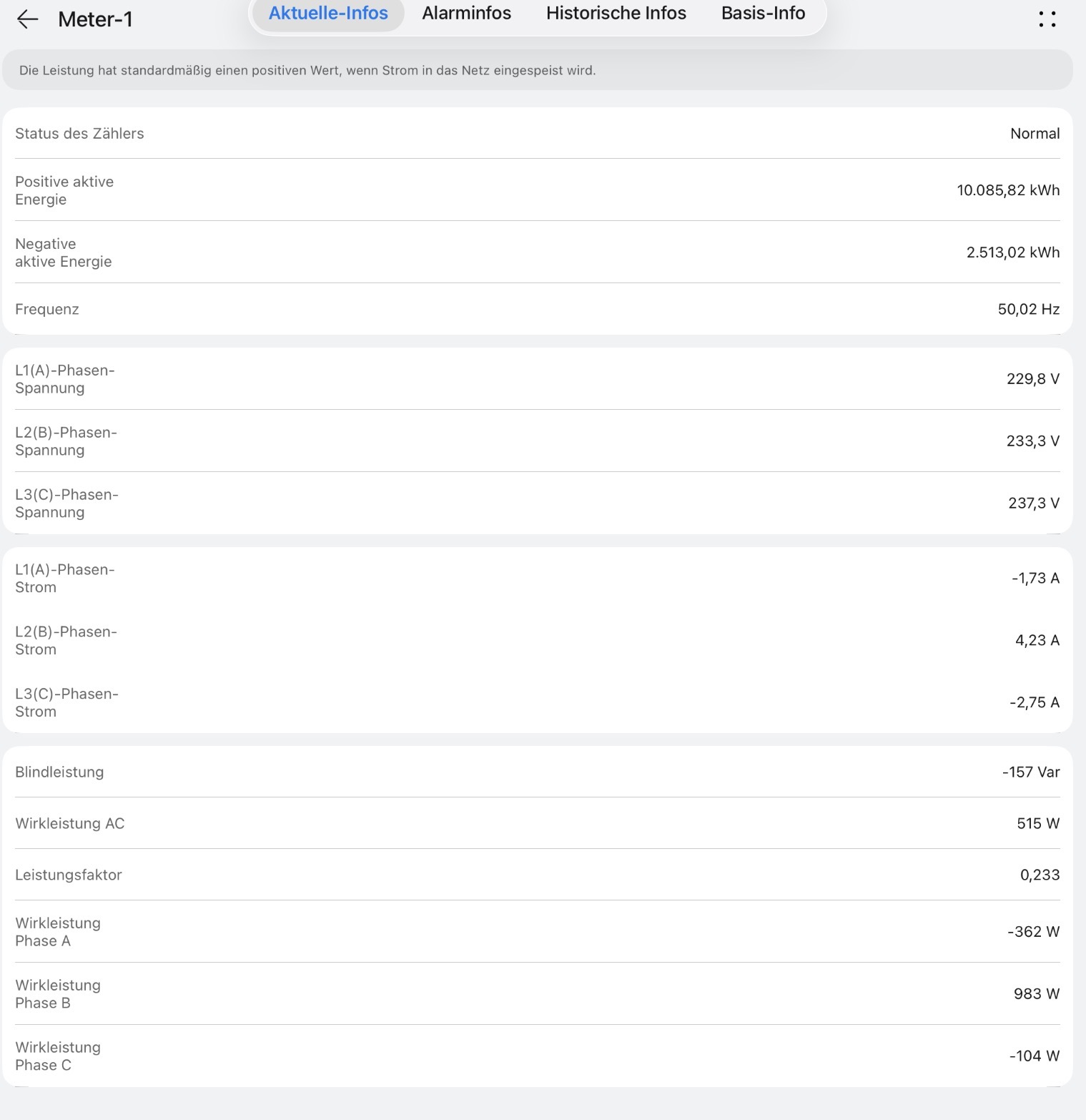
Anhand deines erstens Screenshots vom Post: müsstest du definitiv ein Power Meter haben (genau so schaut das auch in meiner Huawei App aus)
Das hast du aus der Huawei App? –> Gerät –> unter dem SUN2000 / Verbundenes Gerät –> Meter-1
Oder?

Bzgl. Konfiguration: IP Adresse und Port müssen ebenfalls dieselben sein, welche du auch für die SUN2000 und LUNA2000 nutzt. Die Abfragen laufen für alle drei Geräte über den SDongle.
I think that’s something you have to ask your installer.
Ja ganz genau. Screenshot war aus der Huawei-app und die IP ist dieselbe. Die Daten kommen ja scheinbar auch beim homey an, Werden bloß nicht korrekt dargestellt.
Was ist das für ein Typ Power Meter, der verbaut wurde? Oder bist du 100% sicher, dass neben sun2000, luna2000 und dem sDongle keine weiteren Geräte installiert wurden?
Hi, vielen Dank für die App! Einbindung der Emma über Modbus klappt wunderbar.
Den Luna2000 konnte ich nur über API einbinden. Über den Modbus war das nicht möglich.
Hab die gleiche Adresse angegeben wie wie für die Emma.
Hast du eine Idee woran es liegen könnte?
What’s new
New EMMA Modbus drivers
The single “EMMA Energiemanager” device has been replaced by three dedicated drivers that map cleanly to Homey’s device classes and Energy Dashboard:
-
Inverter SUN 2000 (EMMA Modbus) —
solarpanel— PV power, daily/total yield, inverter active power, grid direction -
Batterie LUNA 2000 (EMMA Modbus) —
battery— SOC, charge/discharge power, energy totals, working mode control, backup SOC, chargeable/dischargeable capacity -
Energiezähler (EMMA Modbus) —
sensor— grid import/export (cumulative + today), live load power, house consumption today
All three read directly from the EMMA Modbus interface (unit ID 0)
LUNA 2000 (EMMA Modbus) — new R/W setting
The maximum grid charging power (EMMA register 40002, 0–50 kW) can now be configured directly from the device settings page and is automatically synced back from the EMMA.
Smart Charger renamed
The Smart Charger driver is now called Smart Charger (EMMA Modbus) to make it clear it communicates via the EMMA module.
Inverter renamed
All “SUN2000 Wechselrichter” devices are now called Inverter SUN 2000 for consistency across languages.
Repair flow removed
The repair pairing view has been removed from all drivers. Connection settings can be changed directly via the device settings gear icon.


Moin, oh den habe ich gestern übersehen. Vielen Dank, klappt super
