I’ve been trying to use those same triggers in Homey, but I can’t seem to find a way to do that with the current Flow cards. Do you think it would be possible to add a Flow card that listens for the event_type and its event_data?
And you use the data field “button” as filter for the case you have events for several buttons. Makes it easier to use triggers without a lot of logic cards
got a question, someone might be able to help with, I set up HA just to host tuya devices and use them from homey, I am finding that nearly every day HA has updates, and until I see it and update it, the devices in homey are offline
The Athom app uses HA devices and their entities. That means, you add a device and some of its entities. The power entity is perhaps managed in a special case because the Capability must be named measure_power in Homey.
The comminity app offers several devices for HA domains (like lights, switch etc). The device uses all possibilities offered by this domain (all services).
So if you add a HA device, you basically select one entity from this domain (switch.entityname). The HA device is only a kind of entity group.
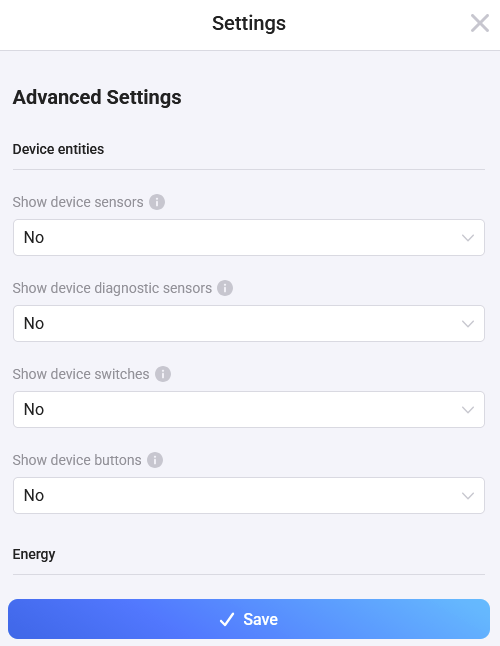
But you can add all entities grouped in the HA device in devce settings:
Doing so, you will get all additional entities/data into your Homey device.
But: for inserting the capabilities, the app uses subcapabilities including the entity name to keep them unique. That won’t work for energy capabilities.
If the power entity fits the standard naming, it will be added if “add power entity” is activated.
It the entity name does not fit, you can insert it into the field.
Another possibility it to start the repair view and add the power entity.
Hi.
I have several HA camera devices added as Camera devices to Homey.
They all have added a lot of entities to the Homey devices including the following 2:
This one set the Homey tile active or inacive according to entity state:
Name: Tilkoblet
Entity: binary_sensor.aarlo_connected_veranda
Capability: onoff_state
This one turns the charger adapter for the camera on or off:
Name: Strømadapter
Entity: switch.kamera_veranda_lader_socket_1
Capability: onoff_button.switch.kamera_veranda_lader_socket_1
This config has been working without issues for many months.
I guess something broke in v1.13.0.
When I press the button for turning on/off the charging adapter, I get an error message telling me that my version of Homey does not support live streaming.
I Have a Homey Pro early 2019, so this is probably correct.
However, I’m not trying to do live streaming and I’m no longer able to turn the charging adapter on or off from Homey.