New test version 1.10.1:
- Fixed converter example for date/time.
New test version 1.10.1:
This fixed it! Thanks again 
fcd1051b-8767-489d-9792-efd061a94baa
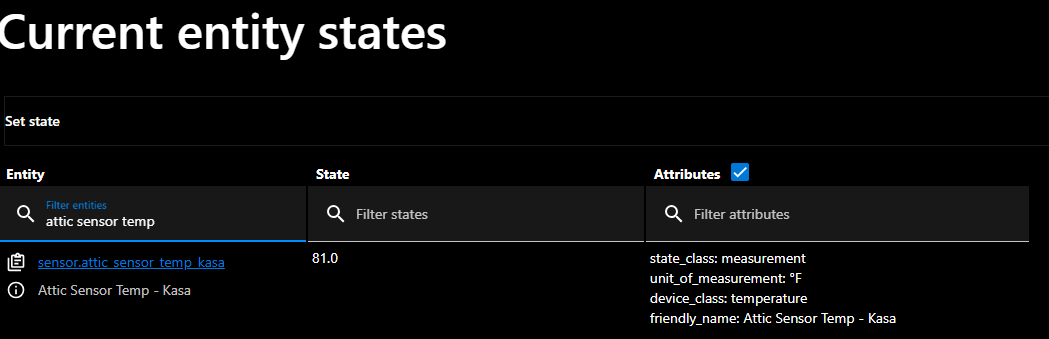
Sensor Calibration is way off. HA is showing a temp of 78.8F but Homey is showing 177F. This is happening on temp sensors, motion sensor temps and on climate
Nothing wrong I think. Is your HA entity providing a unit F? If not, then Homey takes the calue as °C. And in the GUI it’s showing the value as °F
HA should provide a unit in this case, so the HA app is able to convert the value to °C which is the internal unit.
Yes HA is set to F. The temp is set as F in HA, ST, GH and the individual apps. Homey says F next to the temp but if it is F; then the temp would match what is in HA.
Can you please share a screenshot of HA developer tools (entity details)?
Which Homey device are you using? Sensor device custom device?
I meant: how did you add your entity to Homey? Which device type did you select in pair view?
In Homey they are added through Home Assistant Community app as a sensor.
New test version 1.10.2:
For custom device I didn’t add such a conversion. Perhaps someone has a converter already. Bu I can imagine there it also would make sense.
@Shai
You can install the test version any try if your temperature is now shown correctly?
I did install the Test app and gave it a few minutes to refresh but it still did not update them. I was able to narrow it down to one type of device. If it helps, this is affecting the Tapo T310 Temp/Humidity Sensors.
Hi guys,
Not quite sure if this topic has been already raised and I apologise if so, I have been noticing since few days (I have no clue if that happened earlier but I needed some entities in HA that are coming from Homey via mqtt) that some of the entities disappeared (examples: part of Netatmo entities, part of Aqara zigbee climate sensor). I tried to restart mqtt hub, delete and add device on the homey side but nothing works. In homey they appear as “not provided by mqtt anymore”…
the mqtt explorer shows these entities transmitted but it may be retained values… (this regards aqara - Voc alert as an example, I have just renamed it to Netatmo):
Any idea how to solve this?
Many thanks for any constructive hint.
TIA. J
Can you check if there is a copy of that entity in HA (with a number suffix)?
If tha device changes in Homey, but has the same name, this results in a new entity in HA using the same name. That happens for me when I remove and re-add a device in Homey with same name.
If that’s the case, you can use the new one in HA.
Or you can remove both from HA. Then restart sync in Hub app. This should trigger a new publish incl. HA autodiscovery.
I hope this covers your case.
You are absolutely right. I am ashamed I have not checked this in detail b4 writing. Many thanks. J.
Everything ok, happens only once, then you know 
Thanks for your patience 
Hello all!
New homey user here 
I’ve integrated Home Assistant with homy and the approach suites me better than using the ESP Home app.
There is one thing i am unable to fix:
i was able to pass my entities to Homey. only the units are not displayed as described in my yaml file.
Don’t use the compound device. That’s an old and (for me) deprecated early version and replaced by the “custom device”. That’s much more flexible to adjust in repair view.
@RonnyW , integrated a Humidifier with your app and a “Custom device” as I usually do, and realized that it might be a benefit if you had a driver for Humidifier in the inclusion screen. “Climate” driver does not detect it. If it is possible, I can provide the necessary entities.
Kind Regards
Marius