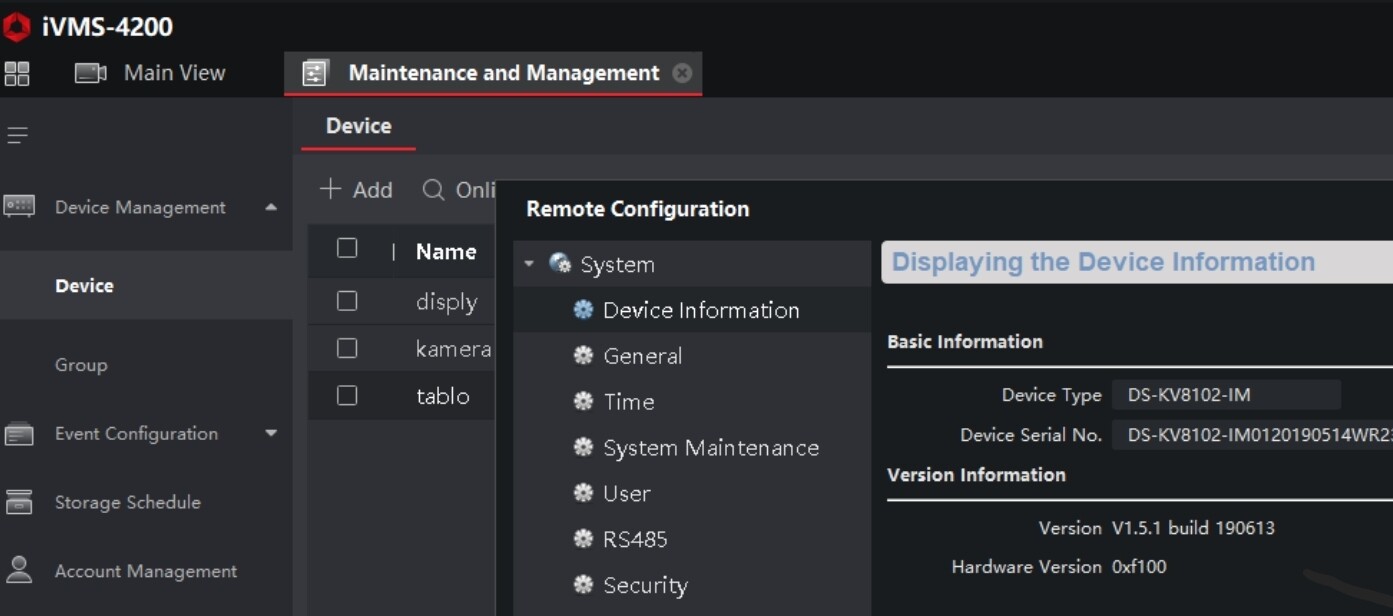
Hello. As I have Said I have no doorbel so i’m realy blind.
Have you try to change this setting ?
Hi Pierre,
Yes I did.
Unfortunately it doesn’t work.
To bad.
can someone with a doorbell can do this curl call?
curl --digest \ -u admin:doorbellPassword \ http://DOORBELL_IP/ISAPI/Event/notification/httpHosts
Hi Pierre, I could do this if I had an idea what you mean! 
Bonjour, je viens de tester votre appli.
Elle fonctionne bien dans l’ensemble.
Pourriez-vous faire pour l’alarme ax pro?
merci
jason
Bonjour.
Merci pour votre retour néanmoins je ne possède pas cet équipement. Je galère déjà avec la doorbell je ne vais pas me relancer à l’aveugle.
Si l’équipement générique fourni dans l’appli ne le supporte désolé mais je ne ferais pas plus tant que je n’ai pas cet équipement. Et je n’ai pas prévu de l’acheter.
Désolé.
Hello, thank you for your reply.
can you try this one ?
curl --digest -k -u admin:doorbellPassword https://192.168.0.90/ISAPI/Event/notification/httpHosts
Have you changed the listening ports on your doorbell?
Do you have a port configuration screen like the one in the screenshot(mine is for a camera)?
Could you send me a screenshot of it?
I ran your curl and this is what I get:
?xml version=“1.0” encoding=“UTF-8”?
ResponseStatus version=“1.0” xmlns=“http://www.std-cgi.com/ver10/XMLSchema”
requestURL>/ISAPI/Event/notification/httpHosts</requestURL
statusCode>4</statusCode
statusString>Invalid Operation</statusString
subStatusCode>invalidOperation</subStatusCode
errorCode>1073741830</errorCode
errorMsg>invalid operation</errorMsg
/ResponseStatus
I asked ChatGPT what it means (as I’m clueless) and it said:
 You authenticated successfully (Digest worked)
 But the HTTP method you’re using is not allowed for that endpoint
Right now you’re doing a GET request (curl default).
On Hikvision ISAPI devices, /ISAPI/Event/notification/httpHosts usually requires:
GET → to read config (sometimes disabled)
PUT → to create/update config
POST → sometimes for add
DELETE → to remove
On many doorbells, GET is not supported, which causes Invalid Operation.
Hikvision firmware often:
Allows PUT
Rejects GET
Returns Invalid Operation instead of Method Not Allowed
 Most Likely Situation
You are trying to read the HTTP notification config, but your doorbell firmware only allows writing, not reading.
Then it suggested to try:
curl --digest -u admin:Precision123
http://DOORBELL_IP/ISAPI/Event/notification/alertStream
That returned:
?xml version=“1.0” encoding=“UTF-8”?
ResponseStatus version=“1.0” xmlns=“http://www.std-cgi.com/ver10/XMLSchema”
requestURL>/ISAPI/Event/notification/alertStream</requestURL
statusCode>4</statusCode
statusString>Invalid Operation</statusString
subStatusCode>invalidOperation</subStatusCode
errorCode>1073741830</errorCode
errorMsg>invalid operation</errorMsg
/ResponseStatus
ChatGPT conclusion is:
So far, from your tests:
/ISAPI/Event/notification/httpHosts → 404 + Invalid Operation
/ISAPI/Event/notification/alertStream → Invalid Operation
This strongly indicates your firmware uses a different ISAPI structure than the newer Hikvision doorbells.
I guess I can’t offer much help.
Why does live streaming from the cameras only work from a web browser and not from the app?
I have 5 cameras linked to the app via NVR. Live image didn’t work for me either, snapshot and last event snapshot did.
In the NVR under Configuration/Video and Audio, adjusted the Video recording for each camera from H.265 to H.264.Now live image also works again with all cameras.
Dear Pierre,
first of all a big thank you for your effort, I waited for this app for 2 years  I wanted to use it with my door bell, and it works! I have the DS-KD8003-IME1-NS outdoor station. I can see the video stream, but I can’t open the door. Am I missing something, or this function is not available yet in the app? Or the “turn on/off” would be that? If yes, that’s not working.
Hi Guys, maybe this can help. If you need the latest api (isapi/otap) developer guides you can find them on https://tpp.hikvision.com/download/ISAPI_OTAP (it includes, ipc,NVR, AxPro,Intercom etc..)
Keep up the great work Pierre!
This is the answer I receive from my doorbel when I execute curl --digest -k -u admin:doorbellPassword http://DOORBELL_IP/ISAPI/Event/notification/httpHosts
<?xml version="1.0" encoding="UTF-8"?>
<HttpHostNotificationList version="2.0" xmlns="http://www.isapi.org/ver20/XMLSchema">
<HttpHostNotification version="2.0" xmlns="http://www.isapi.org/ver20/XMLSchema">
<id>1</id>
<url>/</url>
<protocolType>HTTP</protocolType>
<parameterFormatType>XML</parameterFormatType>
<addressingFormatType>ipaddress</addressingFormatType>
<ipAddress>0.0.0.0</ipAddress>
<portNo>80</portNo>
<httpAuthenticationMethod>none</httpAuthenticationMethod>
</HttpHostNotification>
</HttpHostNotificationList>
HTTPS throws an error on untrusted certificates
when adding the -k directive to curl I receive the following resonse:
<?xml version="1.0" encoding="UTF-8"?>
<HttpHostNotificationList version="2.0" xmlns="http://www.isapi.org/ver20/XMLSchema">
<HttpHostNotification version="2.0" xmlns="http://www.isapi.org/ver20/XMLSchema">
<id>1</id>
<url>/isapiEvent/doorbell/8abcc675d648</url>
<protocolType>HTTP</protocolType>
<parameterFormatType>XML</parameterFormatType>
<addressingFormatType>ipaddress</addressingFormatType>
<ipAddress>HOMEY_IP</ipAddress>
<portNo>6080</portNo>
<httpAuthenticationMethod>none</httpAuthenticationMethod>
</HttpHostNotification>
</HttpHostNotificationList>
Thanks
And it’s not working with https mode ? 
If you use generic device have you some event ?
Hi,
I’ve vibe-coded a Homey app (with help from my trusty friend Claude!) to connect to my AX Pro.
If anyone would like to take it over and develop/maintain it properly, feel free to reach out.
By default the generic device uses http, so no events are registered with the generic device. I did switch to the ‘Use HTTPS’ = YES, but I see no differences.
Using HTTPS in combination with persistent get triggers a connectivity alarm, so no succes there either.
Hi Pierre,
Great work on the app. I tested the doorbell (DS-KV9503-WBE1) and can see the video.
A PUT request to ISAPI/AccessControl/RemoteControl/door/1 opens the gate connected to the doorbell. Any chance to add that to your app?
Happy to do more testing if needed.
Hello
Thanks i will do this soon. Have you the xml body ?