If you include the devises after installing V3.8.9 you will see a good improvement. For me I was going from more than 90% TX error on all my HeatIt devises down to below 10% error average. With 10x Z-TRM6 6x z-dim2, only 4 is above 15% the worst with 60%, this is testing that has been done over the weekend. It is at least better than it was. I have good feedback thorough the support form on HeatIt trying to share info so we all can get it up and running for the colder time are arriving.
I’m throwing in the towel here.

This is the situation after 3 days since the last reboot, not acceptable.
Tx queued 48575 and Tx sent 19680
I guess this have to make an impact for the Homey pro.
I’m experiencing some problems which I believe is related to the jamming from the Z-TRM6.
On one occasion, all my flows, both standard and advanced flows, was completely gone, I had to reboot Homey to fix this.
I have also experienced that some flows doesn’t run at all, probably since the Z-TRM6 makes the Homey pro overloaded.
As a result of these problems, the Z-TRM6’s is excluded and will not be included before there is a stable solution for this.
I have also started to look after some other thermostats for testing in our environment.
I have noticed some vendor that seems to take the development of their app seriously, reported bugs seems to be fixed within day(s).
And Aeotec seems to take their customer seriously, a few days ago they released an update to their app which rendered their Tri sensor useless. Whitin 24 hours, the problem was taken care of.
End of story, I’m not impressed with Heatits customer support.
1 Like
I agree with Olex on this.
I bought these products to controll heating in my home, now i constantly have to baby sit this system to keep it running.
I feel like this is system in beta status and i am the tester.
I would like Heatit to take this matter seriously and no to treat us like your beta testers.
If i knew it would be like this i would have gone another way as a heat controll system for my home.
2 Likes
I have the Z-TRM6. How do I set the day and night settings? Reducing temperature at night without having to make Homey Pro Flows to arrange for that to happen?
And, if this cannot be done using the legacy software (hardware GUI or inside Heatit App settings in Homey) what’s the easiest flow to use? I have several Z-TRM6 that should use the same scheduler.
Hello, I’m currently facing an issue with my Z-TRM6 thermostats after the latest update, which unfortunately has rendered them unusable with Homey. To prevent my children from tampering with the thermostats, I had disabled the physical buttons. Now that I’ve lost connection with the thermostats, I can’t control them manually either. Does anyone have suggestions on how I can regain control of the thermostats?
Mine continued working after the update. Have you tried holding down the Left and Right buttons for 10 seconds?
How did you implement day/night settings on the thermostats?
Edit:
Try to holding center and right button for 30 seconds until the display shows “unlk”.
If that doesn’t work, you have to reset the device.
(You have to include it again, and probably remove inactive node manually from Homey afterwards)
Enter the menu by holding the Center button for about 5
seconds, navigate in the menu with the ”+” button til you see
FACT. Press the Center button until you see “-- --” blinking in
the display, then hold for about 5 seconds to perform a reset.
You may also initiate a reset by holding the Right and Center
buttons for 60 seconds.
Heatit z-trm6 issue… @HeatitControlsAB
Updated to 3.9.0 and thermostat is showing room temp , not floor sensor (floor is set in settings)
attached : before /after ( same settings on the thermostats)
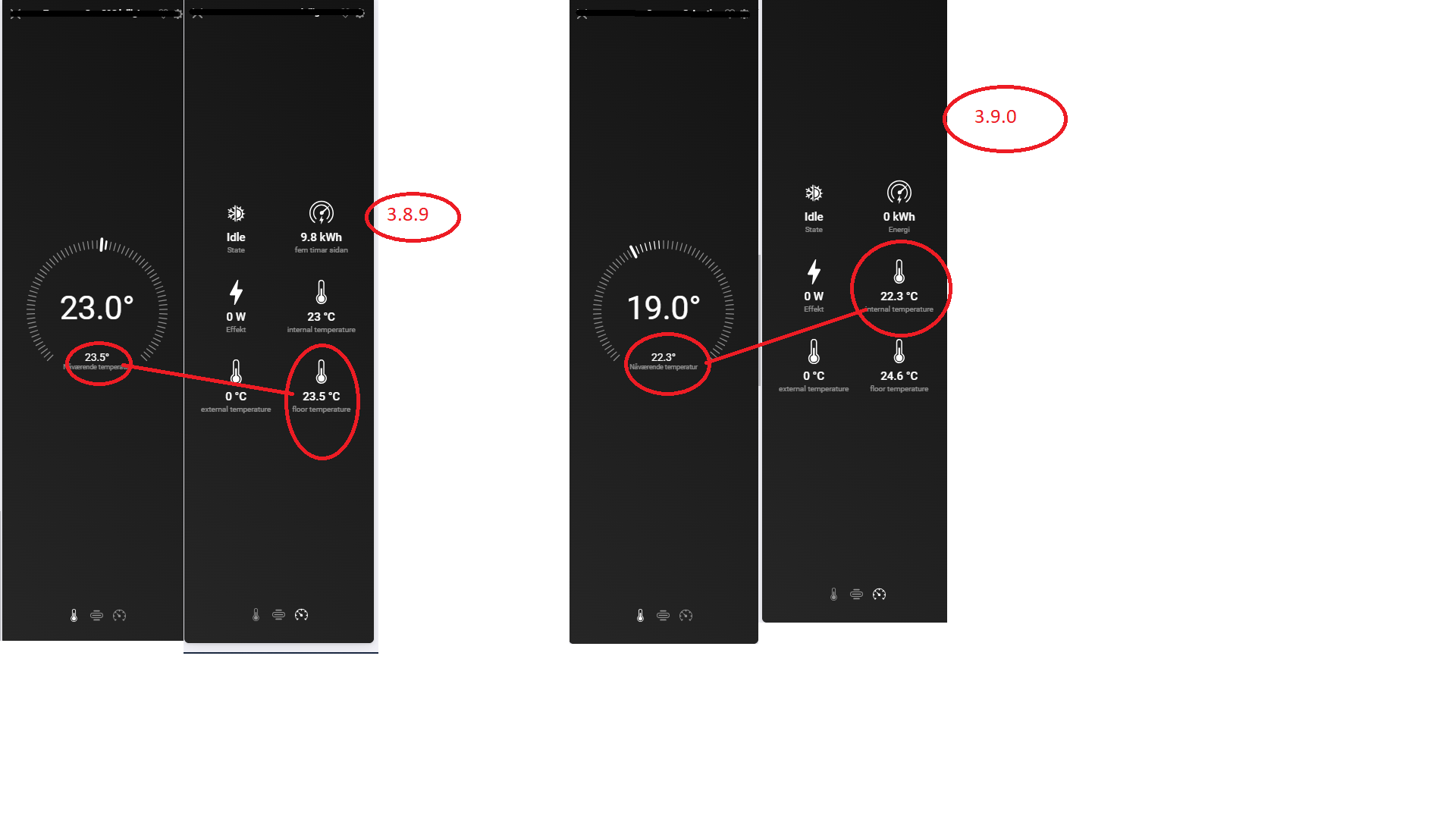
also , it seems to trigger “relay on” by use of floor temp sensor - and trigger "relay of by using the room sensor … can someone check ?
Yes, @F3006, same thing happens here. The thermostat is not showing the floor sensor, but the internal temperature.
Hi,
I am having issues with all of my Z-TRM6 that are constantly missing connection with Homey. When I disconnect and reconnect the Z-TRM6 device from power, I get the connection back instantly. But it usually last only for a couple of days before I am missing connection again. Is there a way to make sure to not missing the connection with Homey?
I had the same problem with mine.
For me, it worked to restart the Heatit app.
If that works for you as well, you could make a flow that restart the app every night or so.
It could also be related to the spamming from the Z-TRM6, here the latest version 3.9.0 should resolve that.
I have excluded mine for the moment due to several problems with them, therefore I can’t tell if the 3.9.0 works better.
3.9.0 have fixed the problemd for me. Now its only the bugs that F3006 mentions
1 Like
Hi,
I’m experiencing the exact same issue. Did you find a cause and solution?
3.9.1 works  it seems. Still some of the thermostats come up as unreachable , but works when tested. Guess that is a Homey problem and not related to heatit.
@HeatitControlsAB Z-trm6 falls back to “default” Room sensor when homey (heatit app) restarts.
need manually set to floor sensor every time homey restarts or heatit app
updates … 3.91 and 3.92
@mhemil - is it like this for you ?
1 Like
I don’t think it resets to internal sensor, but I’m still on 3.90.
Hei, z-temp2 is not showing as thermostat no more? Why? New ones that is added dont have the same functionality as the rest?
I have the same problem as you, with the internal temp showing under setpoint weel. Have this issue been resolved for you?
Is the issue with internal temp showing under setpoint wheel instead of floor temp resolved? When is the next Homey update, will this issue be fixed then?
