Hi. I’m very new on Homey Pro. Switched from FH And also have a Nobø System running.
Is there anyway to display Price for Tomorrow. I tried to set a flow to to fecth price every day at 13:00 CET when the NordPool is releasing the price. I want to use it for control of hi-load activities like floor heating Hot Water and Charging Car. And to be able to display tomorrow prices in a Dashboard / Insight. Br JAV.
Hi, just started using this and I´m wondering whats the easiest way to set the heating controller to thursdays is not working days. My wife has a free day each thursday, so I want the heating schedule to consider thursdays as a weekend or public holiday. I want it to stay in comfort the entire day. How can I solve this?
Hello! Utility prices are from 1st of October changing every 15 mintues and not evry hour. Any plans to update app? (I’m a SE3 user in Sweden)
I’d like to suggest to check the Power by the Hour app for that. It also has lots of price driven flow cards.
Note: at this moment the developer is working hard to adjust the app to the price market change to 15 minute prices
My integration worked right away with heating controler, that is the one that fetches prices in homeyscript through Heating controller.
Is Heating Controller going to get updated with the 15 min price changes? How does it work today when there are 15 min price changes? Does it take the price on the full hour and present it as the whole hour price?
This is by far the best app to control my water heater and other things.
I am working on a heating automation for when we are leaving the house. I wan’t two different scenarios.
-
This is for when we are leaving for a short period of time. Mostly in the weekends. This is triggered by a button we have by the front door. And when we push that I want the heating sources set to a temperature thats a little lower than normal temperature. Then at 12 o’clock the next sunday, I wan’t the house to go back to normal mode.
-
This is for when we are leaving for a longer period of time. For instance vacation trips etc. This shall be triggered by a button by the front door, but in this case we will set the house to normal mode manually in the Homey app.
In this case I’m wondering what the difference between some of the cards are since I’m getting some different results when testing this.
Here is the flow thats starting scenario 1 above. I’m using the “Set away” cards and in the flow for the heating source I’m thinking it should trigger 19 degrees. But sometimes it triggers 15 degrees.
I’m thinking about using the “Turn off” card for when I wan’t it to trigger 15 degrees. Am i thinking right here, or is the “Set away” and “Turn off” cards actually the same cards.
Same with the “Home mode is disabled” and “Deactivated” cards. Are they the same?
Hope this was understandable


How is 15 min prices done here? Average/hour or every 15 min as single price?
Same question.
Current price is amongs the 5 hours of the lowest between 10 and 20. Will it use 5 full hours or pick the 20 lowest 15 min price or will it take the 5 lowest 15 min price and the wording hasnt been changed in the new version ?
Looks like it takes the lowest 4x15 minutes for the card lowest 1 hours now.
Hey @balmli ,
I was wondering actually, and I think I may have asked before.
Can we get a version of the app without utility prices, or where we can at least completely disable the utility prices for a heating controller? I feel that utility prices should not be the responsibility of a heating controller and there are many other apps that do this already, and Homey even has a native option for specific countries.
I’d rather have a very robust heating controller that doesn’t rely on external services and focusses purely on scheduling.
Apart from this, I really like the app. And for now, the current schedule options works ok for my current situation, but I’d rather have more advanced scheduling options as well. Like the ability to program start and end times for each day of the week, the ability to choose which days are working/non-working days yourself, and the option to enable/disable fetching holidays from an external service as well. I feel like this would make the app much more useful for many more use-cases and people of the community.
As a NodeJS developer, I would gladly contribute to the app as well if that would help?
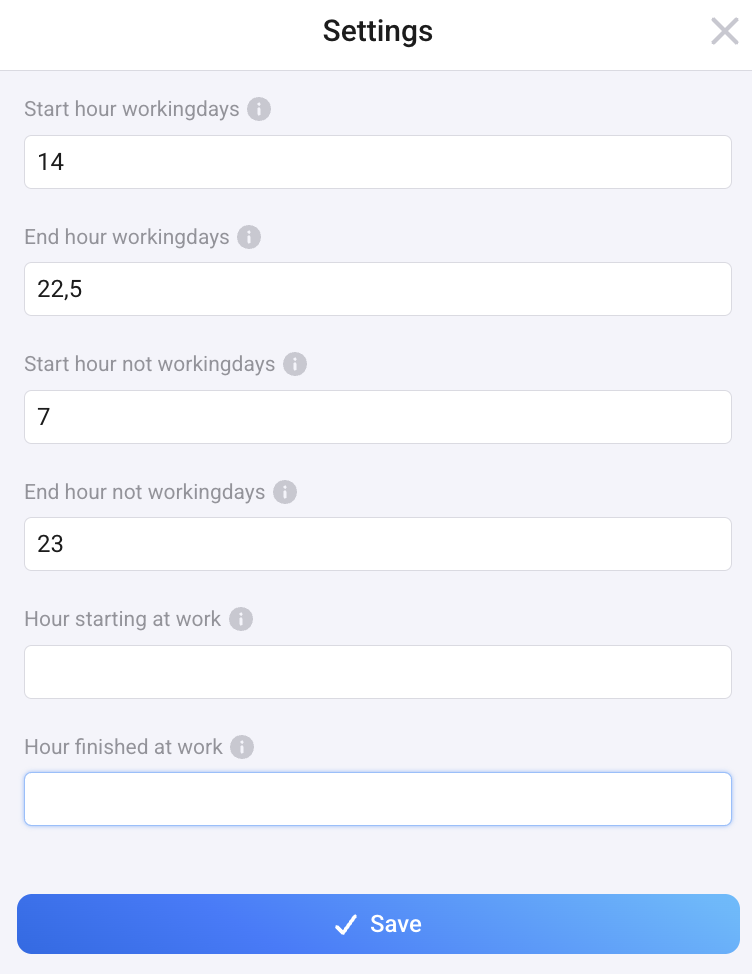
I have just installed Heating Controller and am finding it a little complicated to do simple things like the following example: I want comfort temp between 14 and 22:30 on workdays and between 7 and 23 on weekend days, but in addition I want late ECO-mode on friday night and “workday ECO-mode” on sunday night. It seems like there has to be a lot of flow cards to do this? So what is the cleanest way to achive this?
Hi @balmli
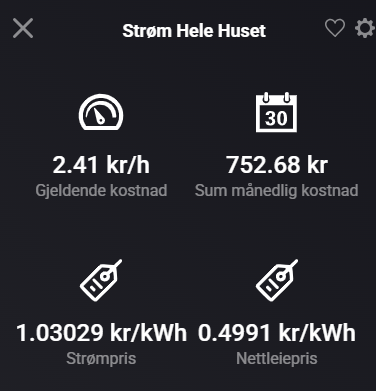
I’m using the Heating Controller / Varmekontroll app together with the Norwegian Electricity Bill / Strømregning app, and I’m trying to understand exactly what price Heating Controller is using when I enable the “Prices from Strømregning” option.
My goal is to have Heating Controller see the same kWh price that Strømregning shows as total, i.e.:
-
energy price (spot + markup + taxes)
-
- grid tariff (nettleie)
-
– Norwegian government electricity support (“strømstøtte”)
At the moment it looks like Heating Controller is higher than Strømregning’s total, which makes me suspect that strømstøtte is not included.
When “Prices from Strømregning = Yes”, which value from Strømregning does Heating Controller actually use?
Sending some screenshots from my setup.



Hi @balmli!
Utility Price is updated 5 times per hour for me.
See this simple flow;

I think it should be updated 4 times;
hour:00
hour:15
hour:30
hour:45
But the times of each hour look like this in the Timeline;
hour:00
hour:10
hour:15
hour:30
hour:45
I think the “extra” update that occurs at hour:10 should not be there, as it contains the same values as hour:00..?
Or am I thinking wrong somewhere..?
TIA!
I want to control my Raychem underfloor heating thermostat. But how do I add it? There is nowhere in the heating controller where I can choose which device it should control?

I’m having some trouble with a flow for setting Home override on each Thursday.
I want to let the heating sources stay in comfort mode each Thursday, so I set it up like the flow underneath.
It has worked fine earlier, but in the last weeks it doesn’t work anymore. So I need to start the flow manually, and then it sets everything in comfort mode.
Anyone see any problems with the flow?

Hi @balmli!
Today I had a problem that I discovered was because I was getting different Price ratios for the same Quarter price.
2026-08-10 10.30.00 Price: 0.07611 Price ratio: 0.684211
2026-08-10 11.30.00 Price: 0.07611 Price ratio: 0.663158
2026-08-10 13.00.00 Price: 0.07611 Price ratio: 0.652632
2026-08-10 14.00.00 Price: 0.07611 Price ratio: 0.621053
2026-08-10 15.00.00 Price: 0.07611 Price ratio: 0.6
2026-08-10 16.00.00 Price: 0.07611 Price ratio: 0.589474
Shouldn’t there be the same Price ratio on these Prices during the same day?
Or have I misunderstood what Price ratio is?
TIA!
EDIT: I thought a little more about Price ratio and how to interpret the result;
Is it possible that the app makes a unique ranking of the prices over the day? That the app forces each quarter to get a unique position, even if the price is exactly the same. Then when the list is sorted and comes across identical prices, it sorts by time of day (chronological order). The later in the day the quarter occurs, the higher the position (more expensive) it is considered to be in the list, which causes its Price ratio to drop?
TIA!
Hi @balmli!
I looked at the code on GitHub and I found a small logical issue where identical electricity prices during the same day receive different price_ratio values (forcing ties into different ranks depending on their sorted order). This causes some unpredictability in flows when prices are identical down to the decimal.
I have submitted a small, clean one-line fix (I hope) for this as a Pull Request at your GitHub repository for node-homey-utility-prices.
Thanks again for a really good app!
TIA!
