I installed the app but i am not sure how to use it.
( i created account, activated the 3 api and created the json key and entered it into settings).
After setup i added a new device google tts device
How can i send a tekst to my google (mini) speaker?
When use a simple flow: Is flow started
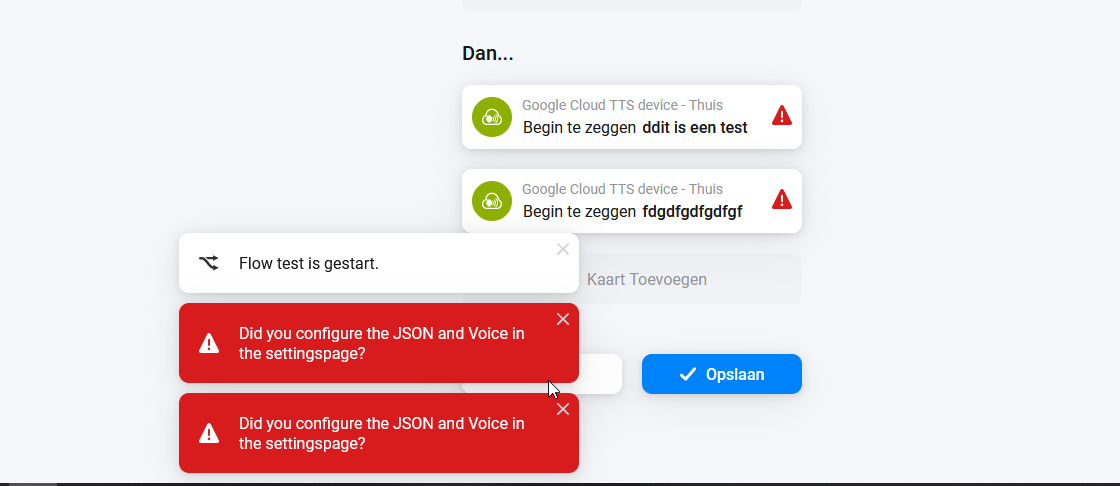
Then (google tts device) begin te zeggen: dit is een test
This does nothing, i get a nice green v that the flow tan but i hear nothing.
Where do i choose which google speaker this should be broadcasted to?
I have several google cast devices in my homey, but not sure how i get this message to the correct speaker…
ok, but how do i link ‘Google Services → Text-To_Speach’ to my device?
How does homey know which device is linked to my ‘google mini’ and which device is my ‘google TV’ etc
I have no option to link them and when adding them i also cannot choose/link them.
Also on the google API page is no linking to my device google device.
So i really do not understand how i can choose my end device…
Is the linkin in the renaming then?
I first used note++ but when i copied the jason no voice’s where shown.
Then i opend the jason with note (kladblok) and copied the jason. Voices where shown then.
It’s multiple explained in this thread. So I can’t tell you nothing new.
You have a „Google Mini“. So please rename the added Google TTS device to „Google Mini TTS“, or whatever. The Name is only important for you to find the right device, nothing more.
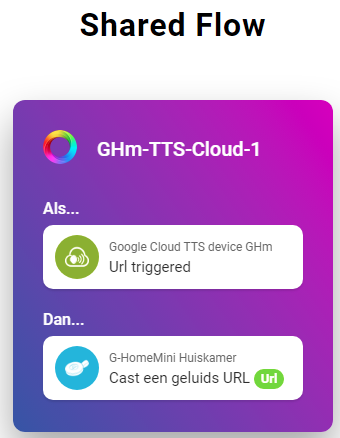
Then create the main flow:
If…
— URL is triggered (please choose the device „Google Mini TTS“)
Then…
— Play an URL (please choose your „real“ Google Mini and choose the URL tag from the „Local tags“.
(Example: see the last post from @JPe4619)
If you want use TTS on your „real“ Google Mini then create a flow and you choose in the „And…“: Google Services → Google Mini TTS → Start TTS…
The json which i downloaded during registration is filled in at the settings menu of this app…
But all other field are empty, the pulldown menu for default voice is also empty, no options to choose.
I guess the error says that there should be something wrong with the JSON file.
It could possibly be that when the JSON file was copied, the text was changed from plain text to formatted text.
Or not the complete JSON file was copied.
But these are only guesses. Maybe Arie can say more about the errors.
Edit: As already mentioned in the first post of this thread, the easiest way to copy the JSON file is by using a browser. Open Developer → Tools → App Setting, choose Google Services and paste the JSON file.