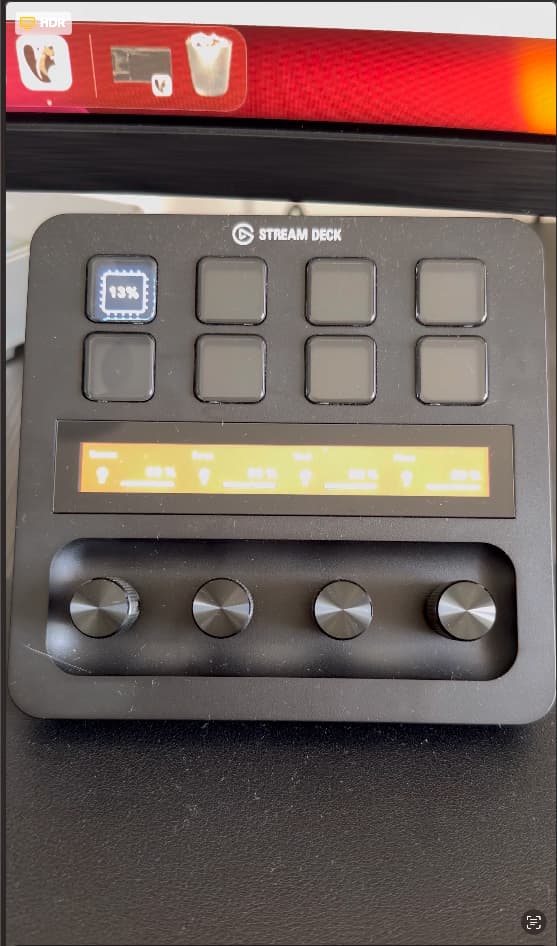
@Shakesbeard I started testing with Elgato Streamdeck Mobile and Homey and I have 3 questions:
Is there a dummy guide to set up the integration for each possible action and what I should/could enter in each field? I managed to toggle devices on/off and trigger 1 flow but have trouble with showing the setting of a logic variable.
Is there a dynamic way to start flows by passing the name of the flow via string to a generic flow that picks up the name of the trigger and than can pass that string to set of the correct flow? In stead off having to make different flows for every trigger I make in Streamdeck Mobile?
Where can I find the Homey icons in the plugin? Do they automatically show up? Because I cannot find them in the icon library.
Unfortunately not. Never paid much thought to that but you are not the first one to ask.
I might add one if I ever get the time to do it.
It should really just be select variable and bam it is shown. If you are missing variables or devices try restarting the Homey app. There is a known issue which is bugging me still, where the automatic subscription is not working when devices are removed/added or when Homey restarts. Sometimes it worksm other times not.
Yes. You can enter a payload on the trigger button. Or any button which supports the trigger functionality. In the flow you start by that triggers name you can access the payload through a flow variable and do stuff with that.
The app does not come with any icons really. The few basic ones it has are build into it. I did that to give it just something to start with instead of showing empty buttons. I intentionally left the build in custom icon functionality in place so everyone can simply choose their own icon sets. Sadly there is a limited selection of icon packs which relate to Home Automation though.
Even some screenshots would work so I know how to set up every action. And how it translates to Homey (flows)
I found the cause: my variable is in the Homey app Better logic variable and it does not find it. Only variables from Homey’s own variable list. I solved it by linking a Homey variable with my Better logic variable.
I haven’t found a solution yet because the card Start flow in Then does not accept tags for the Flow name. And I’m not familiair yet with triggers and payloads. I’ll keep on looking for an easy solution that does not require me to write a flow for every button in Stream Deck
The StreamDeck app itself has a trigger flowcard, which takes the name you enter on the SD as trigger name. Flows started by that also have the payload data available as flow variables.
Not at all. The only thing the plugin does with flows is starting them by the app’s own Trigger card.
Everything else is direct communication with the Homey api. Basically simulating UI interactions.
Hi @mibblitz ,
This is not possible by design. The StreamDeck has no api which allows accessing buttons not owned by the plugin itself.
However, some time ago I was told that they are thinking about something going that direction but I have not seen anything for this, yet.
I just went here looking for answers and after quite some time found this post. This fixed my problem. I suggest the author makes it possible to use only ‘homey’ as the hostname
Connection between Stream Deck Mk 2 and Homey Pro 2023 seems to work fine in a sense that all my devices appear in the Stream Deck configuration (and it does not show a connection error).
When I select one of my lights (which I want to turn on/off) it just doesn’t work.
Not sure which issue you are referring to. You got a link to a post?
I just checked on the report you submitted but it actually looks fine on Homey’s end.
I see that query for devices with on/off capability but I cannot see any actual commands incoming on Homey.
You see this for more devices or only that specific one? Furthermore does it only not work with on/off or are other button types also not working?
So, I used “homey” as the Homey Address while configuring my “toggle device on / off”. That was enough to get connection to work and to get a list of all devices. However, when I updated the Homey Address to “homey-<long hex string found in the Homey settings>” it works as expected.
It might be in the documentation somewhere but I would love if you could provide examples in your FAQ. But now I’m a happy camper. Bought my Stream Deck just for this feature. Love the integration. Thank you for creating it!
The complete address should actually be shown in the apps settings page where you set up the access key. Will do some retention testing when I do the next update.
In the Homey App, the hostname is just homey.
I put this into the SteamDeck plugin and get the list with devices back and can configure a action. But the action is not triggert. an exclamation mark sign is displayed then.
The option with the homey-hexcode is not working, this worked before for me on both my Homey (early 2019) en (early 2023) editions.
If It try this now, the plug-in will give the error Cannot connect to the Homey.
Restarted the plug-in and the app, also reinstalled both, won’t solve the issue.
I checked also if the homey is reachable from my workstation. This is possible, but the reaction is based on my DNS. I also checked if homey-hexcode is reachable, this response with a IPv6 address. Don’t know if this has any influence on the working of the integration?
I did some follow-up checks. And when I add a Display Data [+Trigger] action to the SteamDeck. It won’t build up a connection to the Homey. It keep trying to connect, but finally a connection error will appear. But you can select a Device. That is filled correctly.
The Toggle a Device On / Off establish a connection almost directly. But there is a hourglass showed on all buttons on the SteamDeck.
I have a problem with my StreamDeck+ and my Macbook Pro. I don’t know if it’s a software or plugin problem but every time I open a session on my Macbook, then the StreamDeck software also opens, however the integration with Homey is no longer available until either the buttons or the circled screen which flashes red).
To reactivate it, I have to go into the software, and simply click on any icon of a Homey integration. This will refresh the Homey plugin and everything will be back to normal.
I have never seen or heard of this behavior before. My SD+ works jsut fine. But I am on Windows with it.
So to confirm I understand it correctly. The SD indicator an error with the button flash. Then you open the SD App on your Mac and just select one of the buttons for configuratiion and it suddenly starts working without you changing anything?
Does this happens always or only when your Mac comes back from StandBy? I mean does it behaver the same if the system was on Standby or was started up freshly? It sounds like a potential bug in the SD software at first glance. Like the SD not loading the settings stored for the plugin. Hmm…
Please let me know what you observe, I will do some thinking. Also let me know which version of the SD software you are currently on.
@Shakesbeard I’m using StreamDeck version 6.3.1 (18954) and Homey Integration version 1.9.0.
The problem occurs when I click “lock screen” on my Mac and turn off my screen (which cuts power to my Mac, since it is powered by Thunderbolt). So I guess when I turn it on it wakes up from a deep sleep but doesn’t turn off.
I now get a IPv4 address in response when a ping homey-[hexcode].
And the intergration with StreamDeck is working again, when I put the connection to homey-[hexcode].
My local DNS is still just homey. I suspect that IPv6 is part of this issue.
I have a strange one.
I have my stream deck working on my mac and did the thing to resolve hosts that it made it work properly.
However, just some of the devices do not show up if i try and assign them to a button.
The devices that do not show up are switches that use the TKB / manufacturer app and it’s just those that do not appear.
So, im guessing its something to either do with that particular app or the streamdeck app that is not showing those particular devices for some reason.