@Hans_Petter_Lande important to say which Homey you are running on
this works on my HP23 :
try {
console.log(“createEaseeChargerSchedule args”, args);
const obj = JSON.parse(args[0]);
await Homey.flow.runFlowCardAction({
uri: ‘homey:easee:home’,
id: ‘homey:device:a277230b-f6db-4f6b-a244-1418f1b971f3:createSchedule’,
args: {
‘startTime’: obj.start,
‘endTime’: obj.stop,
‘repeat’: true
},
});
} catch (err) {
throw Error(“Error occured with createEaseeChargerSchedule : " + err + " args: '” + args + “'”);
}
the script doesn’t seems right
try this

I am using a homey pro 2019 verion. Therefore using the 2019 version of the script
Still not working. Getting this error now
Only difference between this and the arguments I originally was running is removing the comma after obj.start.
Seems like it is struggling with the end time argument now

This is the error i get running the script as it was:
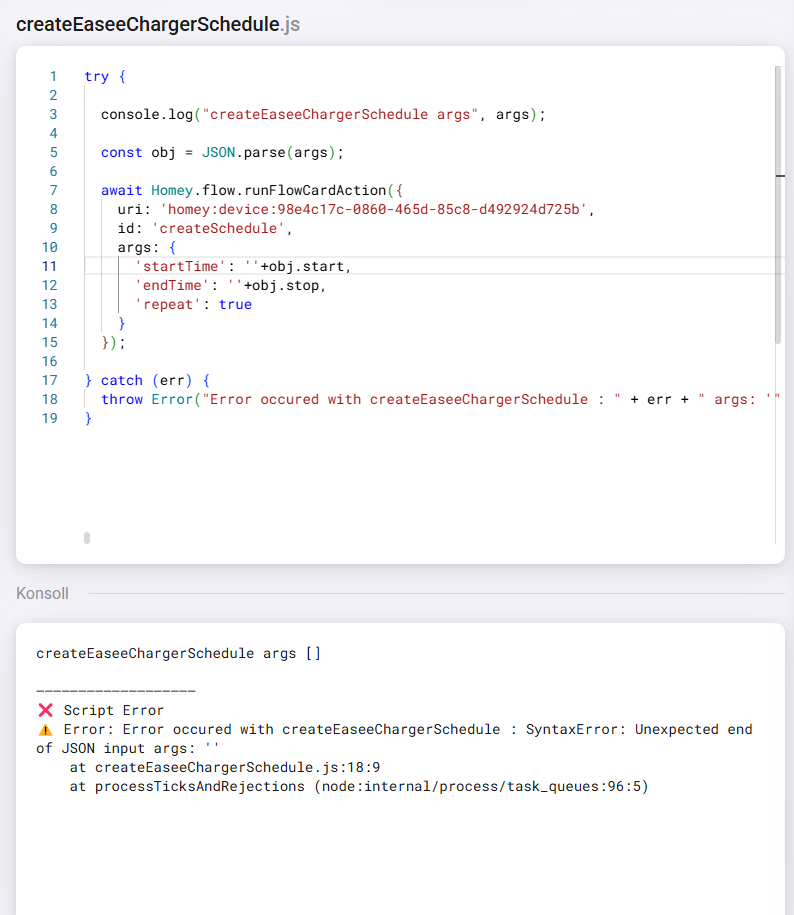
It seems to me that it is just missing the input, but for some reason will not take the arguments from the flow:

Maybe there is something wrong in how I have entered the arguments in the flow?
my bad, you need a comma after obj.start
… obj.start ,
That is the same as already stated in the script, but still does not work.
it still seems different. ensure that it is ’ ’
when I’m copy your code :


well in this case the issue is that the arg on line 3 is empty.
you have to pass correct arguments AS JSON …

Hi again.
Thanks a lot for helping. I was doing quite a lot troubleshooting during the weekend as was about to give up when I realized something.
When creating a normal flow that sets a charging schedule, I looked through the developer tools and saw that it is calling for the ID differently than the script (I am running a homey 2019 version)

Therefore I rewrote the script without calling for uri, but only ID and it worked


I can then send the arguments in a flow in the same way that is described in the documentation website.
here is the script if anyone else have the same issues as me:
try{
const obj = JSON.parse(args);
await Homey.flow.runFlowCardAction({
id: ‘homey:device:016e4335-2abb-479b-ba4a-4cd0293d4bc8:createSchedule’,
args: {
‘startTime’: ‘’+obj.start,
‘endTime’: ‘’+obj.stop,
‘repeat’: true
}
});
} catch (err) {
throw Error(“Error occured with createEaseeChargerSchedule : " + err + " args: '” + args + “'”);
}
ah, it migth be that Homey has aligned and updated the api so 2019 and 2023 now are the same
Does anyone have a good solution if you only want ECC to charge the car certain days? I.e. if I want the car to be fully charged by 7am on Mondays and Fridays only?

ECC is out in test, now with hourly prices back again
Now with support for Norgespris (only for norwegians)
Thanks for creating the app, it looks promising but I’m finding it quite difficult to understand the documentation. I have a Volvo and Garo which are both connected to my HP23. I could really need a screenshot of a complete advanced flow to connect the dots. Anyone in here with a similar setup? 
BR,
Erik
It really depends on how much magic you want to enable.
Just break it into simple task.
First install the app, create a device and see that the price is correct.
Then you need to set up a flow to control ( start and stop) the charger : Homey Easy Charge Controller Homepage - Homey Easy Charger - Confluence and Homey Easy Charge Controller Homepage - Homey Easy Charger - Confluence
Just see if you are able to do this, then we will go to next step
It’s the flow part I’m finding confusing, the prereqs are in place. I’m not seeing any triggers in the documentation. What I want is to start and stop charging based on lowest pricing with the target of full charge at 08:00 the following day.
