Cool, although it looks quite similar to this imho
I think @Peter_Kawa 's solution is more correct, as you can see the current date is a part of your url. So after a couple of hours, you have to get a different gif url 
You Rock!
Hi @skogsaas, thanks for multiply option. Can you make now an option to add more dash to the menu bar? Now I can only switch between them. Also icon option that you also can use instead of dashboard name. Like the menu bar icons in my example earlier.

You can click to the rightmost “+ NEW”. Not in edit mode.
Yeah I use the buienradar gif in my local served flavour of homeydash for a few years now, and the gif is always up-to-date.
Something I noticed:
The dreaded “Homey offline” message appears quite often since I’ve been playing with homeyboard, but I’ve also updated the mobile app from v6 to v7 around that time.
Before that, that “offline” nonsense was pretty rare.
If no-one recognises this, the cause must be the mobile v7 app
Homey Pro 2019
@skogsaas
Marcus, You’re right 
Dj.
How can I install and test this. Only via CLI
This looks very nice !
Start at post #1 as always. Second sentence 
Update 0.6.2 - Dashboard settings + Performance
And here it comes!
You can now edit settings for the dashboard by clicking the Settings button far right on the toolbar. Currently only possible to set the dashboard title, but more will come, including dashboard display icon 
As a part of this release I’ve also rewritten how capabilities updates are propagated internally in the app. So browser performance should be much better as well 
Just pushed it to  https://homeyboard.github.io
Same here. Different computers, locations, browsers and OS… No matter what I use, I always end up with a blank screen.
@skogsaas Just to be sure; Opening homeyboard.github.io (without any URL parameter) should redirect me to a homey.ink like login page?
TIA
It should! But, I just tried clearing all site cache, and now I get the same blank page! 
Basically means that I can fix it! 
(The issue is just for new users that have not logged in before)
It works! Thanks @skogsaas
Thank you!
can you also revoke access somewhere?
Revoke access?
As in logging out?
With Athom OAuth2, the online login screen where you have to consent to access, it is not possible for users to select exactly what they want to consent to. It’s all or nothing sadly 
Even though the dashboard does supports limited access and readonly scopes. Athom just has to improve their login consent page.
To clarify; when you login you are returned to the homeyboard.github.io site with an extra access token in the URL. This is just stored in your browsers local memory, and never shared anywhere. Revoking access is basically the same as logging out, or just exiting the page. Without the page open, nothing happens anyway. If you open the developer-tools in your browser by pressing F12, you can find it here:
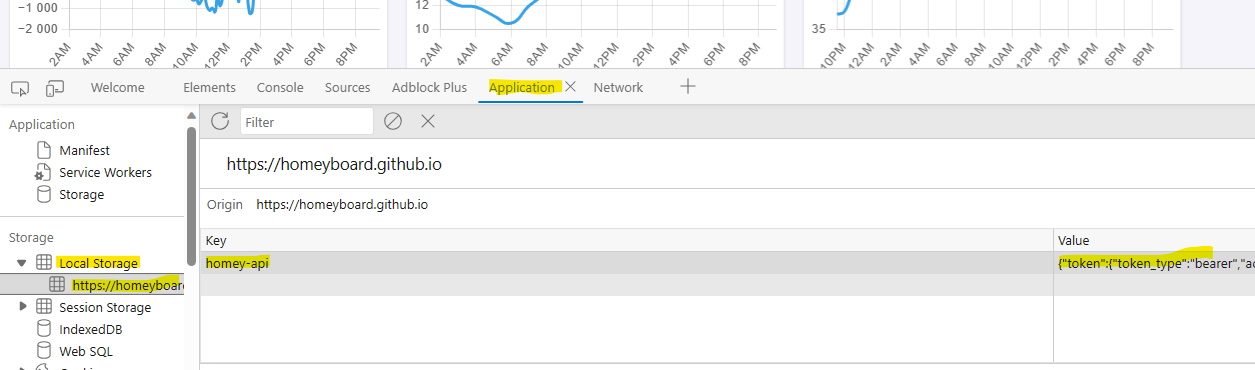
When the installable Homey Pro app is approved by Athom, you can (on the HP23) create an API-key with exactly the access scopes you want it to have. And you can through the Homey app also revoke any API-keys you create.
But basically; there is no sign-out button anywhere at the moment 
Just close the page if you don’t want to use it anymore.
This is what I mean indeed I logged in to http://homeyboard.github.io) choose online is that right for now or must I choose local ?
After that login screen I gave permissions …. So that’s is what I mean …
But when I clear browser data it’s removed I guess because it’s storage on the browser
For now you have to login with the online alternative. Still waiting on Athom for the app review before local is an alternative for anyone else than me
Alright…
was a bit suspicious because I had to give permission for something and couldn’t withdraw it anywhere… thought it was online somewhere
