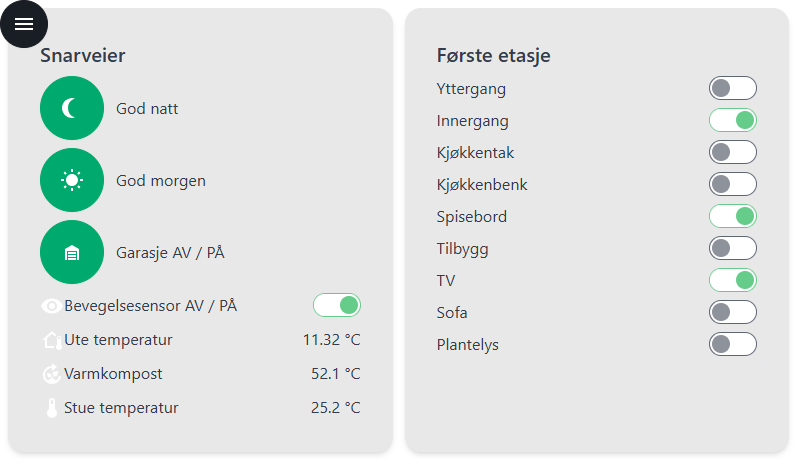
other question: what is the purpose of the list widget?
I tried now within section to add sensors or insights. I can place them directly into the section one-by-one, so they appear as “list”.
Or I can put a list widget into the section and then place the sensors and insights there … so for me it seams there’s no difference at all.
btw: putting widgets into to correct “container” parent is a nightmare … it takes 5-10 attempts to have the widget where I want it …things are jumping around (so e.g. if I wont to move a sensor into a section, the section jumps away to another place)
I give up … started trying to rebuild by old dashbaord from scratch
after around 10 sensors or insights added, editing suddenly hang, no way to save or do anything in the UI … reloading the page URL showed completely empty page (I guess source code for dashboard corrupt - error in console log …)
I’m really disappointed … the almost perfect “old” dashboard was replaced by something that simply is not usable (and I’m in IT, I’m patient and try a lot of things before I give up).
so now we have no working old dashbaord, and no working new dashboard
@skogsaas don’t get me wrong .. you did amazing work and I appreciate your efforts, with old version and your many plans for new version (that what Athom should have done probably in first place) … but I really cannot understand how you could release this version to the users
I am grateful for your efforts and looking forward to next versions of 1.x. I think it will be great. For the moment remote access is not working for me. There is apparently so many things to cover for so many user cases and hard for a one-person free-time developer to find out. But I will have patience and will definitely donate when you make it possible.
Hi skogaas,
Thanks for the new version of your dashboards app. In the new version you can create multiple dashboards in only one dashboard device/store in homey. What is your advice, performance wise, when using multiple dashboards: store all dashboards in one dashboard-homey-device or use one seperate dashboard- homey-device for each dashboard?
right click sometimes would be much easier I guess (delete, insert widget, edit properites, …)
other observation: once dashboards (in the container device) get corrupt, you no longer can delete them, since you first would need to open it (which does no longer work)
Maybe it’s enough to address this fix … that’s the reason why why converted old dashboard does not load, and also the newly created one raises the same error
Sorry for the radio silence. I’ve been away for three days on a corporate hackathon, really getting my brain cooked
Thank you. Getting error messages like this helps! I’ll look into it
Everyone else experiencing issues, especially issues where the dashboard gets unresponsive during editing, send me error messages!
I totally agree with you, that’s also why it took so long before I actually released anything. Based on what people wrote some months back, it seemed the old dashboard-app had stopped working, just because it used outdated libraries/APIs towards Homey. So I assumed releasing wouldn’t actually affect that many users The previous version, 0.15.3, was actually released in november 2023, so having outdated dependencies seemed plausible. I’m sorry
Also agree here! But letting people have the ability to drag’n drop basically anything into anyting. Having sub-nesting and sorting of widgets gets a bit complicated to also support an intuitive dragging experience. Suggestions on how users should be able to do this? (I have an idea, but I also want to push users to come up with suggestions )
It’s a problem with Athom not adding CORS headers to responses when using the “remote” proxy endpoint. I thought I had found a workaround for this, but apparently not I recommend using the online login method until it’s fixed.
Is this the Capability template? And is this an old dashboard being migrated?
I’ve thought about this, but I also have no idea how much “settings” a Homey device can handle. At least I haven’t found any limits. I’m planning on removing the need for making Homey devices completely, but I first have to find a nice and secure way to create ./userdata files, and not have a static name anyone can access over the internet
I’ll add a delete button to the dots-menu in the dashboard list
Concerning the corrupt dashboards/unloadable: maybe it’s really just a tiny fix, that makes a) the old converted dashboard working again and b) the newly created (as decsribed) … in this case the delete option on dashboard menu level would not even be that important anymore.
So if error handling was a bit more stable, it could really help.
Concerning drag-and-drop-“nightmare” … would it just be sufficient that other items do not change place while trying to drop the moved item (although I can imagine that this may cause other problems).
Another option I could imagine is more use of right-click-context menus (e.g. right click on parent container, show context menu with
list of insertable widgets (insert at the end within the parent then, can be moved later within the parent if required)
delete option
property option
…
would be probably also be much faster for the editing process in general.
PS: for me the old dashboard was perfectly working … so it would have been great to have it around for some while (until the new version is stable enough to do the final switch - while having both during the transition phase)
You might have to reload the page a couple of times for the popup to say that you are viewing version 1.0.0-pre.2. Just view the dashboard, do not save it
Let us try to reduce the language barrier. If english can be hard some times, do not hesitate using your native language
Google Translate Dutch: Op basis van uw afbeelding begrijp ik dat u verwacht dat de tekst aan de rechterkant van de schuifbalk de maximale waarde 100% moet hebben. Maar als u kijkt wat er onder ‘Waardepositie’ is geselecteerd, staat er ‘rechts’. Dit geeft aan dat de actuele schuifbalkwaarde, op dit moment 1%, aan de rechterkant van de schuifbalk wordt weergegeven.
English: Based on your image, I understand it as you expect the text on the right side of the slider should be the max value 100%. But if you see what is selected under Value position, it says right. This indicates that the actual slider-value, currently 1% will be displayed on the right side of the slider
A concept of predefined themes could be added quite fast. Here’s an example with the theme called cyberpunk. It was the most colorful theme I could find available. You want it as the new default maybe?
concerning colors: I was thinking abouit something completely else (filed that wish also for the “old” version already).
I would like to color items based on values … e.g. color the text from the A/C blue when it is turned on and cooling, or red when it is turned on and heating … now thae basics are there with the switch widget …
but it would require to set text colors (or things like bold/italic/…) for the labels and/or values (both would be really great)
and the other thing is: to define background colors of widgets (e.g. different colors for different rooms) … as the layout may change based on display size anyway, it would make it so much easier to find the right card/section at first glimpse


 The previous version, 0.15.3, was actually released in november 2023, so having outdated dependencies seemed plausible. I’m sorry
 )
) I recommend using the