Do I need to install it again
I’ve sent the update; it will download automatically.


Is it am idea to give some more information from the printer like power usage to see that back in the energie tab.
I’m really glad with this app again thank you for your support in this app, please let me know when I can test some extra or new functions
I don’t think the Creality K series has a power consumption sensor. I’m not sure if other models have one. I know you can buy a smart plug and add it, but I’m not sure how functional it would be.
Ooo I didn’t thought about that, i tried to use a smart plug, but it gives sometimes an error like a wrong understanding from google and turns the printer off.
Thank you for your support
@ugrbnk ik heb zojuist een nieuwe print aangezet en ik dacht laat ik wat knoppen testen.
ik moet zeggen in het begin dacht ik dat het niet meer werkte echter ging na paar minuten de knop wel werken dus de printer ging ineens uit 
Nú werken de knoppen weer direct, wellicht een keertje naar kijken ook word er in de widget niet het beeld weergegeven zou wel gaaf zijn maar niet noodzakelijk.
Ik hoor graag als je hulp nodig hebt om te testen.
Fixed command responsiveness on Moonraker/Klipper devices with HTTP Keep-Alive connection pooling.
Improved widget image visibility on slow networks by increasing fetch timeouts.
Expanded thumbnail path resolution to support more Moonraker printer configurations.


I’m not quite sure what the error you encountered is. If you could provide a clearer explanation, I’ll be able to come up with a solution.
When I push on the printer button the one with the red stripes, the printer Goes in the pause mode
Okay, I’ve fixed the issue. If the same error occurs again, please let me know.
Thx it works
mocht je nog wat errors of bugs verwijderen de updates mbt gegevens verversing gaat niet helemaal goed en er zit een klein verschil tusssen de voortgang op mijn sonic pad vs de app wellicht komt het door de late verversing. de printer draait bijvoorbeeld en een half uur op sonic is hij op 14% en in jou app 1% . je hoeft het voor mij niet te veranderen want het belangrijkste voor mij was het omroepen dat de printer klaar is met printen. laat maar weten als je er mee verder wilt gaan.
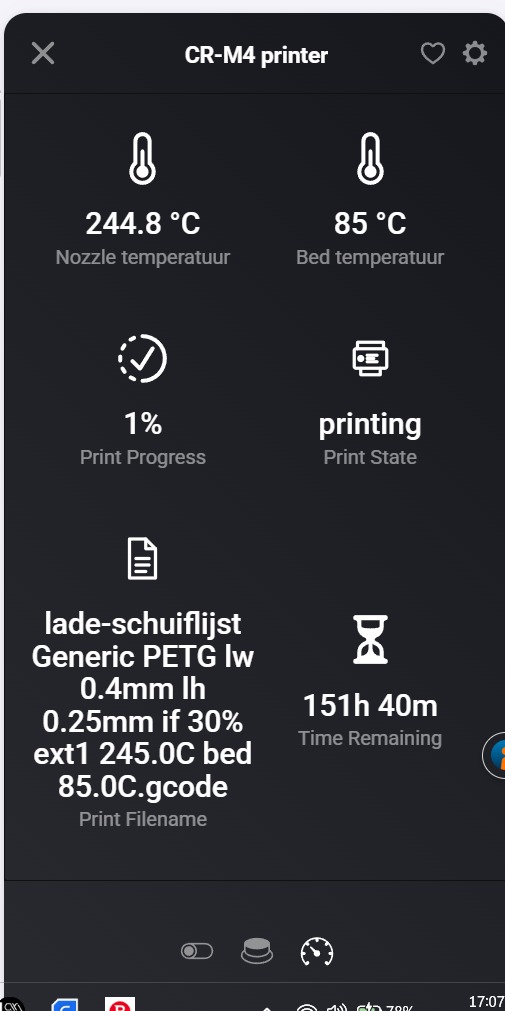
Improved Real-time Updates: Fixed an issue where the widget experienced delays when refreshing data. More Accurate Progress: Resolved discrepancies in print progress for Klipper/Sonic Pad by prioritizing time-based statistics over layer counts. Bug Fixes: Fixed calculation errors in progress tracking for specific firmware versions. Performance: Optimized polling interval for smoother status reporting.
Thank you for your support great app
Hallo ik bedacht me net dat ik de runout of filament mis, kun je dit in flows toevoegen of is dat te lastig.
Dan kan ik in mijn flow verwerken wanneer de filament op is.
Ik hoor het graag en wederom super bedankt voor je moeite en support.
Groetjes Nelson
Filament Tracking: Added new capabilities to track used filament (Filament Used) and estimate remaining filament (Filament Remaining) for the current print. Widget Update: Updated the status widget to display filament info (e.g.,  1.25m used (4.50m left)). Flow Support: Added a new “Filament runout” flow trigger card that activates when the printer detects the filament has finished.Driver Improvements: Klipper (Moonraker): Implemented automatic filament total retrieval from G-code metadata and runout detection from filament sensors. K1 Max: Added support for filament usage data and runout alerts via stock WebSocket messages. UI/UX: Designed and added custom icons (.svg) for the new filament capabilities, following Homey design guidelines.
