I have been a use of Homey for about 6 months now. My main focus is automating energy management in my house. My energy supplier is Octopus - currently it seems to be largely unsupported by the Homey ecosystem.
I have been developing code to automate the collection of energy data for consolidation in Google Sheets for some time. I have taken that code and used it as the basis for implementing my very first Homey App code.
I now have basic automation working for the Octopus Mini device. The data provided is live, though access to the api is throttled (by Octopus) to about 100 requests per hour, so I have a chosen a 1 minute polling rate - this allows other requests to the API in addition to the “live” polling of Octopus Mini.
The code is so new that I am only running the app in debug mode. I also have a number of restrictions on how I can research the API and its use. In particular:
There is no gas supply to the property so I can’t test access to gas meter data;
Only two tariff types apply to the property so I can’t evaluate the use of other tariff types
I have no experience using Github, so that’s going to be a learning curve for sharing the code
If anybody is interested in collaborating to develop the app further it will be great to work with you.
Current Functionality
Octopus Mini live monitoring only
Functionality In Development
Half-hourly monitoring of data on "standard meters" (mediated by the Octopus Mini api)
Planned Functionality
Tariff "devices" to monitor consumption by price-band and measure efficiency of tariff use
Bill "device" to estimate and predict cost of consumption in invoice periods
I have Cosy Octopus (for Heatpump) and Outgoing Variable for the solar PV export…
The access to the Octopus Mini via the GraphQL interface is quite complex to work through. I have been using several distinct technologies to help. Octopus provide their own GraphiQL site where you can test GraphQL queries against their schema and data.
The data returned is not necessarily in a form that is directly usable with Homey. So I have been using JSONATA to query, manipulate and transform the JSON data returned by both the GraphQL and REST api. Just getting to grips with the way to use GraphQL is a bit of a learning curve.
Given this complexity, I reckon that getting anything useful out of a simple script would be a bit of a challenge.
Thanks for your interest. Not a lot of progress since I have been on an extended holiday (much better than writing stuff for Homey ). I got to the point of trying to install my trial app on my Homey and couldn’t get it to run. But that also led me to the conclusion that my architecture was just wrong.
So I have actually gone to the extent of writing a simple Homey emulation that feeds capability values into a Google Sheet - this has enabled me to explore that a good information architecture (aka set of devices and capabilities) will look like. Right now I have a “device” for each tariff (import and export) and a device to take the place of the Smart Meter In House Display. I am still crafting some of this device’s capabilities. I think there will also be a billing device.
One key decision made as a result of this work is that the ONLY data that will be useful is the live data provided by the Octopus Mini device. So it you don’t have an Octopus Mini, then my App isn’t going to be any use. Also I am using the GraphQL interface rather than REST throughout the App.
All this work using sheets isn’t entirely wasted, because I have implemented an emulation of Homey. This means that I can take the device code and move it to Homey with (relative) ease.
As soon as I have an App that installs on my Homey I will come back and we can collaborate on getting stuff into Github. It will be a few more weeks - first to get back home, second to move the code into Homey.
Still working on it. Things have been a bit busy during the summer. My research project to emulate suitable device designs is nearly complete and has yielded a much more robust set of candidate devices. Still planning on getting it working in Homey - hopefully by the year end. Will update the progress here and make early alphas available to anyone who is interested. As mentioned in a previous post, there will be data that will be needed that I am unable to see, so sharing information about stuff that’s wrong or that is missing (gas tariffs, for example) is going to be really important.
Slightly off-topic, I know. But if you use Octopus and have a SOLAX inverter you can now import your Octopus tariffs into the SOLAX app (that I still use alongside the Modbus integration with Homey). This at least makes the financial reporting in the SOLAX app more relevant.
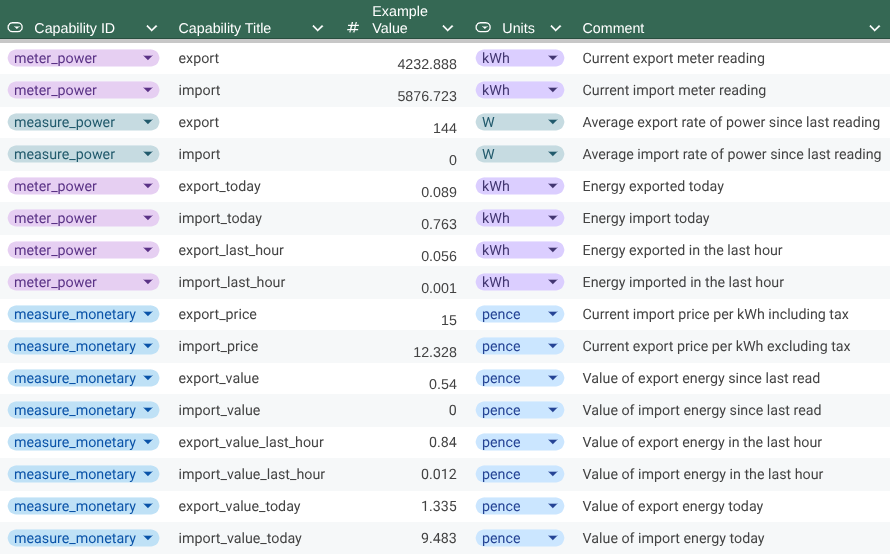
Progress has been slow for lots of reasons. I now have reasonable designs for three device types:
Tariff Device
Purpose
For the import tariff (and, if present, an export tariff). Reflects the consumption for the day and for each price slot (where a price slot is shorter than a day).
Reflects directly the data returned by the Octopus Mini on an instantaneous basis. Additional data is derived per hour and per day. This device could be used to implement the equivalent of an in-house display of energy use and cost.
The estimated financial state of the Octopus account. In practice mini readings for import differ slightly from “official” meter readings - consequently the estimated financial state will differ from the actual account balance. The actual balance is available from Octopus data, so it should be possible to continuously reconcile the estimated and actual balance.
I am unsure of the long-term value of the Tariff device since it only accumulates energy and value by slot (or day if the tariff is constant price). This data is also collected by the Mini and Account devices. Whatever, I plan to implement it and learn from its use.
Next Steps
Take the Google Script code emulating the devices and move it into a Homey app. Then lots of testing. Joy .
Please Contribute
Any feedback or improvements on the designs posted here will be gratefully received.
For me, I’m on Octopus Intelligent Go, so the most important thing I’m looking for is to know when I am on the cheaper rate (When I plug in my car to charge) and which varies every day, depending on the slots that Octopus offer me.
Plus, it would be good to know about the free electricity slots.
It looks like the Account and Mini’s reading of the ‘Current Import Price’ would solve this. So I can trigger when Current Import Price = under 10 pence for example, then run my automations. Although I’m not sure how the free energy slots show up - if they read 0 pence for example?
Hi Pete - thanks for joining in the discussion. Your comment has stimulated a thought about day-ahead prices. None of the devices currently looks there and I am not sure what a good approach would be. As you probably know, Cosy Octopus is priced by the half-hour (as is Intelligent Go), but uses the same standard timeslots everyday - it’s behaviour is unchanging until Octopus move the rules around. Will need to give some thought to the day-ahead stuff in terms of the device design.
Maybe we can collaborate on some thoughts?
I haven’t looked at any of the information about free energy slots - the GraphQL structures are rich but complex. It took me ages to pin down how to get pricing, for example. GQL is now much more of an open book so I am happy to go hunting around… I know that the guys doing this stuff in HA have implemented auto-registration for “energy saving periods”, so I guess the data structures reflect the free energy slots too.
Can you give me some clues about the number of different prices you typically see in a day? It might be useful to model a schedule and trigger flow-cards. Perhaps “When one of the cheapest/dearestN slots starts…” or “…ends”. I have focused so far on the Devices and their data have not really given any thought to flow cards.
I may have to enlist your help in getting some GQL outputs and sharing the result JSON with me so I know the structure I am navigating through. Happy to take you through the use of the Octopus GQL environment if you are willing to help and need the tutorial…
For the prices - with Intelligent Go I only pay two prices.
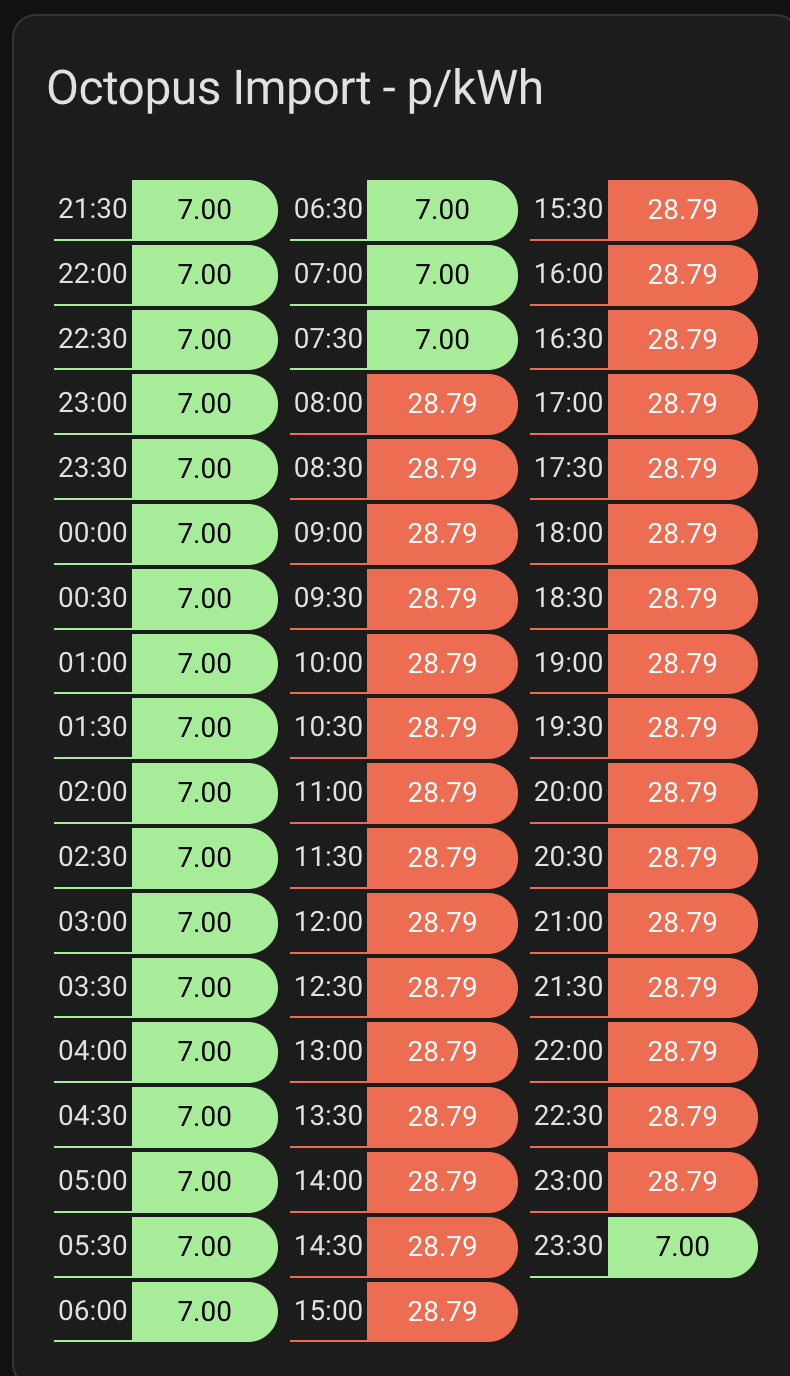
The full rate of 28.79p or the cheaper rate of 7p. I currently use Home Assistant to push the ‘Current Price’ value through to Homey so I can then trigger automations. It’s one of the only remaining functions of my HA Install - I’d much rather move it to Homey and shut down my HA instance.
Here is the screenshot of some data I get on my Home Assistant Dashboard.
With Octopus Intelligent Go - when I plug in my car, it communicates with Octopus who then schedule my charging with cheap windows.
When I plugged in today, it gave me times such as:
3-3.30pm
7-9pm
10.30pm Onwards
Each of these slots would be at the cheap rate.
So then I use my Homey / Homey Assistant to detect when the rate is currently cheap, and charge my Tesla Powerwall Battery along with a few other devices around the home / control the air conditioning in the Summer when it’s hot, house is boiling + we are exporting excess to the grid.
I’ve not seen much in terms of the free price windows on Home Assistant, although I haven’t ever gone looking - but thought I’d mention it!
OK, so that’s less complexity that I expected - it’s even simpler than Cosy Octopus with only two prices. Am I right in thinking that slot timing changes each day? - that seemed to be the implication of your message. So that’s a bit more complexity than Cosy, though the code is built to read the schedule from Kraken, so that complexity is already dealt with. I believed (wrongly, I see) that IG was a fully flexible tariff.
The Tariff device has the “next slot price” that will partly meet the need - I think it would be sensible to add “next slot start date-time” too, so you can see not just what is happening, but also when.
The other thought I had was to address the needs of fully flexible tariffs (this would also work with partially flexible tariffs like Cosy and IG) is to use day-ahead prices to allocate to each slot four items of data:
Slot price rank (1 being cheapest, N being the most expensive where N is the number of distinct prices in the day);
N (as above);
Number of times this price occurs during the day - so in Cosy Octopus there are 3 cheap slots, 3 normal slots and 1 expensive slot;
Which occurrence of the price the current slot is - again in Cosy Octopus the 13:00-16:00 cheap slot is the second slot out of the 3.
So if a slot has 2,5,4,2 then today the price for the slot is 2nd cheapest, there are 5 distinct prices, this price occurs 4 different times and this is the 2nd time the price has occurred. If you then have loads that you want to switch on in a cheap slot, later in the day you could go for the 3rd or 4th cheap slot…
For now I will focus on adding the next slot start time. Other stuff can follow.
Hi Lee - thanks for the info. It is interesting, but the Octopus Mini provides the same type of capability for free. You don’t need an account with another organisation (I guess with local integration using Zigbee a Glow account maybe isn’t needed?). It’s not clear to me that the Glow device provides accurate pricing data, either - though I would hope that it does.
But, right now there isn’t a community app for Octopus. Hopefully we can change that.
Interestingly as the Kraken tech is taken up by more power companies then potentially the app moves beyond just supporting Octopus customers. As long as those companies offer something like a mini- device that feeds data into Kraken.
Tracker Tariff - that’s useful. Any chance you can send me a set of prices for a couple of days so I can get a view of the patterns and variability within a day. For example is it typically 48 unique half-hour prices or is it common for the 30 minutes slots within 2 or 3 hours to share a common price - that sort of thing.
Hello again. Small updates to the definitions in post #9 to show the latest changes. Mainly to the tariff device. Now includes Product code, Tariff code and Next [Price] Slot Change. For non-half hourly tariffs, Next_Slot_Change will be blank. Looks like the tariff device has a real purpose after all.


 ). I got to the point of trying to install my trial app on my Homey and couldn’t get it to run. But that also led me to the conclusion that my architecture was just wrong.

 .
.
 ).
).