You need to try harder Rick. 
I’m quite happy to bank with them and keep the money in my interest bearing account. They haven’t ever asked me to pay it off. 
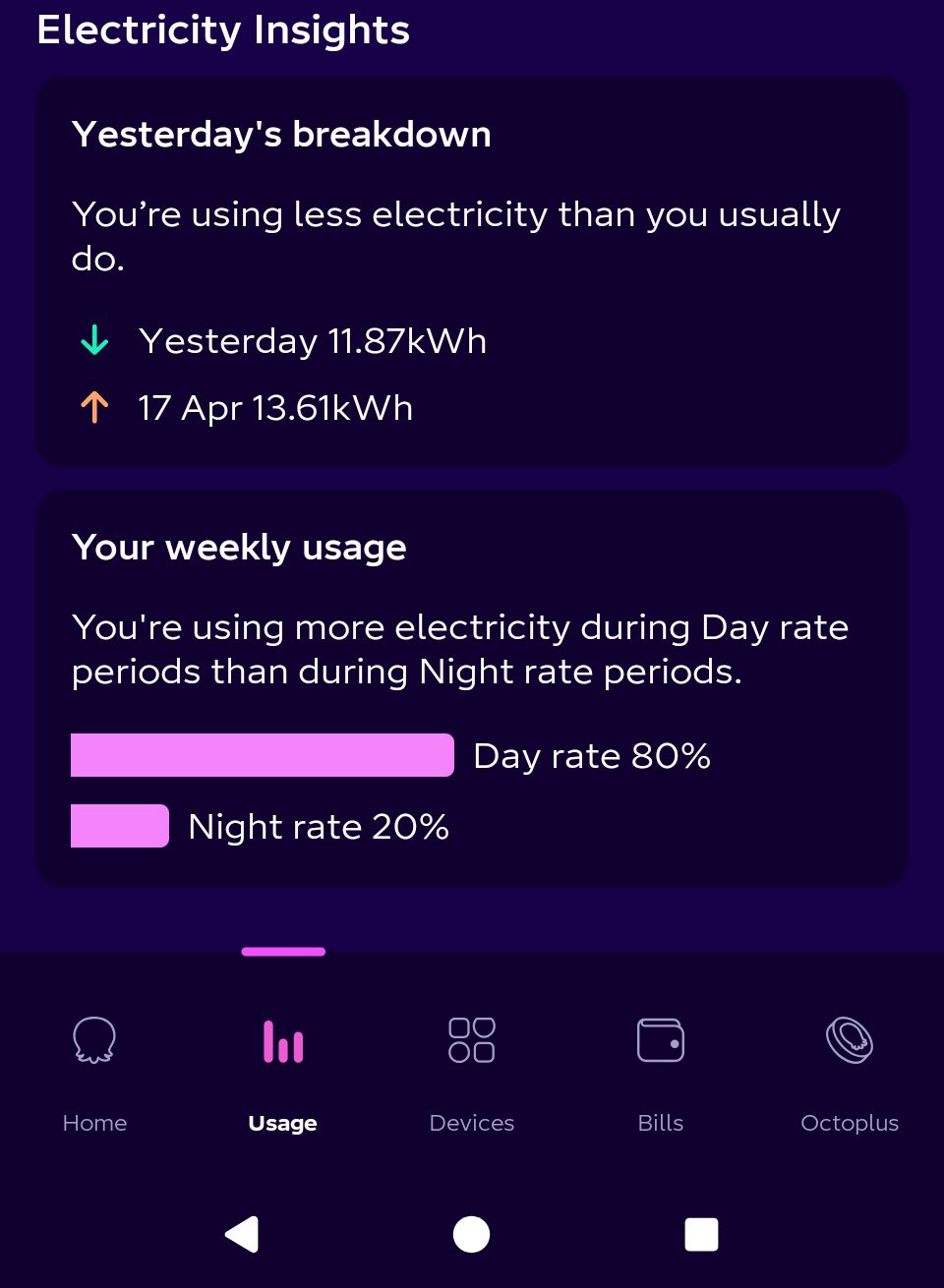
My actual timings are night rate is 22:30 to 00:30 GMT & 02:30 to 07:30 GMT. All other times are on the day rate. The octopus app thinks my night rate is a single block from 00:30 to 07:30 so always reckons I’m using more “day” electricity than “night”.
That is because it thinks my 1st 2 hour block is day rate & that block is probably half, or more, of the consuption of the storage heaters.
I went back to a random day in December. So winter & lots of power going into the storage heaters, but before I was trying to do anything remotely clever. The second image shows the block (& very wrong costing as a result) that the Octopus app thinks is night rate.
Hi Rick
Bit confused by this - I think I need some more context. What do you mean by “actual”?. As I understand it the proper definition of E7 is 7 hours of discounted power from 00:30 to 07:30. Is what you are saying that the meter indicates a cheap rate from 22:30-00:30 and 02:30-07:30? Or are you saying that the Octo App disagrees with your monthly bills?
The only question I have come across elsewhere is not about the schedule - that everyone seems to agree on - but about how daylight saving time is treated. Some sources seem to indicate that SMETS2 meters don’t understand DST, so in summer the cheap hours run from 01:30 to 08:30. The contrary view is that what the meter says doesn’t matter because all the accounting is done by Kraken so energy consumed between 00:30 and 07:30 is charged at the lower rate irrespective of what the meter is saying
I have a fix ready built on the assumption that (a) E7 cheap period is 00:30 to 07:30 and (b) in summer it runs an hour late because of DST. Those assumptions can be changed, but I obviously can’t build a different schedule for every user. There must be a standard definition of what E7 means, somewhere…
Perhaps you could email hello@octopus.com and ask?
Your smart meter will have a fixed off-peak 7 hour period from 00:30 to 07:30. This time period takes place according to Coordinated Universal Time (UTC), so during British Summer Time (BST) the 7 hour period will take place between 01:30 and 08:30.
Click the post title to view the page…
We’ve had E7, with various providers, since we moved into the property in 1983. In all that time,as far as I recall, we’ve had pretty much the same split period (22:30-00:30 & 02:30-07:30). We’ve been with Octopus since October 2021. I had read the link you posted &, when we had to have a new meter last year, as they were going to stop the radio control signal to the old one, I expected it to change to a single session. Nothing was said either way & it didn’t really bother me either way so it one of those things that just got left. I presume the meter must have had some input from Octopus to set the timing on the new meter.
The Octopus app assumes the 00:30-07:30 for its estimate of cost & just gives wildly inaccurate figures. I can confirm that the meter gets it right. When it shows the off peak only circuit is active all electricity from both circuits is charged off peak. I’ve checked the meter readings recently before the 1st slot (around 22:30) & after the 2nd (around 08:30) & total day rate consumption was 1 unit & 18 night rate. I was charging an EV, on a granny charger, timed to use both slots. So I would have known if I & the meter were disagreeing.
Maybe I’ll get round to checking with Octopus. It is only since Christmas that the timings have become more important (I got given an Amazon echo for Christmas & bought some cheap smart plugs). Then we got an EV…
Sounds like (a) I shall have to parameterize E7 settings in the Kraken app - that’s going to add sometime to delivery. (b) you need to switch to IOG… maybe…
Do your hours drift with DST?
Version 1.2.10 went live at 08:30 this morning.
| Version | Status | Installs | Crashes | Crash Types | Comment |
|---|---|---|---|---|---|
| 1.2.10 | Live | 81 | 0 | 0 | Published live 2026-04-25 08:30 |
| 1.2.9 | Superseded | 2 | 0 | 0 | Published live 2026-04-22 20:40 |
| 1.2.5 | Superseded | 1 | 0 | 0 | |
| 1.2.4 | Superseded | 6 | 0 | 0 | Published 2026-03-31 16:30 |
| 1.2.3 | Superseded | 5 | 0 | 0 | Published live 2026-03-16 08:30 |
| 1.2.0 | Superseded | 2 | 0 | 0 | Published 2026-03-04 11:00 |
| 1.1.0 | Superseded | 5 | 999 | 1 | Defect upgrading from prior releases, resolved by deleting and re-adding any device |
| 1.0.39 | Superseded | 3 | 0 | 0 | Published 2026-01-11 17:25 |
| 1.0.38 | Superseded | 3 | 246 | 1 | Affected user upgraded |
| Totals | 108 | 1245 | 2 | Older versions all retired with 0 users |
217 Kraken Devices
Posted 2026-04-25 20:00
Thanks to @Rick_Heath who is the first Day/Night tariff user that I have come across. Not surprisingly, the app does not work very well with these multi-rate “simple” tariffs. Unlike tariffs such as Cost, Agile and IOG, Kraken does not publish Tariff Slots for simple tariffs - in fact there is no formally published information about when prices change for these tariffs.
Working with Rick I have created a work-around that should enable these tariffs fully within the Kraken app. This will be the main change published in the next test release later this weekend.
Unfortunately there is another wrinkle - it appears that not all customers accounts work to the standard timings. This must be quite unusual because it seems that even the Octopus App assumes the standard hours. So in addition to just getting it working, I need to implement a light-weight mechanism that will allow the standard hours to be overridden. That’s going to take a bit longer…
The good news is that any Day Night or Three Rate tariff customer who is on standard timings should start getting accurate information immediately. If you are not on standard hours consumption data will be accurate, but pricing and costing data will not be accurate.
Version 1.2.11 is now available as a test version. There should be no impact at all for users on standard tariffs and half-hourly tariffs. This release introduces basic support for Day/Night and Three-Rate tariffs (note Cosy Octopus has three rates, but is classed as a half-hourly tariff).
Users with non-impacted tariffs can simply install the new version.
Users with Day/Night and Three-Rate tariffs should follow this procedure:
You should see that there are many more capabilities on the Import Tariff device and that, after a minute or so, all the capabilities are populated with data.
I have tested as thoroughly as I am able given the restrictions of the data available to me. But there is always the chance of errors in the new code. If you find problems with the new release, you can reinstall the current live version 1.2.10 from the Athom App Store.
Version 1.2.11 imposes standard hours on all Day/Night and Three Rate tariff users. I am aware that some users have Economy 7 (for example) with non-standard hours. I intend to add that functionality in a forthcoming version.
New Test Version 1.2.11
Current Live Version 1.2.10
Happy to be able to announce the publication 1.2.12. The key feature in this release is the addition of a new flow card (with thanks for inspiration and encouragement from @Carl). The flow card sits alongside the Price Quadrant concept as a way to help you optimise the cost of your import energy (or the value of your export energy).
Given a window of time - say 15:00 - 22:00 - you can ask for the cheapest 2.5 hour (or any other duration) block within that window. The flow card triggers when the identified cheapest block starts. Once triggered, your flow can continue to switch on devices, and to run other processes. Asking for a longer block can help the thermal efficiency of your devices - particularly devices like heat pumps or storage heaters.
There is no corresponding “end of block card”, so it is the “responsibility” of your flow to ensure that devices are switched off at the end of the block. In an advanced flow you can use the delay feature to wait until the end of the block before turning devices off again.
Here is the flow card with the parameters you specify to pick out the right block:
The parameters are:
Irrespective of the times you specify for the window, a block will always begin on a half-hour boundary (:00 or :30) - chunks where prices may change start on these boundaries.
The card passes lots of details about the block into the flow as tags - you can use these to tailor how the flow runs. The tags are:
Here is a Timeline message created by formatting the tags:
If you choose import as the direction, the card will seek the cheapest price available. If you choose export, the card will seek the highest price available (to maximise your revenue).
The random strategy has been included so that you can avoid lots of different processes running all at the same time. Of course, if there is only one block of time in the window that satisfies the price criteria then whatever strategy you choose the flowcard will run at the same time. For this reason, you should specify the longest possible window that meets your needs.
A planned future enhancement will be to calculate the Price Quadrant of the block, so you have a more objective basis of comparison for the price in the block. For example you may only want to run the process if PQ is less than 2.
As always in a flow, you can achieve even more powerful results by combining the trigger flow card with other cards. For example “I only want the process to run on Mondays and Fridays” - use the Today is a Days card from the Date/Time app:
The flowcard is most useful for those tariffs whose prices are unpredictable day to day, but that, once published, are fixed. Primary examples include the Agile tariffs. Even for simple tariffs like Economy 7 the flowcard may provide some benefit in allowing processes to start automatically even if the timings of the tariff change. The use of the random strategy will help distribute load across the discounted period.
The flowcard is least useful for those tariffs where the price is unpredictable. Examples include Intelligent Octopus Go. This is because the addition of a planned dispatch will change the outcome of the goal-seeking algorithm. Planned dispatches change frequently and at short notice, so the value of advanced planning is lost - a block may start and then the arrival of a planned dispatch means that the block should have started later than it has.
For unpredictable tariffs, continued use of PQ is the best solution.
The new version is published as a test version. You can install the test version here:
The currently published live version can be downloaded here:
Continue the implementation of gas tariffs.
This is a minor update to Version 1.2.12.
It adds the Price Quartile as a tag to the cheapest block flow card - this value is calculated from the average price that prevails in the chosen window of time. The value can be used to control the rest of the flow - for example there may be “optional” activities in the flow that can be omitted if the price of energy for the day is relatively high. The block selected meets the criteria of being the cheapest in the window for that day, but the price for the whole day is quite high.
Secondly, the units for energy prices on the Product Tariff devices have been refined. Energy is priced in “£/kWh”, units were previously set to just “£”. The cost or value of energy is still correctly priced in “£”.
| Version | Status | Installs | Crashes | Crash Types | Comment |
|---|---|---|---|---|---|
| 1.2.12 | Test | 23 | 0 | 0 | Published test 2026-05-06 16:10 |
| 1.2.11 | Live | 103 | 0 | 0 | Published live 2026-04-29 08:40 |
| 1.2.10 | Superseded | 1 | 0 | 0 | Published live 2026-04-29 08:40 |
| 1.2.5 | Superseded | 1 | 0 | 0 | |
| 1.2.4 | Superseded | 4 | 0 | 0 | Published 2026-03-31 16:30 |
| 1.2.3 | Superseded | 4 | 0 | 0 | Published live 2026-03-16 08:30 |
| 1.2.0 | Superseded | 2 | 0 | 0 | Published 2026-03-04 11:00 |
| 1.1.0 | Superseded | 5 | 999 | 1 | Defect upgrading from prior releases, resolved by deleting and re-adding any device |
| 1.0.39 | Superseded | 2 | 0 | 0 | Published 2026-01-11 17:25 |
| 1.0.38 | Superseded | 3 | 246 | 1 | Affected user upgraded |
| Totals | 148 | 1245 | 2 | Older versions all retired with 0 users |
295 Kraken Devices
Posted 2026-05-18 10:30
For April-May 2026
| Item | Kraken App | Octopus Web App | % Error |
|---|---|---|---|
| Energy Import | 198.77kWh | 198.68kWh | 0.0% |
| Energy Export | 396.55kWh | 396.54kWh | 0.0% |
| Cost of Import | £35.82 | £35.84 | 0.1% |
| Value of Export | £47.58 | £47.61 | 0.1% |
| Total Bill | -£11.76 | -£11.76 | 0.0% |
| Projected Bill | -£11.76 | 0.0% |
Very pleasing results.
| Version | Status | Installs | Crashes | Crash Types | Comment |
|---|---|---|---|---|---|
| 1.2.13 | Live | 122 | 0 | 0 | Published live 2026-05-20 07:50 |
| 1.2.11 | Superseded | 14 | 0 | 0 | Published live 2026-04-29 08:40 |
| 1.2.5 | Superseded | 1 | 0 | 0 | |
| 1.2.4 | Superseded | 4 | 0 | 0 | Published 2026-03-31 16:30 |
| 1.2.3 | Superseded | 4 | 0 | 0 | Published live 2026-03-16 08:30 |
| 1.2.0 | Superseded | 2 | 0 | 0 | Published 2026-03-04 11:00 |
| 1.1.0 | Superseded | 5 | 999 | 1 | Defect upgrading from prior releases, resolved by deleting and re-adding any device |
| 1.0.39 | Superseded | 2 | 0 | 0 | Published 2026-01-11 17:25 |
| 1.0.38 | Superseded | 3 | 246 | 1 | Affected user upgraded |
| Totals | 157 | 1245 | 2 | Older versions all retired with 0 users |
334 Kraken Devices
Updated 2026-05-26 07:00
This version adds the basic Gas Tariff device. It currently measures live consumption value computes the value of the consumption.
The API being used is the live gas consumption API provided by Kraken. In the UK, official gas consumption measurement is performed in arrears because of the need to calculate accurate Calorific Values. These calculations are complex in nature and require significant processes to complete. Official consumption data is typically available between 24 and 36 hours after the consumption occurs.
Consequently the live data provided by Kraken must be estimated, based on the cubic meters consumed and industry typical figures for Calorific Value. Background reading suggests the errors should be quite small, however users need to be aware of the potential for variance between the consumption (and cost) reported by the device and the actual data used by Octopus to bill for energy.
The benefit of using the live data API is that the data is consistently published every 30 minutes. The Gas Tariff device updates every 30 minutes (rather than every minute for other devices).
Install the new version using the link provided below. Add the device in the normal fashion by clicking + and choosing New Device. If your account has a gas meter it will be offered in the pairing dialogue.
Tile and Capability Views
The new version currently has test status and will not update automatically. To download this version using the following link:
The new version has been tested as usual, but only on a single account and tariff. It is quite possible that there will be circumstances that will cause the app to error. Please provide me with feedback if this should happen to you. You can recover the situation by reverting to the current live release 1.2.13.
Users without a Gas Tariff will be unaffected by the change of version and should experience no problems.
Gas Consumption is not integrated into the Octopus Account device. Firstly to reduce the amount of change between V1.2.13 and V1.2.14. Secondly because I have no reliable information about how accurate Kraken’s estimation of Gas Consumption is.
My current thinking is that Gas Consumption will never be integrated into the Octopus Account device because the data is estimated rather than actual. I plan to extend the Gas Tariff device with invoicing data (period start date, estimated bill, bill to date) so that it effectively becomes the “Gas Account” device (Octopus Account becomes Electricity Account).
It will be great to receive feedback from Gas Tariff users on how accurate they find the consumption and costing to be so that I can refine the plans for the next steps.
Firstly, great app. love your work!
I have installed this test version as I have an octopus gas tariff.
The device added and picked up everything perfectly fine, it has been running all morning. Obviously early days yet as I havent used any gas in the past couple of hours.
I will report back when I get some solid gas data/prices to compare to my bill with
in the meantime, my meter is a smets2 smart meter. I have the kraken mini. The gas metrics are available on the API every 30 minutes according to the octopus site
a note on the m3 to kwh conversion - directly from my bill
I believe this is different for everyone, or regional differences?? im not sure - posting in case it helps you
Hi Paul
Thanks for the feedback - appreciate you taking the time. The information you provide confirms what I have already researched. Volume Correction is a long term constant that is adjusted rarely (that’s the 1.02264). The problematic number is the Calorific Value - this varies by region and is calculated daily (but about 36 hours in arrears). It is also averaged over a bill period - so handling this number is really complex.
Fortunately the Kraken Live Telemetry API does the computation from M3 to kWh in real time - this means it must be using the “estimated” calorific value that has become the standard approach in the industry. Most swap-sites use a value of 39.5 as the basis for their calculation. I don’t know what value Kraken uses, but I guess it’s similar to that “standard” value.
As I suggest in my original post, this means that the Energy consumed and its cost will always be estimated values in the Kraken App. My reading suggests that, because the CV varies up and down each day, the error in the estimates will be of the order of a few percent, so still a very useful guide.
Looking forward to hearing how it continues to work for you - and some feedback on accuracy.