Looks like a problem, doesn’t it. On the hypervolt remember the “being controlled” status means “capable of being dispatched to” (i.e. plugged in). Doesn’t mean there’s a dispatch underway (let alone that energy is being pushed). But I can see that Dispatching Now is “Yes”. So if the Import Tariff is showing PQ = 3 it suggests there is a difference in the way that the two objects evaluate what the chuff is going on.
I will review the logic and try to spot the error. I suspect it will be a bit of a challenge. But it does raise the importance of the rationalisation of the way the business logic is done. Currently different devices implement their own logic. It didn’t much matter until dispatches came along - the different device types all had their own focus. As long as they recognised when tariff slots changed at the same time that was good enough.
The problem with dispatches is they traduce all of the different device classes (tariff, account and smart device) - so the timing logic, duration logic, price management logic all needs to be shared in common. Right now that’s not really true.
I will create an issue in Github and try to work out the resolution. Joy
Did you happen to note whether the Account device was correctly pricing the energy??? Also did the Tariff device say it was applying Dispatch Pricing or not???
I believe the following to be true, please confirm whether I am correct or not. The critical moment in time is 22:30. At this point the Day Rate still applies because the Tariff Slot does not end until 23:30.
There was a PLANNED dispatch from 22:05 until 22:30 (EXTENDED dispatch from 22:00 to 22:30 when correctly PQ=0 because all the energy in a chunk is at the same price). At 22:30 another PLANNED dispatch started - this was planned to be contiguous with the preceding dispatch.
BUT I am confused with this image that suggests that the period from 22:30-05:30 was going to be BOOST - that suggests that PQ=3 was actually correct.
Sorry I edited the message you already responded to as I looked in more detail. The image I have reposted seems to suggest that 22:30 on was BOOST??? In which case PQ=3 is correct. Don’t know which app the image is from - there are so many…
HI David ! I have lost my devices from Kraken … when I try to add them in aka New Devices add I get this message ! So I deleted Kraken added the application against and still get this message ! I have done a reboot of the Homey Pro so any thoughts
Umm nope. Did you reboot before or after you deleted the app?
There is no way that an app can delete devices - not even it’s own - so disappearing devices points to a Homey problem rather than an app problem. So rebooting would have been the thing.
I just tried deleting devices in my test rig and re-creating them - that works, so it’s not an outage in Kraken. If you want to PM me with your Octopus Account Number and API key I can try creating devices on my test rig. Make sure you change your API key after. Don’t know what else to suggest after that.
One other thing. I had a problem whereby apparently all my flows disappeared (panic). It turned out to be a network speed problem - mostly in the web client. I contacted support and Athom suggested that I should reinstall the Homey firmware and gave me instructions on how to do it. Apparently this avoids resetting the Homey and often recovers stuff that gets lost.
Sorry I can’t be more help. Let me know if you want me to do things like trying your account.
Filter on Kraken and see what is listed - as you can see, when I do it I get the Octopus Account device (and others too). If you see anything here then your homey has a “memory” of the devices even though deleted, uninstalled etc. That might stop you recreating the devices.
This is a tiny change that makes the code around Pairing devices a little more robust. It turns out that Octopus is “lazy” in the way it registers OHM identifiers on accounts. Done correctly the OHM id should be registered against both Import and Export meters, but sometimes it is only registered against one or the other. The code now searches more thoroughly for the OHM id. If you have had trouble Pairing devices with the Kraken app, give this test release a go - and let me know if you succeed. Link to the test release:
For the first time ever I have managed to collect a whole month’s worth of data. I think there were some short periods of time when I ran with test data, but typically only a few minutes at a time. The accuracy of the apps data is very pleasing (and a relief after all this development time ).
Factor
Billed
Reported
Projected
Diff
Projected Diff
Import kWh
155.28kWh
155.349kWh
-
0.04%
-
Export kWh
327.27kWh
327.300kWh
-
0.01%
-
Import Cost
£34.11
£34.06
-
0.14%
-
Export Value
£39.27
£39.17
-
0.25%
-
Bill Total
-£5.16
-£5.11
-£5.12
0.97%
0.78%
Where Do Differences Come From?
For the energy readings it is the period boundaries - which quantum of energy falls on which side of midnight at the beginning and end of the period? To see the difference as low as 1 part in 10,000 speaks to the effectiveness of minute-by-minute data access.
For costs, it’s the same story. But for tariffs like Cosy Octopus there are 7 boundaries every single day where “quantum swapping” can occur. There was also the change to the price cap on 1st April, so quantum swapping had a bigger effect at midnight on 31st March. Differences of less than 1% are very pleasing. If you are on a simpler tariff, I believe that the differences should be smaller.
For the bill total. It’s the accumulation of differences against a smaller overall total. But I would like to see if there is anything that can be done to reduce that ~1% difference further. Interestingly the difference in the projected figure was 25% less than the difference in the calculated bill. Hmmm.
I have not received any negative comments about 1.2.9, so I plan to make it live this evening. Let me know if you have had difficulties pairing when using 1.2.9.
This is in preparation for release 1.2.10 which will address some problems with dispatches being experienced by Intelligent Octopus Go users.
Version 1.2.10 is now available for you to test. The big changes in this version are:
Adoption of a light-weight date-time handling library
Management of period start dates in Energy Account device simplified
Counting of dispatch minutes improved across all devices
Date Time Handling
In place of the previous gas-guzzler library an “EV” is now in use. Date handling is very important in Kraken, especially around DST changes in Spring and Autumn. But the needs are not specifically international nor are date-time calculations too complex. I have switched from using a library called Luxon (about 70kb) to a library called dayjs (about 18kb). Most importantly the architecture of the new library means that date handling is simpler, faster and less memory intensive.
Management of Period Start Dates
How the Period Start Date is calculated has evolved as the app has developed. This more reliable derivation is now the only calculation used throughout the app.
Dispatch Minute Counting
Again the subject of evolution over time in the app. Initial solution was reliable but at the cost of introducing very undesirable dependencies between different Homey devices. The next attempt overcame the problem of dependency but at the cost of accuracy and some strange side effects. Tests of the new algorithm have shown it to be reliable and it avoids undesirable dependencies.
Installation
You can download the app to your Homey using this link
Hi. Thanks for all the work on this. I’m a newbie to Homey (I only unboxed my Homey Pro on Tuesday evening) but I have been doing plenty of reading/watching, including this topic, for a while. I had noticed, with the previous version I installed, the the “This Period Start” & “Next Start Day” in the Octopus Account device were a month ahead. I had been going to comment but, when I noticed the app had updated automatically last night to 1.2.9, the dates are now correct. And the power data is collecting nicely, albeit only for a short time.
My use case for the app was the hope to get accurate timings for our economy 7 switchovers (although they seem to be pretty constant, just at slightly random XX:31:30 timings). I’ve never been sure if there is a remote signal to switch or whether it is a case of set them once & the meter just carries in with those timings until told differently.
I’m increasingly convinced it is the latter. We had a smart meter fitted 12 months ago & subsequently got a home mini. The day/night periods in the octopus app had never lined up with our actual timings, which I initially wondered if it was just sloppy programming that was assuming things switched at the standard timings Octopus give for economy 7. As the meter readings & bills were correct, I never followed it up.
You have no idea how happy you have made me. (Sad git that I am).
At last I have a guinea pig I can use to check up on how the app handles (or doesn’t handle) simple dual- or triple- price tariffs like E7. Any chance you can PM me a picture of all the capabilities on your Import Tariff and Energy Account devices, so I can see what’s there and what isn’t. I’ve pasted screenshots of mine at the foot of this post.
I have never seen the “internals” of Kraken for a dual/triple price tariff - does the import tariff report Current and Next slots or does it just report on Days? If the latter then we have the opportunity to pin down when price changes occur in E7 type tariffs - because I haven’t found any documentation on Octopus’ website that gives a clue about when the actual economy period is.
Glad the newer releases are tidying up some of the anomalies. It’s been a long road through the re-architecture, but it feels like the app is settling down again at last.
Do you use Gas too? That’s my next foray…
Here are screen-shots of my import and export tariffs (from my laptop). If your import tariff looks likes the IMPORT screenshot - that’s good news. If it looks like the EXPORT screenshot then there is work to be done in the app to sort out price changes.
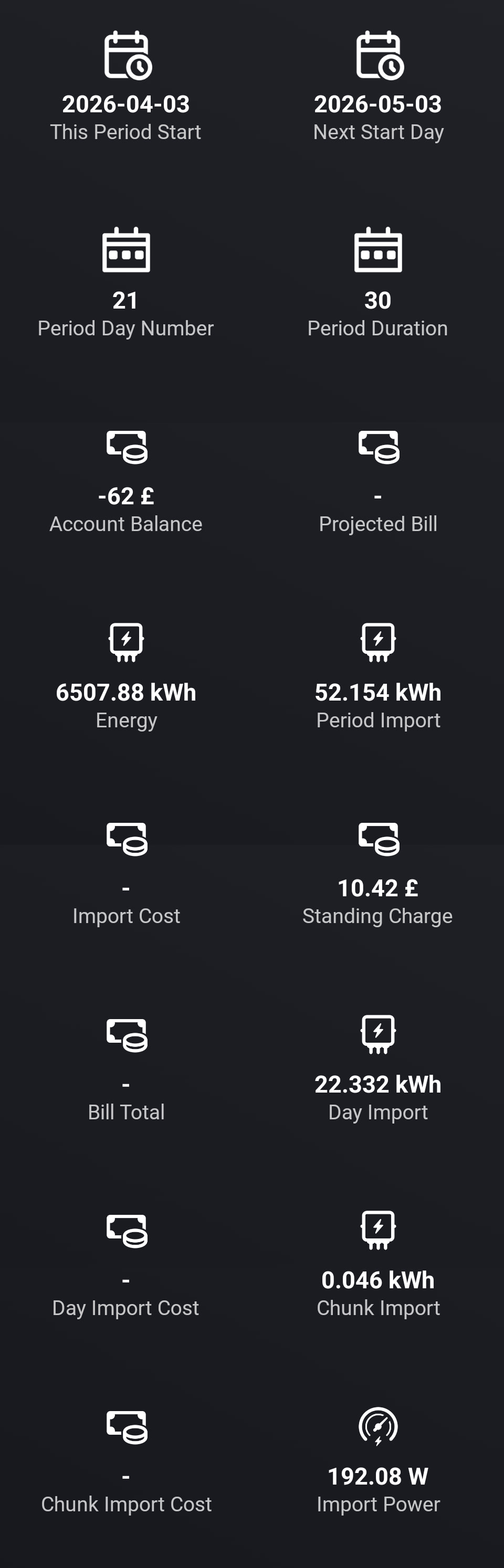
These are what I’ve got. All the energy bits seem to tally reasonably enough with the Octopus app or meter. But there are no costs (apart from my slight negative balance as we come out of the “heating on” part of the year).
I note that the standing charge is included in the data in your app.
In terms of periods, the Octopus app thinks my night rate is active from 00:30 to 07:30 BST but, when our smart meter was fitted, it continued on its old split of 11:30 to 01:30 & 3:30 BST. It doesn’t change with the clocks so it is all an hour earlier (clock time) when we’re on GMT. As I said previously, I wondered if I only got a single timing notification that is stored in the meter & carries on unless timings change. Also we’re on a fixed tariff until January 2027 so the meter only needs to know switch times. If the timings could be located then costs should be worked out if unit prices could be entered manually.
OK, that’s more or less what I expected. Kraken data is reflecting that it’s a “simple” tariff, so that the App has created the simpler tariff device with fewer capabilities. It’s not picking up the unit prices because I have never dealt with a dual-rate simple tariff before. So there’s going to be some new code required in the app.
In summary, the App deals with variable tariffs like Cosy Octopus, Intelligent Octopus and Agile. These tariffs present a list of “Tariff Price Slots” during the day with start time, end time and relevant prices.
The app also deals with single-rate simple tariffs - that’s just a fixed price all the time, so it’s easy.
The problem I face with tariffs like E7 is that the time-slots related to the different rates don’t seem to be defined anywhere (that I have found, at least).
In addition to single- and dual- rate simple tariffs there are triple-rate simple tariffs too. But for now, let’s just get the E7 (dual-rate) tariff working for you. Can you provide me a timetable of peak/economy periods during the day (I note your comments earlier about precise timing - but I want to solve one problem at a time). If I can get the tariff object up and running we can look at making it smarter as we go along.


 ).
).


 as we come out of the “heating on” part of the year).