In theory you could, but that wouldn’t be very neighbourly  That is one of the downsides of the BLE method used by SwitchBot.
With the Bots, you can set a password to prevent that, but not with the other devices (except the door locks which are not connectable via the BLE of the app).
Mmm, I have version 2.5 in my ESP32 and it looks like that an old problem returned …
Today I had the curtains closed all day. No communication between Homey Pro and the Curtains.
I pulled the power from the ESP32 and reconnected it: communication returns, full control over the SwitchBot curtain devices.
I will wait and see when it happens again.
I checked the Serial Monitor output in the Arduino IDE of the ESP32 board when opening and closing the curtains.
While it is closing/opening I can see the board is sending updates on position, battery and rssi, to my Homey. Each time the POST response code is reported as 200 / OK. But, as indicated, the SwitchBot app on my Homey reports an invalid response code 500 and does not process the updates.
Connecting to http://10.0.0.225:80/api/app/com.switchbot/newData/ to send [{"hubMAC":"18:ac:1f:76:ef:d0","address":"C5:BD:1D:AB:C0:E1","rssi":-56,"serviceData":{"model":"{","modelName":"WoCurtain3","calibration":true,"battery":61,"position":26,"lightLevel":1}}]
[HTTP] POST response code: 200
Connecting to http://10.0.0.225:80/api/app/com.switchbot/newData/ to send [{"hubMAC":"18:ac:1f:76:ef:d0","address":"C5:BD:1D:AB:C0:E1","rssi":-50,"serviceData":{"model":"{","modelName":"WoCurtain3","calibration":true,"battery":61,"position":37,"lightLevel":1}}]
[HTTP] POST response code: 200
Connecting to http://10.0.0.225:80/api/app/com.switchbot/newData/ to send [{"hubMAC":"18:ac:1f:76:ef:d0","address":"C5:BD:1D:AB:C0:E1","rssi":-49,"serviceData":{"model":"{","modelName":"WoCurtain3","calibration":true,"battery":61,"position":47,"lightLevel":1}}]
Might this be an issue in the SwitchBot app for Homey; not an issue with the ESP32 BLE hub code?
The ESP32 broadcast it’s presence once a minute and when Homey detects that it sends a message to the ESP32 with a call back URL that is used to publish data changes, and that is the bit that gets the response code 500 (internal server error).
I can’t see why that happens and I can’t reproduce it.
Maybe try reprograming the ESP32 as I am not sure what else to suggest.
Hi Adrian. This morning, all the SB sensor devices showed ‘190: requests reached the daily limit (5013) API calls’ and one of them, a door sensor, showed ‘forbidden’. there is no difference when i restartt the app on th epro, or if i want to include the device again, it remains forbidden. Somehow during the early morning many API calls happened. could that be retries ?. Actually, it would be fine if i can switch off polling, and only rely on the Webhook triggers coming from the device(es).Somehow i have the feeling that this all is caused by the door sensor, before i had these, i never had this issue
I have a similar problem, my curtain controllers say forbidden, and in the log it says 1682 API calls. Is there a problem somewhere?
It seems there is an issue on the SwitchBot server and everyone is getting Forbidden errors.
I have reported it to my contact at SwitchBot
5 Likes
Ah ok! I also opened a ticket with them. Again, its not your beautiful designed app 
Thanks for checking @Adrian_Rockall. I understand that the issue is difficult to pinpoint if you cannot reproduce it.
Unfortunately re-flashing the ESP32 board dit not solve the issue. I also deleted the device and SwitchBot app from Homey, restarted Homey and installed the app/paired the curtain motor again, but that did not help.
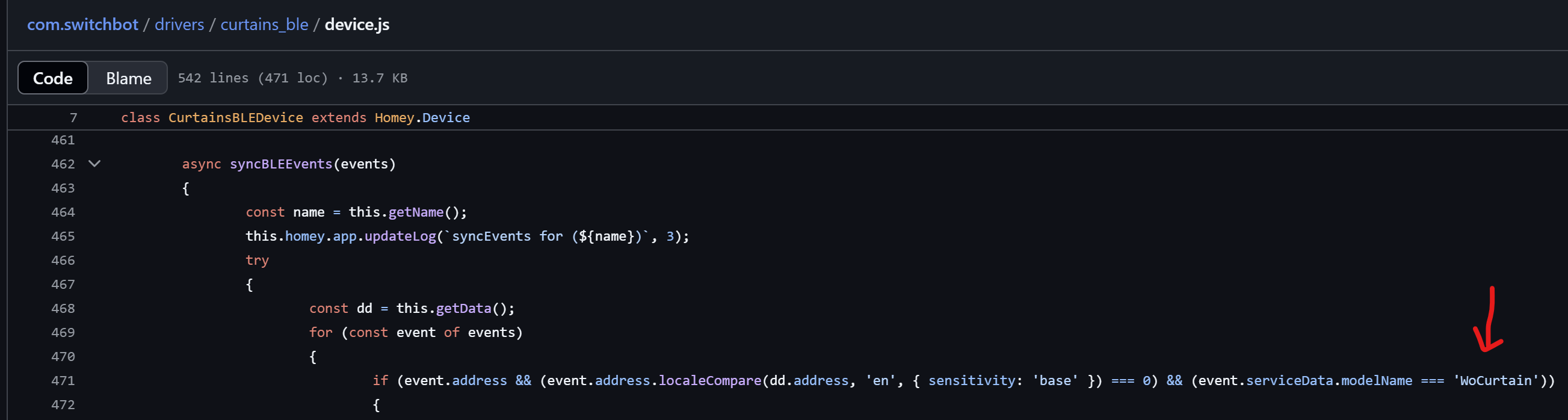
I am just wondering whether the following in the SwitchBot app might cause the issue. I have very little knowledge of JavaScript, so bear with me…
If I am correct:
- The device’s
syncBLEEventsfunction plays a role in processing status-updates from the curtain motor. - The device code used for my Curtain 3 is in curtains_ble > device.js
- The
syncBLEEventsfunction in this device.js checks for ‘WoCurtain’ as model name before processing the received data. - My Curtain 3 motor has a different model name: ‘WoCurtain3’.
- Since the model name does not match, the function is not executed further/data is not processed.
There seems to be a general sb api problem. Homeassistant sb-cloud integration also stopped
“
There seems to be a general issue with SwitchBot API: OpenWonderLabs/SwitchBotAPI#374. Changing the hostname to api.switchbot.net seems to workaround the issue (confirmed by manually hitting the API). As the integration completely stopped working (seemingly for all users) and SwitchBot support does not seem to react on this issue so far, would that be a good idea to add a fallback to the second hostname?
Update: maybe it is not a good idea, as it could theoretically be an attack to gather the access tokens. I personally could not get a confirmation, that this domain is owned by SwitchBot.
“
Here also ‘forbidden’ errors. Even after ‘repairing’ a device and logging in again. Interesting part is that all hub devices are still updating there ‘curtain position’.
1 Like
Hello everyone, seems that the API service is recovered by now. homeassistant integration seems to work again. On homey i still get ‘forbidden’
Edit: it now works again. No message from sb about this outage.
I moved most of the sensors and curtains to ble now. Sb api is not always available i know by know). Only thing is that i have several hub mini used as ir blaster, they can only be controlled via the sb cloud api.
I needed to remove and add my bots, they seem to work now. Somehow my subjective feeling is that the response is much faster than b4 the „incident” yesterday…
A repair made it work for me again!
It just all worked again this morning. Didn’t do anything.
It was the same for me.
Apparently, SwitchBot applied an update to the backend that didn’t quite go as planned.
hi @Adrian_Rockall This is the reply I got from Swicthbot:
Hi, there
Thank you for reaching out to SwitchBot.
This is Aurora from the SwitchBot Customer Service Team.
Currently, our SwitchBot Pan/Tilt 2K Plus cameras are only supported for API integration with Alexa and Google Home . Unfortunately, we do not support API calls for third-party devices, such as Homey, at this time.
We appreciate your understanding, and if you have any further questions or need assistance with Alexa or Google Home integration, feel free to let us know.
Hello @Adrian_Rockall,
Sorry for bothering you again on this matter. Hopefully the last time.
I managed to get rid of the ‘Invalid response code: 500’. I used your binaries, which I initially couldn’t flash. But after changing the SPI mode to DIO instead of QIO, my ESP32 was able to boot. Somehow the 500 errors do not pop up in your compiled binary, but do show up when I compile the code myself.
I also learned that the 500 error was a result of the ‘callback/add’ and ‘device/write’ requests by the SwitchBot app. Though the error popped up, the ESP32 actually was transmitting updates to the SwitchBot app. When I compared the logs based on their timeline, I could see the ESP32 sending updates when the curtains moved. And I also saw the same info being received by the SwithBot app (syncEvents messages).
What (still) does not work is the actual processing of received updates by the SwitchBot app on Homey. I believe this is caused by the syncBLEEvents function in drivers / curtains_ble / device.js.
This function checks for ‘WoCurtain’ as model name before processing the received data:
if (event.address && (event.address.localeCompare(dd.address, 'en', { sensitivity: 'base' }) === 0) && (event.serviceData.modelName === 'WoCurtain'))
My Curtain 3 motor has a different model name: ‘WoCurtain3’. I assume that since the model name does not match, the received data is not processed.
Could you please verify this?
Thanks for your help.
That would make sense. I will look into it and publish an update.
I have publishes a new test version that accepts WoCurtain3 as well.
P.S. Well done for tracking down the issue.
1 Like
