[APP][Pro & Server] Music Assistant

Music Assistant for Homey

Update March 9th, 2026: Updates regarding version 1.3

This app connects Homey to your Music Assistant server, allowing you to control your audio setup directly from Homey flows.

What is Music Assistant?

Music Assistant is an open-source audio orchestration platform that unifies multiple music providers and playback systems into a single control layer. It supports platforms such as Sonos, AirPlay, Chromecast and others, and can combine local libraries, streaming services, and radio into one system. It runs locally (for example via Home Assistant, Docker, or standalone).

What does this app provide?

The Homey app connects to Music Assistant via its JSON API and enables:

  • Starting playback on any Music Assistant player
  • Playing radio streams
  • Searching and playing tracks
  • Sending announcements to one or multiple players
  • Integrating music playback into Homey flows
  • :star: New in v1.3: Playing sounds via direct URL
  • :star: New in v1.3: Playing the latest episode of your podcast
  • :star: New in v1.3: Auto discovery of your Music Assistant server via mDNS, with manual fallback
  • :star: New in v1.3: Trigger cards for updates in artist, title and artwork metadata
  • :star: New in v1.3: Full support for metadata updates of radio stations

Typical use cases include:

  • Automatically starting music when arriving home
  • Playing a specific radio station at a set time
  • Announcing doorbell or alarm events over speakers
  • Creating music-based automation scenes

Authentication

The app requires a long-lived bearer token from Music Assistant. This ensures secure communication and allows the app to control playback and player queues.

You can create a token in Music Assistant under:

Settings → Users → User menu (⋯) → Access tokens → New token

https://homey.app/a/com.cyrilhendriks.musicassistant/

6 Likes

Remove the “& Cloud” part from your topic title, community apps are not supported on Homey Cloud.

Indeed, I meant server. Thanks for notifying.

Just found this and I think it might be the answer to all my prayers! In the UK it’s super hard to get BBC radio stations playing on HomePods without manually streaming from a device, which is not ideal from an automation perspective. Up to now I have been using OwnTone running on an RPi and then I was manually calling the API from flows. This is so much neater and more convenient and the artwork and metadata work right out of the box, plus integration with Apple Music, BBC Sounds and so many more. It’s just awesome. I got this set up and working in about 15 mins start to finish including a brand new Home Assistant install on a Mac, then Music Assistant on top and then installing and configuring the Homey app.

Just amazing work. Thank you.

Have donated!

Thank you very much for your donation! If you have any ideas on how to improve the app further, please let me know :slight_smile:

Thanks @Cyril_Hendriks

Just playing with this - do you have a good solution for having a doorbell chime interrupting playing music? Speak text does this natively really nicely and resumes play afterwards automatically. I can use a doorbell chime track for doorbell events but then how to get what was playing before to resume? I’ve managed this using advanced flow for Radio by checking whether the speaker is playing, checking if the track = name of my radio station and then if so, playing that station 4s after triggering the doorbell track. That works very well, but would be amazing to do the same when interrupting a music track and to be able to resume where it left off in the track. I can’t immediately see a way to achieve that.

Good idea! I will have a look into this :slight_smile:

I have created a new test version of the app with a new flow card type to play any sound (via a url) that works exactly the same as the speech announcements. It’s now in test and when I’m sure that nothing has been broken, I will push it to PRD :slight_smile:

1 Like

Awesome! Thanks for super quick turn around. I will give this a test and let you know how I get on.

New card seems to work perfectly in my testing, thanks again.

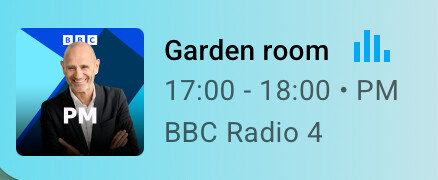
One other little thing: I notice when streaming BBC Radio 4 (I’m using the Music Assistant BBC Sounds integration), I see that Music Assistant itself has metadata about the current programme (which in this case is a programme called “PM”, listed with its running times as “17:00 - 18:00 PM”) (see screenshot from Music Assistant below) but that doesn’t seem to come through to Homey (see 2nd screenshot below taken at the same time as the first). Are there any other items of metadata that could be fed through? I don’t see an ‘Album’ tag for example. Since the metadata items aren’t labelled in the Music Assistant UI it’s hard to know which are which, but I see there’s already an Artist tag in Homey and that’s blank while BBC Radio 4 is streaming so it doesn’t seem to be that.

Thanks again!

Getting the metadata right is still an ongoing struggle. May I ask you which service you use in Music Assistant to stream BBC Radio 4? I will check which metadata I can send to Homey.

Oww, that’s how you discover something
Great system!

The 3rd longlived token made it all happen :nerd_face:

Thank you - I’m using the BBC Sounds service in Music Assistant for this

By the way @Cyril_Hendriks I found something weird while testing which might shed some light on the metadata thing. I tried playing radio 4 on one speaker and then using the ‘add speaker’ card to play it on another. This worked and while the metadata on the first speaker looked exactly like the screenshot above, the metadata on the second had the programme artwork instead of the generic radio station artwork and also it showed the programme info! Like this:

Hi Jonathan, that you for your testing efforts. I will have a look into this next week the latest. I have some busy days upcoming.

1 Like

Hi Peter, thank you! :slight_smile: Happy to see that you managed to connect MA with Homey. :slight_smile:

1 Like

I think I managed to fix it in the latest test build: * Link: Music Assistant | Homey :slight_smile:

1 Like

Looking good! Amazing work thanks @Cyril_Hendriks

One more idea for you. Absolutely no rush, but it would be awesome to have some flow cards for controlling podcasts. I’m thinking:

  • play latest episode of
  • Play random episode of
  • Play all episodes of (Could then be put on shuffle mode if desired)

I’ve switched over to using this app now for 9 speakers for radio, music, doorbell and announcements full time so giving it a thorough soak test. Loving it, so many more use cases opened up with this. Where has this app been all my life?!

Nice ideas indeed. I’ll have a look at that :slight_smile: My first priority might be a bit more boring, but I want to make the app more efficient, since it’s consuming quite some memory :blush:

1 Like