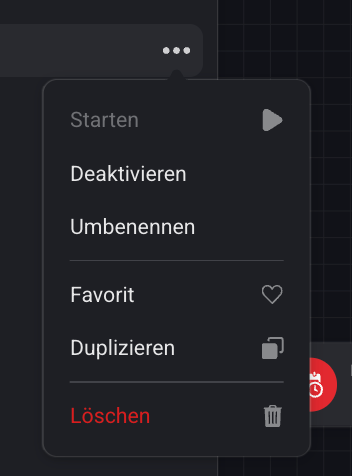
I learned that in the web app, when right clicking an Advanced Flow or Standard Flow and simultaneously holding the ALT key, the context menu gets some additional items:
The Export option creates an .homeyadvflow text file for an Advanced Flow (.homeystdflow for a Standard Flow), containing (I assume) the flow definition.
I haven’t been able to determine how you would import this file (restore the flow) in the web app. Anyone any suggestions and/or experience with this functionality?
EDIT - I found it: right clicking the My Flows header when holding ALT brings up an Import Flow option. And it indeed restores the exported flow:
{"type":"standard","name":"Seizoen Switch Herfst","trigger":{"uri":"homey:manager:cron","id":"every_nth","args":{"n":1,"type":"day"}},"conditions":[{"uri":"homey:manager:cron","id":"day_month_equals","args":{"day":"22","month":"9"},"group":"group1"}],"actions":[{"uri":"homey:manager:logic","id":"variable_set_string","group":"then","args":{"variable":{"id":"f9c6dd26-5fce-456a-b679-3571d144db60","name":"Seizoen"},"value":"Herfst"},"delay":{"number":"122","multiplier":60}},{"uri":"homey:manager:notifications","id":"create_notification","group":"then","args":{"text":"Het nieuwe seizoen vlgs Homey is nu: \"[[homey:manager:logic|f9c6dd26-5fce-456a-b679-3571d144db60]] \". De zonnestanden app zegt: \"[[homey:app:com.cyclone-software.sunevents|season]] \" - [Flow Seizoen Switch Herfst]"},"delay":{"number":"123","multiplier":60}}]}
Who didn’t know yet: a copy icon pops up when hovering code blocks, no selection hassle needed:
The imported flow should popup like this (no clue if it creates, or asks to create a variable)
Note that I have a Homey Pro 2023. If I am correct you have a Homey Pro 2019. Maybe some flowcards are not exactly the same under the hood. In this case the ‘Every x days’ WHEN card.
I checked the contents of the file for the trigger card by also creating a Standard Flow with the same Every 1 Day trigger card:
Yes, indeed very nice that this feature has been added. It can save a lot time. Though I’ll still keep my PDF-backup copies of my current and some former flows, as they help visualize the flow for easy reference.
Yes I imported it on my Pro 2019 on beforehand.
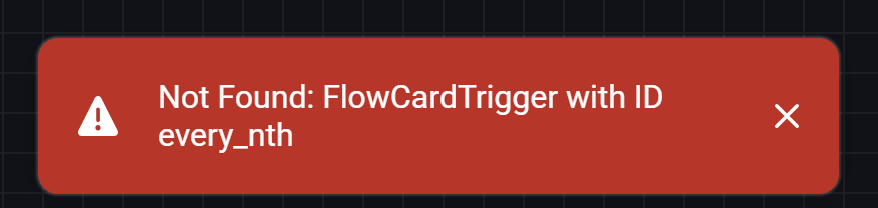
It’s funny the simple “Every 1 day” trigger is unrecognised, but it’s a fact both models don’t use exactly the same cards, or handle similar cards differently.
So I think we should be glad if certain, or most, flows can be exchanged between different models.
File extension:
yes it’s correct you have to save the exported code with .homeystdflow extension for standard flows, and .homeyadvflow for advanced flows.
Variable:
A missing variable causes no error, but it just imports the card holding the name of my variable. So it’s important to create the correct variable up front or afterwards.
I replaced the trigger with a “Flow started with a text tag”
Can you try again?
{"type":"standard","name":"Seizoen Switch Herfst","trigger":{"id":"programmatic_trigger_string_tag","uri":"homey:manager:flow","args":{}},"conditions":[{"uri":"homey:manager:cron","id":"day_month_equals","args":{"day":"22","month":"9"},"group":"group1"}],"actions":[{"uri":"homey:manager:logic","id":"variable_set_string","group":"then","args":{"variable":{"id":"aaa401d5-255b-4153-b0d0-e2af5060bd7d","name":"MyStringVar"},"value":"Herfst"},"delay":null},{"uri":"homey:manager:notifications","id":"create_notification","group":"then","args":{"text":"Het nieuwe seizoen vlgs Homey is nu: \"[[homey:manager:logic|f9c6dd26-5fce-456a-b679-3571d144db60]] \". De zonnestanden app zegt: \"[[homey:app:com.cyclone-software.sunevents|season]] \" - [Flow Seizoen Switch Herfst]"},"delay":null}]}
I think you are using a tag in your flow of an app that is not installed on my Homey. Most likely the ‘Zonnenstanden’ app you are referring to. I assume the ‘Seizoen’ and/or ‘Current Season’ tags.
So that suggest that you need to have all apps installed that the flow uses. Which makes sense, though the importer leaves you in the dark as to what apps are missing. Would be nice if the importer would create a ‘missing dependencies’ overview with the human readable names of apps and tags.
I changed the trigger to several other “standard” things, but importing @ Homey Cloud fails on the triggercard every time, I think it fails @ Pro23 as well.
For now I think it’s best to test exchanging flows with other Pro 2023 owners
I assume though that import will also fail if you import a flow that contains references to apps that are not installed. As the IDs of such flowcards are not known either.
Regardless, it is of course a welcome addition for backing up your own flows. In case you want to restore or revert to an old saved version without restoring a full backup.
Maybe Athom will extend the functionality in the future to make cross Homey platforms / device versions possible.
I agree, I also would like the option to skip anything which can’t be imported.
plus I would like the option to display all hidden menu entries without needing an ALT button:
when you work with the web app @ phone / tablet.
Indeed it is already very nice to be able to save your flows and import when needed.
Of course, I have both an ALT key, which is called the “option” key on a Mac, and a right-click. But when I do this action on the three dots next to the flow name, only the “old” context menu opens:
Ahhh, I figured it out. First, you have to right-click on the three dots and then press the option key. Until now, I had been trying it the other way around or simultaneously, but that didn’t work.
Thx!






 .
.