after connecting wired, I have 2 connections. one to an AP systems (wireless) and one to an Alternate Power system (wired). both have different IP address, neither of them work
Ok. Unfortunately, my script won’t work for you, as it depends on that specific webpage.
Just out of curiosity, are all links below unresponsive
/index.php
/index.php/management
/index.php/management/datetime
/index.php/management/language
/index.php/management/network
/index.php/management/wlan
/index.php/management/modbus
/index.php/management/upgrade_ecu
/index.php/realtimedata
/index.php/realtimedata/power_graph
/index.php/realtimedata/energy_graph
Hello @Mombasa
Thnx for the script, only on my side it is also not working 
I think it is not the script, but also on IP adres and the /index.php (and more) there is no “website” given.
Have you made special router option in your router for port forwarding of something else why i and other users can’t not reach the website interface off the ECU?
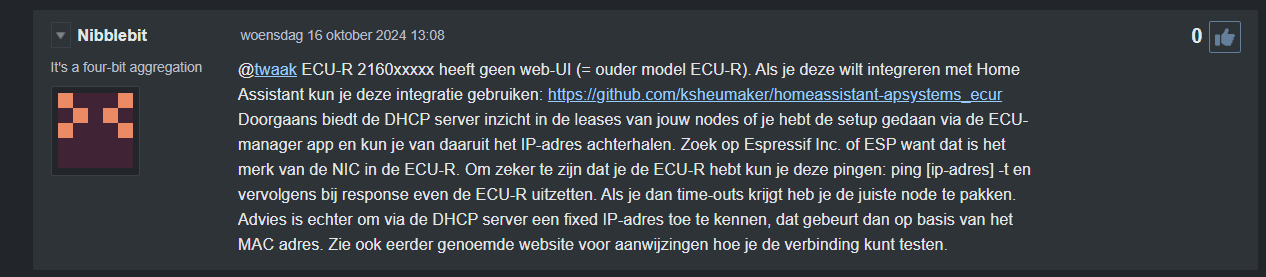
Hi All,
I’ve been following this topic for some days. I tried the script but I get the same (negative) results as the other posters.
Did anyone explore the option of using the official APSystems API? After logging in to the APSystems portal, there is a section that explains the API.

Unfortunately, I myself are not skilled enough to test this.
The API manual is here: https://file.apsystemsema.com:8083/apsystems/resource/openapi/Apsystems_OpenAPI_User_Manual_End_User_EN.pdf
Rob
To all who where not able to get the scripts working: I did some research and found the following Python code that is able to connect to my ECU-R:

I also found an explanation of the various result strings.
| GetSystem Info | APS1100160001END’\n’ | |||||||
|---|---|---|---|---|---|---|---|---|
| Response | Start Index | Length | Coding | Name | Remark | |||
| Header | ||||||||
| 0 | 3 | ASCII | SignatureStart | always APS | ||||
| 3 | 2 | ASCII | CommandGroup | always11 | ||||
| 5 | 4 | ASCII | FrameLength | |||||
| 9 | 4 | ASCII | CommandCode | 0001 - GetSystem Info | ||||
| ECU data | ||||||||
| 13 | 12 | ASCII | ECU-Id | |||||
| 25 | 2 | ASCII | ECIModel | |||||
| 27 | 4 | HEX | LifeTimeEnergy | /10 kWh | ||||
| 31 | 4 | HEX | LastSystemPower | W | ||||
| 35 | 4 | HEX | CurrentDayEnergy | /100 - kWh | ||||
| 39 | 7 | BCD | LastTimeConnectedEMA | always D0D0D0D0D0D0 | ||||
| 46 | 2 | HEX | Inverters | |||||
| 48 | 2 | HEX | InvertersOnline | |||||
| 50 | 2 | ASCII | EcuChannel | always 10 | ||||
| 52 | 3 | ASCII | VersionLength (vlen) | e.c. 014 | ||||
| 55 | vlen | ASCII | Version | ec. ECU_R_1.2.17T4 | ||||
| 55+vlen | 3 | ASCII | TimeZoneLen (tzlen) | e.c. 009 | ||||
| 58+vlen | tzlen | ASCII | TimeZone | e.c. Utc/GMT-8 | ||||
| 58+vlen+tzlen | 6 | HEX | EthernetMAC | |||||
| 64+vlen+tzlen | 6 | HEX | WirelessMAC | |||||
| Fooder | ||||||||
| 70+vlen+tzlen | 3 | ASCII | SignaturStop | always END | ||||
| 73+vlen+tzlen | 1 | ASCII | always \n | |||||
| b’APS 11 0094 0001 216000133110 01 \x00\x01\xe0\x1e \x00\x00\x04\x01 \x00\x00\x01\x0b \xd0\xd0\xd0\xd0\xd0\xd0\xd0 \x00\x0c \x00\x0c 10 012 ECU_R_1.3.16 009 Etc/GMT-8 \x80\x97\x1b\x05\xa7L\x00 \x00\x00\x00\x00\x00 END\n’ | ||||||||
| GetRealTimeData | APS110028000221600xxxxxxEND’\n’ | 21600xxxxxx=ECUId | ||||||
| Response | Start Index | Length | Coding | Name | Remark | |||
| Header | ||||||||
| 0 | 3 | ASCII | SignatureStart | always APS | ||||
| 3 | 2 | ASCII | CommandGroup | always11 | ||||
| 5 | 4 | ASCII | FrameLength | |||||
| 9 | 4 | ASCII | CommandCode | 0002 - GetRealTimeData | ||||
| 13 | 2 | ASCII | MatchStatus | 00 - OK | ||||
| Common Data | ||||||||
| 15 | 2 | ASCII | EcuModel | |||||
| 17 | 2 | HEX | Inverters | |||||
| 19 | 7 | BCD | DateTime | |||||
| for all inverters | ||||||||
| common for all Inverter types | ||||||||
| 26 | 6 | ASCII | InverterId | 408000xxxxxx | ||||
| 32 | 1 | HEX | State | 0x01 - online | ||||
| 33 | 2 | ASCII | InverterType | 01/02/03 - YC600/YC1000/QS1 | ||||
| 35 | 2 | HEX | Frequency | /10 - Hz | ||||
| 37 | 2 | HEX | Temperature | -100 - °C | ||||
| if YC600 | ||||||||
| 39 | 2 | HEX | Power1 | |||||
| 41 | 2 | HEX | voltage1 | tbc | ||||
| 43 | 2 | HEX | Power2 | |||||
| 45 | 2 | HEX | voltage2 | tbc | ||||
| if YC1000 | ||||||||
| 39 | 2 | HEX | Power1 | |||||
| 41 | 2 | HEX | Voltage1 | tbc | ||||
| 43 | 2 | HEX | Power2 | |||||
| 45 | 2 | HEX | Voltage2 | tbc | ||||
| 47 | 2 | HEX | Power3 | |||||
| 49 | 2 | HEX | Voltage3 | tbc | ||||
| 51 | 2 | HEX | notclear | |||||
| if QS1 | ||||||||
| 39 | 2 | HEX | Power1 | |||||
| 41 | 2 | HEX | AcVoltage | |||||
| 43 | 2 | HEX | Power2 | |||||
| 45 | 2 | HEX | Power3 | |||||
| 47 | 2 | HEX | Power4 | |||||
| … | ||||||||
| Fooder | ||||||||
| len-3 | 3 | ASCII | SignatureStop | always END | ||||
| len | 1 | ASCII | always \n | |||||
| GetPowerOfDay | APS110039000321600xxxxxxENDdddddddd’\n’ | dddddddd=Date (BCD) | ||||||
| Response | Start Index | Length | Coding | Name | Remark | |||
| Header | ||||||||
| 0 | 3 | ASCII | SignatureStart | always APS | ||||
| 3 | 2 | ASCII | CommandGroup | always11 | ||||
| 5 | 4 | ASCII | FrameLength | |||||
| 9 | 4 | ASCII | CommandCode | 0003 - GetEnergyOfWeekMonthYear | ||||
| 13 | 2 | ASCII | MatchStatus | 00 - OK | ||||
| for each power value | ||||||||
| 15 | 2 | BCD | Time | |||||
| 17 | 2 | HEX | PowerOfDay | |||||
| … | ||||||||
| Fooder | ||||||||
| len-3 | 3 | ASCII | SignatureStop | always END | ||||
| len | 1 | ASCII | always \n | |||||
| GetEnergyOfWeekMonthYear | APS110039000421600xxxxxxENDpp’\n’ | 21600xxxxxx=ECUId | pp=Period (00/01/02 - week/month/year) | |||||
| Response | Start Index | Length | Coding | Name | ||||
| Header | ||||||||
| 0 | 3 | ASCII | SignatureStart | always APS | ||||
| 3 | 2 | ASCII | CommandGroup | always11 | ||||
| 5 | 4 | ASCII | FrameLength | |||||
| 9 | 4 | ASCII | CommandCode | 0040 - GetEnergyOfWeekMonthYear | ||||
| 13 | 2 | ASCII | MatchStatus | 00 - OK | ||||
| Common Data | ||||||||
| 15 | 2 | ASCII | WeekMonthYear | 00=week, 01=month, 02=year | ||||
| for each power value | ||||||||
| 17 | 4 | BCD | Date | yyymmdd | ||||
| 21 | 2 | HEX | PowerOfDay | |||||
| … | ||||||||
| Fooder | ||||||||
| len-3 | 3 | ASCII | SignatureStop | always END | ||||
| len | 1 | ASCII | always \n | |||||
| GetInverterSignalLevel | APS110028000421600xxxxxxEND’\n’ | 21600xxxxxx=ECUId | ||||||
| Response | Start Index | Length | Coding | Name | ||||
| Header | ||||||||
| 0 | 3 | ASCII | SignatureStart | always APS | ||||
| 3 | 2 | ASCII | CommandGroup | always11 | ||||
| 5 | 4 | ASCII | FrameLength | |||||
| 9 | 4 | ASCII | CommandCode | 0030 - GetInverterSignal | ||||
| 13 | 2 | ASCII | MatchStatus | 00 - OK | ||||
| for each inverter | ||||||||
| 17 | 6 | BCD | InverterId | yyymmdd | ||||
| 21 | 2 | HEX | SignalLevel | |||||
| … | ||||||||
| Fooder | ||||||||
| len-3 | 3 | ASCII | SignatureStop | always END | ||||
| len | 1 | ASCII | always \n |
Hope I is of use to someone, converting this into a JS script for Homey?
Can you add the script in a text file?
@Theo_Hendriks It seems this editor doesn’t allow me to attach any type of file:

I put it in WeTransfer. Hope this works…
I have translated it into a homey script but am once again unable to access the ECU. Which serial number ECU-R are you working with?

I’ve been working on it myself for a while now. I can now log in locally via the IP address on an ECU-R 2162** (this did not work for my ECU R 2160**). I then read the ECU from a homey script. I can also turn them on and off with a webhook. If anyone is interested, let u know.
Hi @Theo_Hendriks I’m interested in your script. Can you post it?
@Theo_Hendriks , I would be very interested as well
(only for me ECU-B, not sure if that makes a big difference)
I started with an advanced flow with an “Execute // code // and return Number tag” flowcard from the HomeyScript app.
With the tag I adjust a variable from the Better Logic Library app which I use for a tile of the Device Capabilities app.
The code I used is:
// ECU Total Power

const url = 'http://0.0.0.0/index.php/realtimedata'; // Replace 0.0.0.0 with your target IP adress of your ECU-R 2162**

let totalPower = 0
let myHomeyScriptVariable = 0
fetch(url)
  .then(response => response.text())
  .then(html => {
    // Basic HTML parsing
    const tableStart = html.indexOf('<table>');
    const tableEnd = html.indexOf('</table>', tableStart);
    const tableHtml = html.substring(tableStart, tableEnd);

    // Extracting data from the table
    const rows = tableHtml.split('</tr>');
    let tableData = rows.map(row => {
      let rowData = [];
      const cells = row.split('</td>');
      cells.forEach(cell => {
        const start = cell.lastIndexOf('>') + 1;
        rowData.push(cell.substring(start).trim());
      });
      return rowData.filter(cell => cell); // Filter out empty cells
    });

    // Calculate total power
    let totalPower = 0;
    tableData.forEach(row => {
      if (row[1] && row[1] !== '-') {
        totalPower += parseFloat(row[1]);
      }
    });

   global.set('CurrentPowerInt', totalPower);
    //console.log('Table Data:', tableData);
    console.log('Total Power:', totalPower, 'Watts');
  })
  .catch(error => {
    console.error('Error fetching the URL:', error);
  });

//get global variable and update tag for use in Flow
const currentPowerTag = global.get('CurrentPowerInt');
const CurrentPowerInt = totalPower
await tag('CurrentPower Int', totalPower);

return currentPowerTag;
I only got this to work after I was able to read the ECU via the web browser with http://0.0.0.0/index.php/hidden (replace the 0.0.0.0 with the IP address of your own ECU).
@Theo_Hendriks Thanks, but unfortunately that will not work on my ECU2160***, as you already stated.
Would be great if someone would be able to convert the (working) Python script to JS!
Hi @here,
Following up on this topic, I today found out that my APsystems app allows me to create an API developer key, so I should be able to access my system that way.
As I’m not a seasoned dev I have not been able to create a script to access by system.
If there is anyone who could give it a shot, that would be greatly appreciated.
I’m attaching the API manual below as images, as I don’t think I can attached pdf files. Basically, I’m looking for the code that allows me to do GET or POST calls with authentication.
Rob


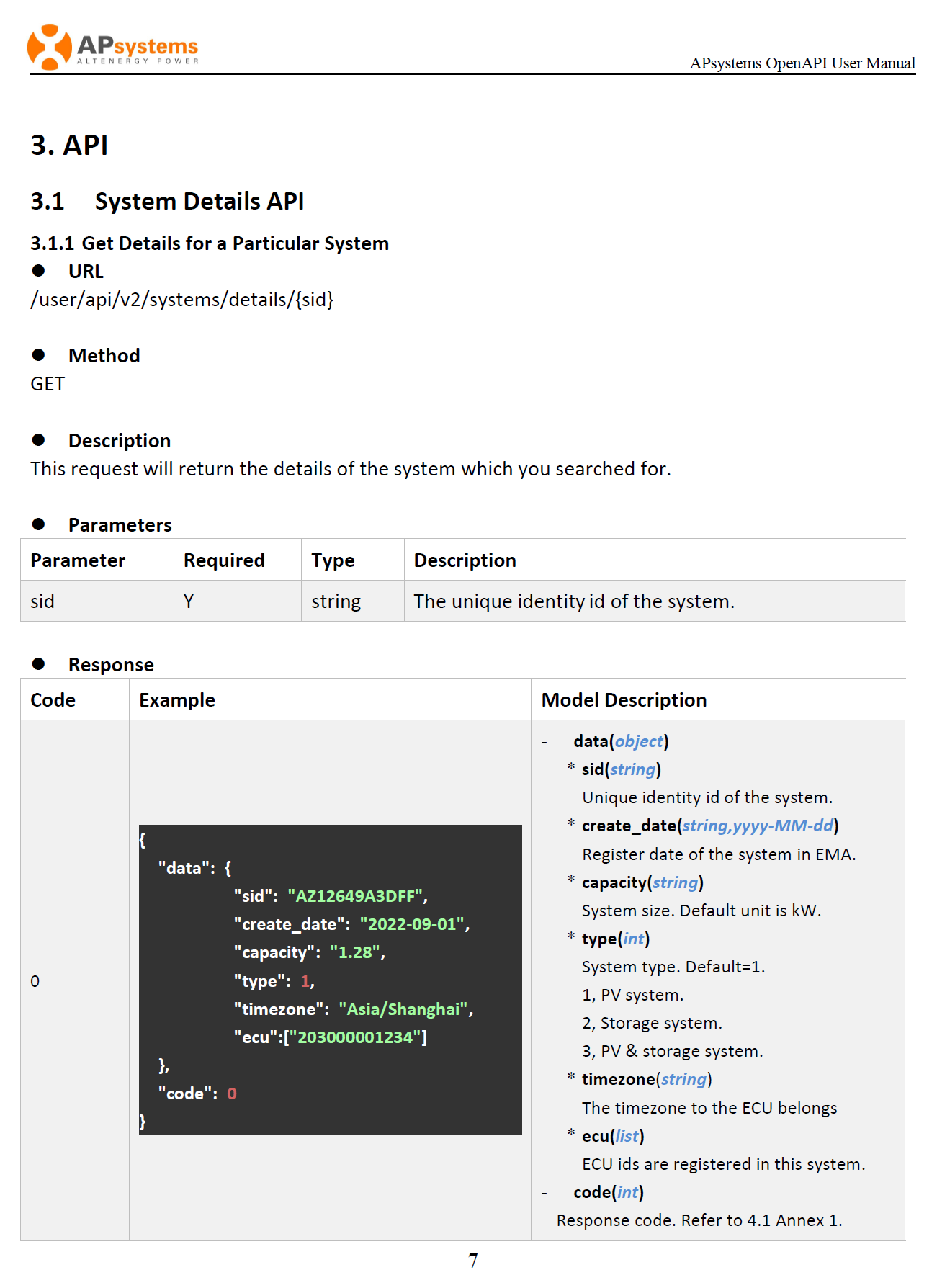

Is this a recent post on the internet? The last I heard about it is that the closed the API 5 years ago.
Yes, that’s why I added the url. I found it this morning.
