Hello,
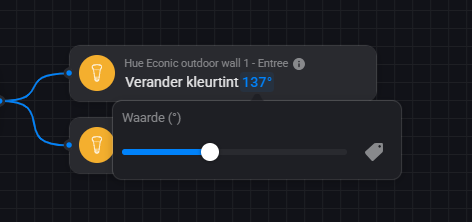
Here i have a flow to adjust the Philips Hue Colortint card with a variable.
This number variable changes when the flow is triggered.
The problem is that this number variable is not working in the Philips Hue Colortint Card.
When you select the slider a number with a degree symbol is present (like 137°)
In the Philips Hue Colortint card you can only select a tag with numbered variables.
Does somebody have a solution for this?
Or maybe this requires a development update.
Regards,
Martin
“under water” Homey uses 0,01 to 1,00 as % values. So the variable value 11 should be 0.11
Not sure what your calculation should do, make sure the highest possible result is 1 (which represents 100%):
{{ max( ( [Outdoor scene]+0.1 ) ,1 ) }}
(The last ,1 represents the maximum calculation result for the max function)
Optional: To make sure the sum’s result is a valid dim value, round the value to 2 decimals:
{{ round( max( ( [Outdoor scene]+0.1 ) ,1 ) ,2) }}
(The last ,2 represents the maximum number of digits for the round function)
Always use decimal points for values and numbers; comma’s are part of the function(s).
Hi,
Thank you for your fast reply.
This indeed is the correct solution for the flow.
On second thought i could have known this, but couldn’t figure it anymore.
The variable is needs to increased by 1%, so +0.01
Yea it’s quite confusing, while they use 0 - 360 for hue values;
Imho they should’ve used 0-100 for dim values.
And, you’re welcome!