Very very nice SunBeech, thanks for the nice tutorial.
You did though, also put me in a rabbithole of time consuming as I wanted to use this for planning charging of my EV. And I wanted to get some feedback when I clicked a button/icon so I knew it was activated. This made me build in two or three pictures for each ikon with different colors. Took some time, but I’m pretty happy with the result.
Also, the table expects four cells, but you only defined one (for the Netflix icon).
You either need to reduce the number of columns in the colgroup definition to one, or add three empty cells.
In case of the former, the card with the colgroup definition would become:
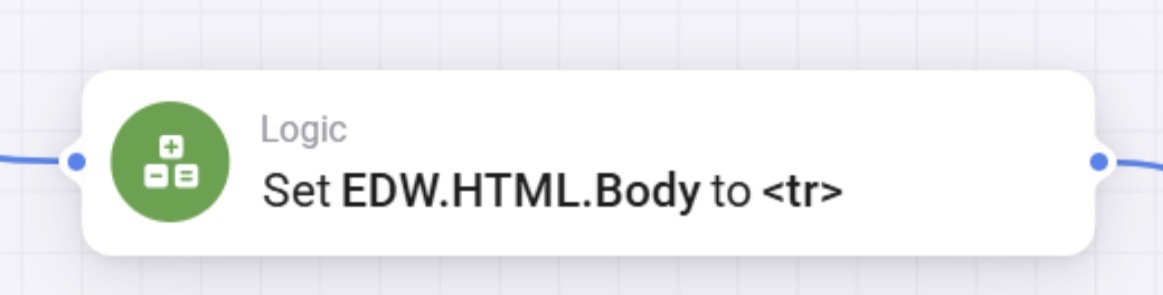
Set EDW.HTML.Body to EDW.HTML.Body<colgroup><col style="width:100%;"></colgroup>
But, I assume you want to add additional icons, so you want the latter option and add the empty cells. After the Netflix-card you need to insert three the same cards that set the empty cells:
better, but i still need sth to correct. the netflix picture is already shown in the widget and in case of on object click, the desired flow is executed, but in the first line there is still “undefined”
@Zsolt_Hennel: I am currently not seeing the issue, but normally the undefined message is caused by a typo or missing (double) quote, that renders part of the HTML code invalid. I’ll check again tomorrow.
Unrelated to the error: it is best to set the following widget setting to 0 in order to get the maximum space available in the widget:
The “undefined” issue came from the EDW itself. When I provided any title in the widget, run the flow, and than delete the title, the “undefined” disappeared. Seems it can not leave blank initially. Thanks a lot again for your kind support!
I really like this widget idea. I tried to recreate it with the help of your tutorial and the responses in the forum, but my widget is still empty. @SunBeech or anyone else, do you see what the problem might be? I’ve added screenshots of the flows below.
 :
: 


 .
.