Can hardly see the status numbers on the tiles after the update.
The bold light green number top right is now a tiny blue number bottom left.
It does not work well in dark mode.
Any way to configure this as a user?
Changing to larger tiles and reading the additional data field directly instead of trying to read the status indicator is a workaround. Maybe I’m getting to old.
In the web-browser? They look just fine to me, have you maybe changed the zoom level in the browser? Test to reset it. Hold button CTRL + 0
Who asked for these changes? It was perfect before. Why change the font from green to blue, which is much less legible? The new app look is AWFUL!!!
I think it turned out really well and is great. It’s also more consistent now 
Already loved the update for the App (apparently now also live), and finally web matches the new design better.

Fingers crossed that the mobile app (Android) will NOT get this update.

Indeed, hard to read for older people (like me and many other enthusiasts)
The contrast is low - and the size of the numbers too..
Some customisation to optimise this for each individual eyesight would be nice.


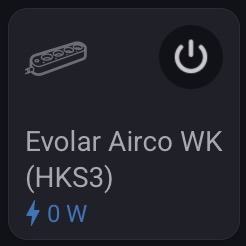
 .
.I agree, the On / Off is a major improvement over the previous version.
I don’t understand the point of that on/off button in the corner. Before, you could just tap anywhere on the tile, but now you have to aim for that specific button. I have 180 sensors, and for 90% of them, there’s no option to configure anything else. The gray text under some sensors is practically unreadable in dark mode. The labels under many sensors are now misaligned and scattered all over the place; they used to be neatly aligned, but now it looks really poor. I hope they refine this in future updates. From my perspective, what was once a practically perfect app has turned into a mess.


Some labels are positioned higher and others lower because information such as energy consumption is displayed at the bottom.
The energy dashboard in the smartphone app displays positive power values (W) in blue and negative power values (W) in green.
Since all devices with connected loads generally display positive power values, the color was presumably changed to blue for all other devices as well, including, for example, sensors.
So the color scheme in the Energy Dashboard and the color scheme in the “Devices” category were inconsistent.
Have you tried toggle the quick action in setting for the tile?
It doesn’t make sense, because the on/off function works when you click anywhere on the tile. Adding that button just creates clutter. And since the values are at the bottom, the text alignment gets thrown off. Many people probably don’t notice, but it bothers me—especially since the design used to be polished. Now it looks like someone just threw something together without checking it at all.
But maybe it’s just me.


Usability fail. Values in grey have very poor contrast in both light and dark theme, less than 3:1 in the light theme.
Can’t say for sure but the text for values seems smaller than I remember it being before.
