Ik zie bij jullie Goede Middag als 2 woorden. Eigenlijk klopt dat niet, dat moet 1 woord zijn In het bestand waar de opbouw is van deze regel zit een spatie. Deze kun je verwijderen. Bij avond waar je dan een extra N nodig hebt kun je deze toevoegen als navond ipv avond. Ik gebruik geen Nederlands, maar het viel me op.
@Andre_Prins (Homey.ink on a tablet/desktop - #205 by Andre_Prins) Ik zie bij jullie Goede Middag als 2 woorden. Eigenlijk klopt dat niet, dat moet 1 woord zijn In het bestand waar de opbouw is van deze regel zit een spatie. Deze kun je verwijderen. Bij avond waar je dan een extra N nodig hebt kun je deze toevoegen als navond ipv avond. Ik gebruik geen Nederlands, maar het viel me op.
I changed this. Thanks for the tip.
@ruud My files are on github. Again they have not been updated to the latest version of Danee.
I have updated my version to the latest version of Danee.
Could I be made possible, to see the status of a thermostat, (in color) blue for cooling, red for heating and white for neutral ?? Now all status is white…
@DaneedeKruyff is it perhaps an idea to add an icon for the recent notification tab? now you have to click in the open space for this tab. I had already looked at whether I can make this myself, but I still can’t do it.
This weekend I was busy adding an icon for the timeline notifications. was a lot of trying and cursing, now I have got an icon on the page, I just don’t get it linked to the current timeline notifications panel. if anyone knows how I can do that, I would love to hear from you.
I tried the same thing. Adding the icon was easy, but getting it to do something…not so much. I gave up. I don’t have enought javascript skills unfortunately. Time to do something about it
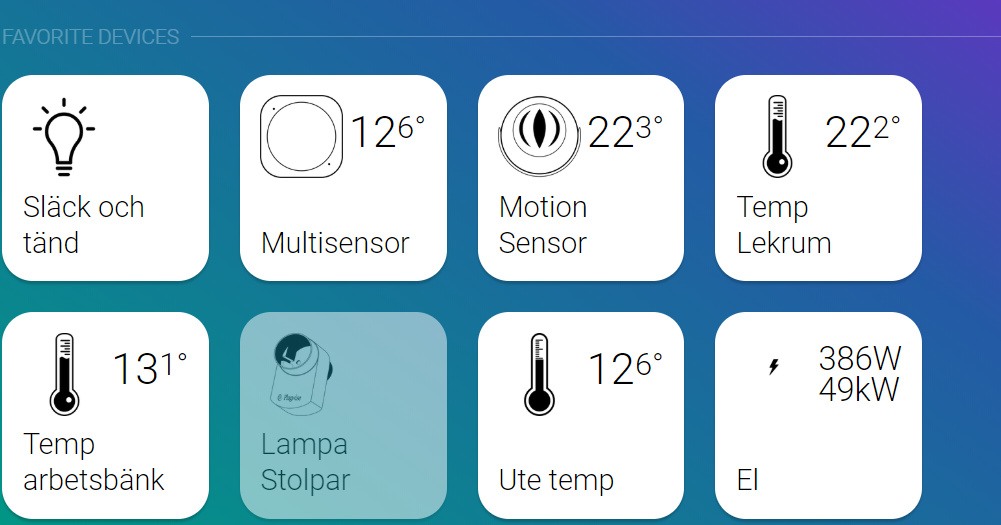
I have added some measurement data from devices now. I get data from a MYSQL database.
Values are latest 5minutes consumption and latest 24h consumption. As extra I got measuremens from my plugwise devices if they are “on”
 In het bestand waar de opbouw is van deze regel zit een spatie. Deze kun je verwijderen. Bij avond waar je dan een extra N nodig hebt kun je deze toevoegen als navond ipv avond. Ik gebruik geen Nederlands, maar het viel me op.

 Was goed bedoeld hoor
 In het bestand waar de opbouw is van deze regel zit een spatie. Deze kun je verwijderen. Bij avond waar je dan een extra N nodig hebt kun je deze toevoegen als navond ipv avond. Ik gebruik geen Nederlands, maar het viel me op.
 I use Brackets (program) to adjust the files