I have published a new test version.
I just installed it and tested some changes. It looks like it holds the broker-settings!
Hello Adrian.
This morning I noticed, again, as I mentioned once before that the status of one of the buttons on my panel had changed to an incorrect status. It hadn’t happened since that previous time.
So, out of curiosity I checked if there had been an update to the button+ app and lo & behold… 21 hours ago a new version was automatically installed. That is in the timeframe the change of button status has happened.
I’m not sure if this is intentional or not… but something tells me an update of the Homey app should not change the button status of my panel… or should it? It doesn’t feel right to me. But I’m easily persuaded to change my mind about it. 
Anyway, I thought I should mention it. Take care, thanks!
What is the source of status?
None of the buttons are sourced. All is handled by flows. (And that worked for many weeks now.) Now I’ve sourced them (with the corresponding variable), I need to review all the flows (it’s not working anymore sadly…).
Maybe I’ll go back to un-sourcing them if it’s too much work… and accept the change of states when there is an upgrade of the app.
I may have succeeded. The next few weeks will prove if I have.
I have a little complicated setup with 2 domotica hubs (Homeseer being the dominant one) and I’ve included the button+ panel in Homey. Which I used to replace a touch panel that was included in the Homeseer network. I did ask for trouble…
Using a variable as source means there is a direct relation to ‘on’ and ‘off’ state corresponding to ‘Yes’ and ‘No’ of the variable. Sometimes this is in reverse in my old set up (and depends on the name of the variable)… this gave me a lot of trouble as I have some buttons with that logic one way, some others with the other way. I guess this On-Yes and Off-No logic is a Button+ given…
Hello, I’ve had the below issue longer and finally decided to start from scratch because there were no reports I thought it could be a local issue. So I’ve uninstalled Button+App from my HomeyPro 2023 (13.4.0) and installed the test version 0.7.4.2 to manage my Button+ devices V2 hardware (3.1.6).
The issue: when saving display or button configurations the first action from a device is saved and not the selected. Patience and lot of editing and saving finally gives a 4 pages display and button config.
Examples:
1 - On display page add item for the Button+ time. On save all configurations the Button+ module reloads and shows nothing. On opening the display item the first item ‘Display Connector 2’ is selected.
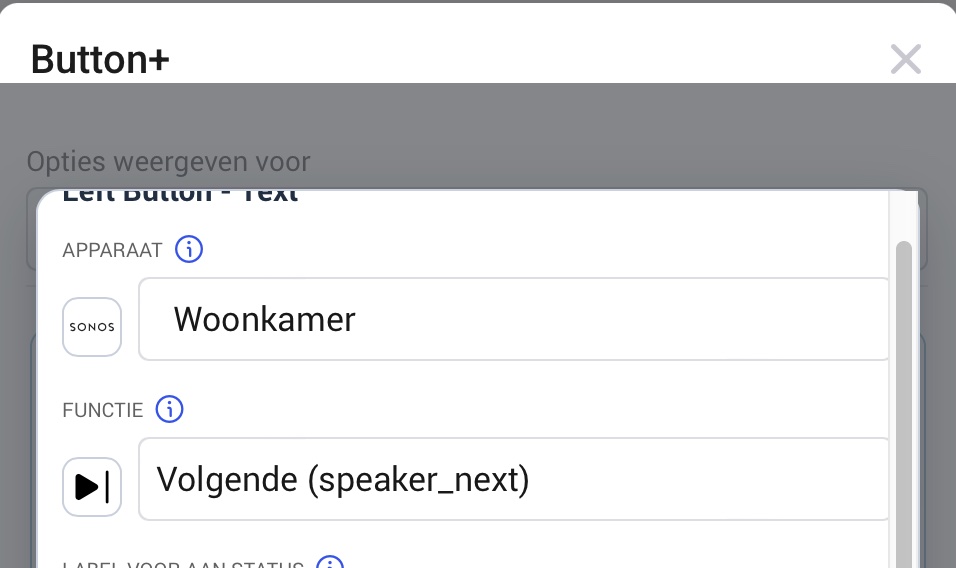
2 - On button select Sonos device and action ‘Mute’. On save all configurations the Button+ module reloads and the button action is Play next. On opening the button item the first item ‘Volgende (speaker next)’ is selected.
3 - On button select device group device and action ‘On/Off’. On save all configurations the Button+ module reloads and the button action is Dim. On opening the button item the first item ‘Dim Niveau (dim)’ is selected.
It’s not reproducible, but repeating. So I could do some testing. I’ve noticed that in some occasions the button actions were shown double, in other occasions the selected device wasn’t showing in bold font and others I couldn’t find anything.
With the 3rd config I directly did a ‘export config’ in the app and checked the JSON which confirms the wrong saving of button:
                "leftTopText": "Woonkamer alles",
                "leftOnText": "",
                "leftOffText": "",
                "leftDevice": "d5beccba-9fea-4881-9693-7bf2a2605d08",
                "leftDeviceName": "\ud83e\uddf7groep woonkamer",
                "leftCapability": "dim",
                "leftCapabilityName": "Dim niveau (dim)",
                "leftBrokerId": "Default",
                "leftDimChange": "-10",
                "leftFrontLEDOnColor": "#ff9300",
                "leftWallLEDOnColor": "#000000",
                "leftFrontLEDOffColor": "#000000",
                "leftWallLEDOffColor": "#000000",
                "leftCustomMQTTTopics": [],
                "leftDisableLongRepeat": false,
I’ve seen this happening with lot of devices: Button+, group devices, lamps and sensors via Zigbee2MQTT, Sonos, Dyson.
If you need any diag logs or other tests just let me know.
Below some supporting screenshots:



Product improvement suggestions:
-
on copy / paste of button configuration also copy/paste the svg configuration.
-
when editing button configuration make the on/off text fixed. These two fields change depending on the preview state (see screenshots)
-
In the Button selection list show the name of the config (like with displays)


I have fixed all these and they will be in the next update.
I am currently looking into your previous message to try and work out what is happening, so I will get back to that this evening.
Wow that’s quick! Thanks!! 
I have published a new test version.
I wish other apps had similar dedicated and enthusiastic support!
(My situation is stable right now, the update you did had no effect anymore on the status of the buttons now they are sourced properly… but that is not why I posted this.)
Thanks Adrian!
You are welcome. I have to fix things quickly as I have a terrible memory, so if I leave things they’ll be forgotten.
Sometimes I will be contacted in the morning while I am at work and by the time I get home I have forgotten 
I just recevied my Button+ today and was searching forever for the option to use the display-buttons to control flows instead of changing pages - luckily the new “test”-release has that option - this is amazing, thank you!
In Homey I currently only see the card “Select {{page}} on large display”. If I were to use a Button+ without large display - would I still be able to change pages using Homey Workflows?
Interesting question that I can’t answer.
In theory theory, the button pages are synced to the large display, so it might still work. The Flow card was named before the Button+ supported pages and the app provided that support for the large display, so the name is a hangover from then.
Hello,
Since the latest update, I am no longer able to configure my Button+ displays correctly.
When I select a function and save it or write the configuration to the Button+, the selected “Function - Value” always reverts to the first option in the drop-down menu. I have tested this on multiple Button+ devices and encounter the same issue on all of them.
In addition, all values on my displays (V1) remain blank. The app also crashes every time I try to write the configuration to the Button+. After restarting the app, I get a prompt asking whether I want to restore unsaved settings, but this does not work either.
Could you please have a look at this issue?
I am using a first-generation Button+ with firmware version 3.1.7.
Thank you in advance.
Kind regards,


App chrashed again, now displaying “app not running”
125ffd90-c86e-4063-811d-43daa94d2adf
I have published a new test version so can you install that to see if it fixes the issue?
Thanks Adrian,
I’ll try to test it throughout the day and let you know the results.


The previous issue appears to be fixed now. The displays can be configured correctly again. Thank you for your support.
