Can anyone help me explain why this flow isnt working? I push the button and it changes state but the flow never triggers.

On FW 1.13.3 with Release 0.5.10
Can anyone help me explain why this flow isnt working? I push the button and it changes state but the flow never triggers.
On FW 1.13.3 with Release 0.5.10
Never mind. Got it working. Had to update button config in app to get it working again.
i unfortunnaly don’t get it working.
the " The Right or Left button on connector nr was turned On or Off"
does not respond.
can you help me ?
I think I have now fixed this one,
Could you explain this a bit more as I’m not sure what you mean.
The Flow card is triggered by user interacting with a button, so the trigger won’t start when a page is changed because that would have been fired the last time the user pressed the button while on that page. So changing pages effectively hides and shows the buttons, restoring their last state when they are shown.
I have added a trigger for the next update.
I can’t seem to reproduce this. I added new pages and even tried renumbering them to change the order. Could you provide the steps to make it happen.
Thank you for the feedback, it’s very helpful.
@Adrian_Rockall Maybe it’s been asked (probably actually) but: how do I assign something to the pushbuttons that are on the display? I’d like to assign plus and minus for the room heater temperature to them. but I don’t know how 
The only way is to use a Flow to trigger when one of the display buttons is pressed (once I have fixed it).
I have published a new test version with a few fixes, so button triggers on the display should now work. I have also added a Flow trigger for page changed and fixed some issues with button numbering.
At first (fw2/0.9.7) i got my labels for the first page right, then i started adding buttons for the second page, but also decided to make diplay page 3 my 2nd page and changed the buttons. Since that action i get black button labels. I will send you my configuration files, because you said you can’t reproduce.
Sorry, i meant changing pages via the hardware display button didn’t trigger that flow. I understand it isn’t triggered by a change through flows.
The configuration would be good so I can get an idea of what you have setup.
I’m still not sure if we are on the same page with changing pages  . Do you mean if a button comes on because the page is changed?
Same behaviour here (fw2.0 / app v0.7.10). The buttons on the right side go black after config update. Looking at the gui from the Button+ itself after saving configuration i can see added button configs for page 0 for the right side buttons. Removing them there and saving to device brings back the labels from the current page.
Wiped all fields in config for default page / right side button but that didn’t help.
@Adrian_Rockall , the right button problem is not that it’s not being updated, but the contrast of the text is realy low and only readable if you look realy closeby at it in a dark environment.
It is not affected by changing the dimvalue.
That’s strange. I have no control over that as I can only set the brightness per bar.
I will pass it on to Ronald to see if he has any thoughts.
Ronald has not seen anything like that before either. He suggests requesting a replacement as it looks like a defective display. Button +
I doubt it is hardware, when skipping to the next page (fw 2.0/7.10) the left button has the same behaviour (some kind of grayed out) and when skipping back it is normal again. When deploying my older configuration both bar-labels/info is showing like it should. I think deploying the configuration again is triggering something, because it showed after this step was performed. And there was a similar situation reported by another homey user, also on fw. 2.0/7.10.
I am going to create a new configuration and will make a picture of the first situation and than what is shown after deploying the configuration again.
Thanks for exploring with me, it’s quite uncatchable what is causing this.
Continuing the discussion from Button + (Release 0.5.10, Test 0.7.10):
With firmware 2.0 my initial display/button configs are showing the text normal. When choosing a item made with firmware 2 active i get the ‘not visible buttons’. One thing which seemed to have some impact was that i also had a button with device ‘none’. For testing puposes i just added a testdevice and that somewhat seems to make thigs better. Where at first sometimes the left button also greyed out, now only the right button seems te be doing that.
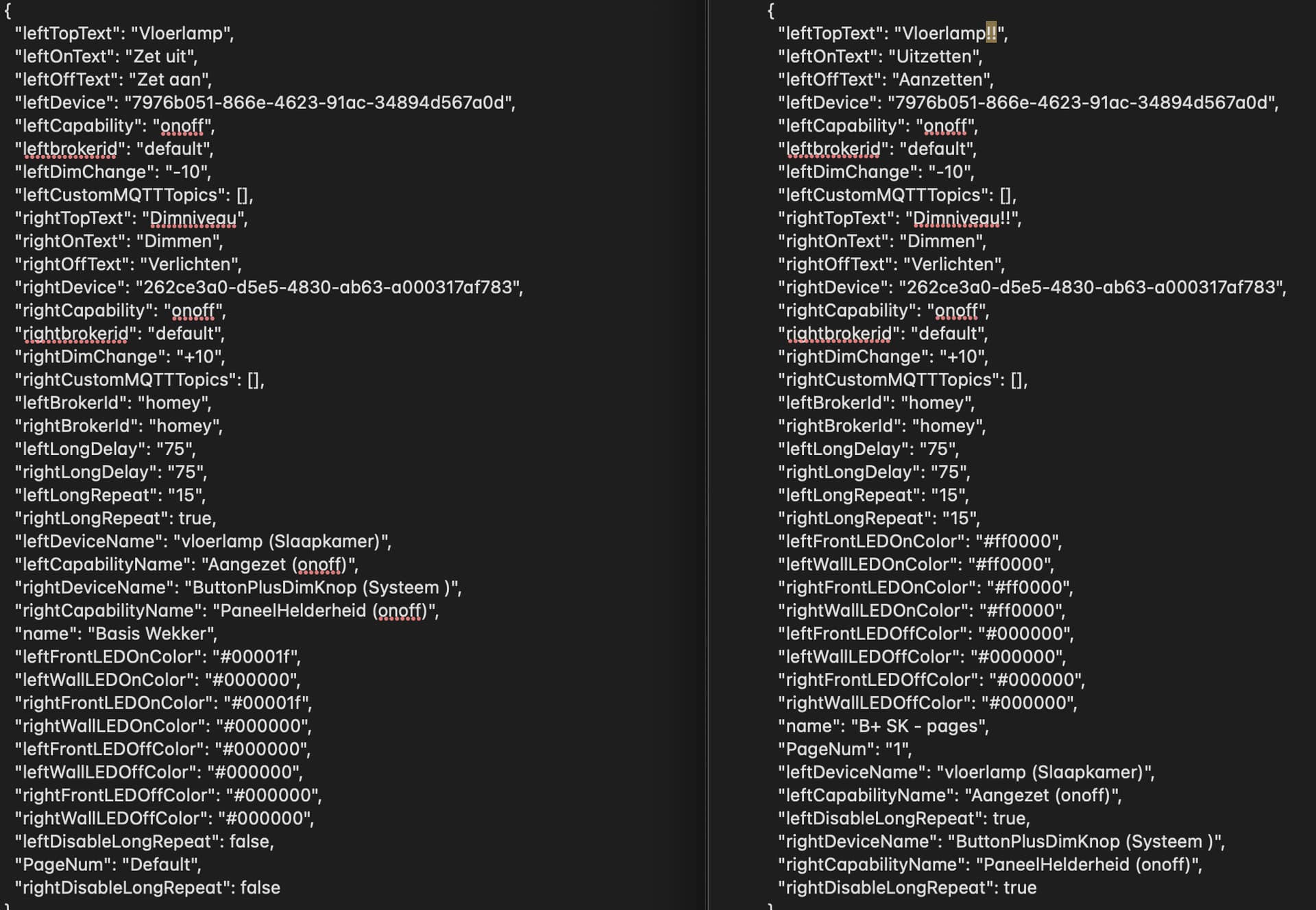
I looked at the differences between an old item, build in previous firmwares/app versions (left side) and a similar new configuration (right side). In the new configuration, i didn’t change anything in the colorsettings, so they differ.
Another thing i noticed was in the old item: “rightLongRepeat”: true, and in the new item: “rightLongRepeat”: “15”,. Not sure if that has any impact.
Hope this helps. And i doublechecked. The right button can work just fine in my older configurations (using fw2), so hardware looks to be fine.
When you have the dimmed display, could you got to the Button + web page and export the configuration and email to me so I can see what it has received.
I’ve sent two different configurations to you.
I don’t know if it has anything to do with Kringloper’s problem. but my top right button also doesn’t change labels when I control it by flow.
I also attached the device “none” to this button because I only use these button in flows.
The flow card:(Switch Right button on connector 2 for page 0) doesn’t seem to trigger anything.
If I press the button itself, everything works as it should, then it executes the flow that is connected to it. however, if my lights (the right upper button controls the lights) go on and off from lux, the button itself does not change state.
I tried changing the pages in the flow card but this makes no difference.
I’m on 0.7.10 and fw 2.0
I gave up on the Button+
If anyone interested please send me a mail, I’ve two Button+ doing nothing.
I have released a new test version that fixes the Flow action card not switch the button state, plus it fixes the issue where a display item set to none was not showing the text.