@_Bredero sorry its not clear to me what you mean
Please attach screenshots so its clear what youre trying to achieve
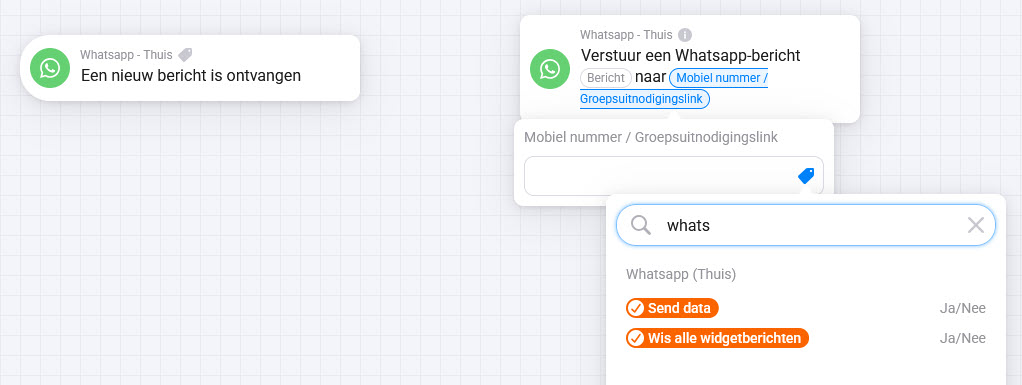
How can i activate this message for example? a respons to the “afzendernummer”. Can i fill in afzendernummer? this is not a label i can select
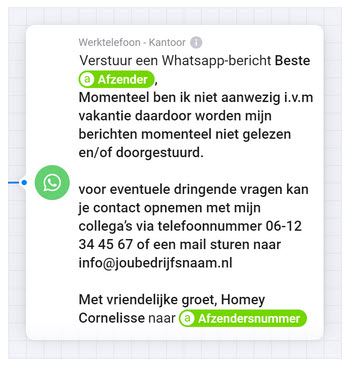
@_Bredero ofcourse because you have to create that variable first if you want that.
That’s default homey behaviour. but you can also fill in the number yourself.
Please search the forum for variable usages if you are unware of that.
And the “afzendersnummer” only appears if you draw lines between the cards.
Hi,
Okay, normally i can select the label, i will create a variable for this usage. Thanks. Have a nice easter
@_Bredero yes attach the cards and it works
@martijnpoppen, thanks. It works.. normally first i create the different cards and fill in all the details, at the end i attach the cards and test it. Before i send this question, i don’t have attached the cards and check of the variable are visible. Thanks for your patience 
@_Bredero nice
Best practice is to connect the cards immediate
A lot of trigger cards have tags attached to them. You can see it in the card it self it shows a small icon
Hi, i use Homey for many years.. first time i see the small icon… haha thanks for the tip:wink:
I can’t for the life of me figure out how to get the “senders number” and “sender” cards to work. Here’s a picture of my flow:

I printed out the sender name and number and keyed it in exactly as what I saw in the “senders number” and “sender” cards, but the flow would never get processed, i.e., it can’t match the sender number.
Can someone advise what is wrong?
@Darkness sorry but this is not really a clear image.
Please provide what you’re trying to do. Input and expected output.
What i wanted to do is to simply filter a message by the sender and number so that i can process it. I can confirm that the app receives the message, but somehow it is unable to match the sender or the phone number.
@Darkness please try a simple flow without the extra check for a variable. now you’re combining all things together. Just try step for step and see if that works, then start expanding the flow

@Darkness and you did add the + icon to the senders number?
Yes, with the country code.
@Darkness i don’t recognise this and can’t reproduce. are there no spaces in the input field?
please send a report after running the flow
There must be some unexplained bug ongoing. I created an advance flow (instead of standard flow) using only the simple cards and it works. I then proceeded to replace all of the previous cards that didn’t work into this debugging flow and replace them with exactly the same cards except that i created them again from scratch and then it works. After that, i copied the entire flow again from the debug flow to the main flow and it stopped working again.
I created the diagnostic report 48f726c8-a1a7-4a2c-84d7-ab91e03ed7e1
@Darkness ok so it works with only WhatsApp cards. Are you sure that the variable check works?
Report looks good
I deleted all the cards from scratch and created them again and it works. So what i did now is to split the flow into 2 separate flows and it now works.
GroupID not found when sending to WhatsApp Group Invite id is opening the correct group when clicking on it.

