I will try another patch the HybridSensorBase.onNodeInit() do a lot of calculations thaht can timeout on the EndDevice battery who is on sleep mode just after pairing.
Hi Francesco,
I’ve published v5.5.252 with a more aggressive fix for the ZG-204ZM!
The problem : The device initialization was doing too many operations (queries, cluster bindings, etc.) that timeout on a battery-powered EndDevice because it goes to sleep immediately after pairing.
The fix : Battery sensors like ZG-204ZM now use a “passive mode” initialization:
- No blocking operations during init
- Only sets up listeners to receive data
- Device is marked available immediately
- Data will update when the sensor reports (on motion detection)
Please try again:
- Update the app to v5.5.252
- Remove the ZG-204ZM from Homey completely
- Factory reset the sensor (remove batteries → wait 10s → hold button while inserting batteries)
- Re-pair the device
- The device should now stay available!
Note: As a battery sensor, data will only update when motion is detected. The sensor sleeps between detections to save battery.
Let me know if this fixes the issue! Released right now.
Nope, same behaviour.
I don’t have any other ideas sorry
If some one else have ?
Please remove my app remove the device and pair it again without my app and do an interview and give the interview here
Hi
The 4 scene button is now detected as “unknown ZigBee device”
Thanks for the regular updates !
Witch manufacturername and device interview

diag repport and device interview please
on your screen capture , isn’nt it the right value ??
it’s the MOES 4 scene button :
“ids”: {
“modelId”: “TS0044”,
“manufacturerName”: “_TZ3000_zgyzgdua”
},
“endpoints”: {
“ieeeAddress”: “a4:c1:38:b7:1d:a0:94:53”,
“networkAddress”: 39252,
“modelId”: “TS0044”,
“manufacturerName”: “_TZ3000_zgyzgdua”,
“endpointDescriptors”: [
{
“status”: “SUCCESS”,
“nwkAddrOfInterest”: 39252,
“_reserved”: 20,
“endpointId”: 1,
“applicationProfileId”: 260,
“applicationDeviceId”: 0,
“applicationDeviceVersion”: 0,
“_reserved1”: 1,
“inputClusters”: [
1,
6,
57344,
0
],
“outputClusters”: [
25,
10
]
},
{
“status”: “SUCCESS”,
“nwkAddrOfInterest”: 39252,
“_reserved”: 14,
“endpointId”: 2,
“applicationProfileId”: 260,
“applicationDeviceId”: 0,
“applicationDeviceVersion”: 0,
“_reserved1”: 1,
“inputClusters”: [
6,
1,
6
],
“outputClusters”: []
},
{
“status”: “SUCCESS”,
“nwkAddrOfInterest”: 39252,
“_reserved”: 14,
“endpointId”: 3,
“applicationProfileId”: 260,
“applicationDeviceId”: 0,
“applicationDeviceVersion”: 0,
“_reserved1”: 1,
“inputClusters”: [
6,
1,
6
],
“outputClusters”: []
},
{
“status”: “SUCCESS”,
“nwkAddrOfInterest”: 39252,
“_reserved”: 14,
“endpointId”: 4,
“applicationProfileId”: 260,
“applicationDeviceId”: 0,
“applicationDeviceVersion”: 0,
“_reserved1”: 1,
“inputClusters”: [
6,
1,
6
],
“outputClusters”: []
}
],
“deviceType”: “enddevice”,
“receiveWhenIdle”: false,
“capabilities”: {
“alternatePANCoordinator”: false,
“deviceType”: false,
“powerSourceMains”: false,
“receiveWhenIdle”: false,
“security”: false,
“allocateAddress”: true
},
“extendedEndpointDescriptors”: {
“1”: {
“clusters”: {
“powerConfiguration”: {},
“onOff”: {
“attributes”: [
{
“acl”: [
“readable”,
“reportable”
],
“id”: 0,
“name”: “onOff”,
“value”: false,
“reportingConfiguration”: {
“status”: “NOT_FOUND”,
“direction”: “reported”
}
}
]
},
“basic”: {
“attributes”: [
{
“acl”: [
“readable”,
“reportable”
],
“id”: 0,
“name”: “zclVersion”,
“value”: 3
},
{
“acl”: [
“readable”,
“reportable”
],
“id”: 1,
“name”: “appVersion”,
“value”: 68
},
{
“acl”: [
“readable”,
“reportable”
],
“id”: 2,
“name”: “stackVersion”,
“value”: 0
},
{
“acl”: [
“readable”,
“reportable”
],
“id”: 3,
“name”: “hwVersion”,
“value”: 1
},
{
“acl”: [
“readable”,
“reportable”
],
“id”: 4,
“name”: “manufacturerName”,
“value”: “_TZ3000_zgyzgdua”
},
{
“acl”: [
“readable”,
“reportable”
],
“id”: 5,
“name”: “modelId”,
“value”: “TS0044”
},
{
“acl”: [
“readable”,
“reportable”
],
“id”: 6,
“name”: “dateCode”,
“value”: “”
},
{
“acl”: [
“readable”,
“reportable”
],
“id”: 7,
“name”: “powerSource”,
“value”: “battery”
},
{
“acl”: [
“readable”,
“writable”,
“reportable”
],
“id”: 65502
},
{
“acl”: [
“readable”,
“reportable”
],
“id”: 65533,
“name”: “clusterRevision”,
“value”: 2
},
{
“acl”: [
“readable”,
“reportable”
],
“id”: 65534,
“name”: “attributeReportingStatus”,
“value”: “PENDING”
},
{
“acl”: [
“readable”,
“reportable”
],
“id”: 65506
},
{
“acl”: [
“readable”,
“reportable”
],
“id”: 65507
}
]
}
},
“bindings”: {
“ota”: {},
“time”: {}
}
},
“2”: {
“clusters”: {
“onOff”: {},
“powerConfiguration”: {}
},
“bindings”: {}
},
“3”: {
“clusters”: {
“onOff”: {},
“powerConfiguration”: {}
},
“bindings”: {}
},
“4”: {
“clusters”: {
“onOff”: {},
“powerConfiguration”: {}
},
“bindings”: {}
}
}
}
wi be fixed on the next version. It’s will be avalable until 1 hour.
|#693|Cyril|MOES TS0044 _TZ3000_zgyzgdua|v5.5.256|
|#690|Ronny|_TZE204_gkfbdvyx + _TZE284_iadro9bf|v5.5.254-256|
Hi Ronny,
Thanks for your report! I’ve added full support for both your sensors in the latest versions:
v5.5.254-256 includes:
_TZE204_gkfbdvyx→ Uses ZY_M100_WALL profile- DP1 = presence state (0=none, 1=motion, 2=stationary)
- DP3/4 = detection distance (÷100 for meters)
- DP9 = target distance
- DP101/102 = sensitivity settings
_TZE284_iadro9bf→ Uses TZE284_SERIES profile- DP1 = presence state
- DP9 = distance
- DP104 = illuminance (lux)
To fix your sensors:
- Update the app to v5.5.256 (latest)
- Remove both sensors from Homey
- Re-pair them
- Wait 1-2 minutes for first data to appear
The app now uses an Intelligent DP Mapping System that automatically detects your sensor type and applies the correct configuration.
Please let me know if it works after re-pairing!

Please do an diagnostic on the app seeting .
Best regard.
on the next version ( to be released asap ) v5.5.257: FIXED _TZE284_iadro9bf ZY-M100-S_2 DP mappings (Ronny #696) - DP104-112 range
But i need your diag.
v5.5.257 _fixes your _TZE284_iadro9bf sensor!
Root cause: ZY-M100-S_2 with TZE284 chip uses DP104-112 range, NOT DP1-9 like older models.
Fixed mappings:
- DP104 → Illuminance (lux)
- DP105 → Motion state (none/presence/motion)
- DP109 → Target distance
- DP112 → Occupancy boolean
Note: This sensor does NOT have temperature - only presence, distance, and illuminance.
To fix:
- Update to v5.5.257
- Remove the sensor
- Re-pair the sensor
- Wait 1-2 minutes for data
The app now correctly detects your sensor as TZE284_SERIES profile with the correct DP104-112 range.
Please let me know if it works!
The button is now recognized as “4 boutons contrôleur sans fil” 
but the physical buttons don’t work, and the battery isn’t updated.

The button work when i click it in the app (capture), but not when I click on the physical module

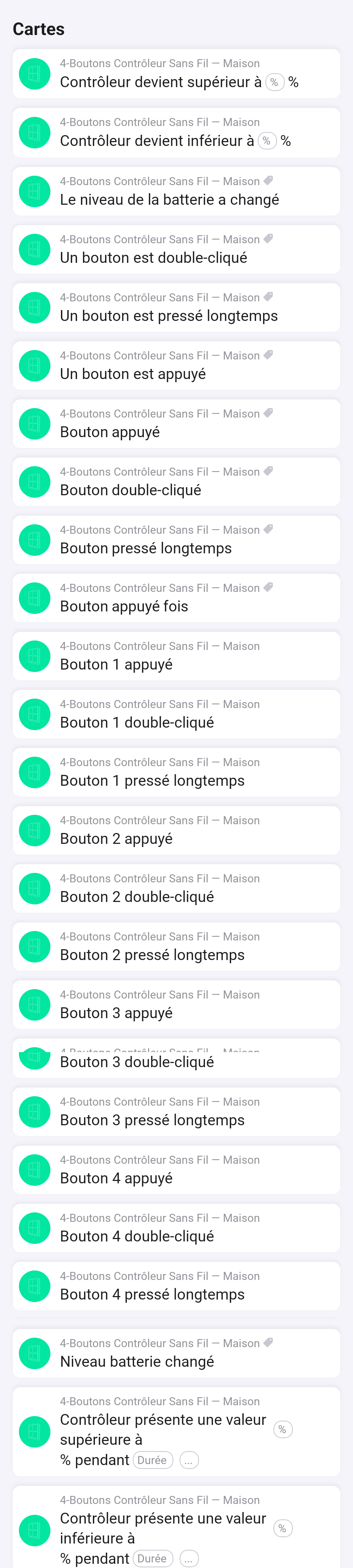
In the flows, there is too much “when” cards I think, like “bouton appuyé “ and “un bouton est appuyé” that seems to be the same
And I don’t understand the “contrôleur devient intérieur à x% “ etc… when cards
Thanks again !
i think it’s about the battery percentage ; “ontrôleur devient intérieur à x%” do you have any diag log after pressing buttons ?
best regard
Where can I find diag log ?
I have create a log in the app settings after pressing “1, 2, 3, 4, long 1”
The code returned is : 67ad34b7-6f78-4f61-9284-1555c4d2a224
Hi Cyril,
v5.5.260 fixes your 4-button controller issues:
What was wrong:
- The driver only had 1 endpoint, but TS0044 uses 4 endpoints (one per button)
- Battery listener was not properly configured
Fixed:
 Added all 4 endpoints with scenes/onOff clusters
- Battery reporting now works via powerConfiguration cluster
- Enhanced logging for easier troubleshooting
To apply the fix:
- Update to v5.5.260
- Remove your 4-button controller from Homey
- Re-pair it (hold any button 5s until LED blinks rapidly)
- Test each physical button
About the flow cards:
- “bouton appuyé” = generic card (works with any button + token)
- “un bouton est appuyé” = Homey’s built-in capability card
- Both are intentional for flexibility - use whichever you prefer!
Please let me know if it works after re-pairing!
okay i will check your diag log and do an patch
