[APP][Pro] Tuya Zigbee App

Hello all,

I am trying to add an OXT double dimmer to Homey. It is possible with holding for 10sec button that is on device. I am using Tuya Zigbee application. It should be added as two different devices but in adds only one. Means that I can only control one electrical circuit. Any idea how to do this to have two separete devices for the same dimmer module.

Link to the device details:

I have the same issue. I bought 60+ OXT 2 channel devices and Homey sees only 1 channel. Tried to do “interview” but did not help. Any ideas?

Hi all,

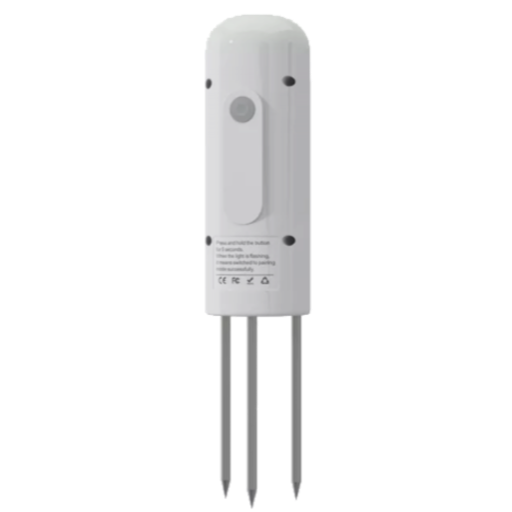
One of my two TS0601 soil sensors doesn’t report temperature anymore, only humidity. The other does both. They have served me well so far until the batteries in one of them died. Since then, no more soil temperature, only soil humidity. The device is _TZE204_myd45weu TS0601 (pic of device). I have tried repairing the device but that doesn’t bring the temperature back. Any ideas?

Thanks,
Paul

Try interviewing the device. Keep it awake by shortly pressing the pair button every 2 seconds or so.
https://tools.developer.homey.app/tools/zigbee

Done. Still no temperature value. Humidity is still working fine, as is battery condition.

You need to view the interview data to view if it’s there.
Interviewing doesn’t help to suddenly show the data when paired.
Ultimately you should bring it up on github ( see 1st post )

Hi JvdMeulen,

I suggested interviewing it, because interviewing did “unlock” color settings for Lidl lights for example, which were unavailable at first…
With that in mind, it could possibly bring back the temperature capability of Paul’s sensor.
But it’s obviously not exact science or always giving results.

If that’s true, that is magical i’d say.
Maybe Athom changed something, but when i added hardware based on a identifiction .. that is where you define the what the device is capable of. Not based on an interview.
I’m curious how the interview changes (or could change) what you define in device.js
( not trying to be smart, but really curious on how that works)

Interviewing doesn’t show me the 64% humidity. No value is 64, but that’s what it’s reporting. It does change the humidity value if I stick it into some other soil, so it seems to be a real result of a measurement. Temperature is still zero after interviewing (twice). I have another one of these sensors, I bought 2 at the same time. That other sensor works fine, reporting both temperature and humidity. Taking the batteries out and sticking them back in doesn’t help either (batteries ran out and after swapping batteries the temperature was gone). So unless there are any other ideas, I guess I’ll just have to live with only humidity for this sensor. Thankfully that’s its main purpose. Temperature is nice to have.
Thanks for your suggestions @Peter_Kawa and @JvdMeulen !

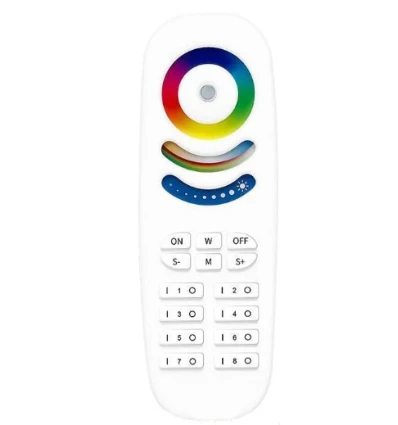
Hi, Is it possible to add this remote to homey via Tuya zigbee?

Please refer to the first post in this topic for guidance on how to request new device support.

@mats_nygren And there is a better place for that device to request support

1 Like

Hi everyone
,I’ve been working on enhancing the Tuya Zigbee app for Homey by automating several processes to make it easier for users and developers. Here are the key features and improvements:Future enhancements include some automation.
I believe these improvements will significantly streamline the process of adding and managing Tuya Zigbee devices. Your feedback and contributions are highly appreciate

Thank you for your support!Best regards,

Dlnraja powered by kimi K2 IA and many others ai

Ps: i have a lot of issue about the project because it’s since long time i havent coded.
If someone can help me to fix issues about github action and workflows .

7 Likes

Hi Dylan Good morning, how nice that you are working on a better improved version of the Tuyau ZigBee app.
I hope that all the people who were waiting for their devices to work within Homey are satisfied now that every function of their device is working or going to be soon.

I’m going to try it out by uploading it and install it wit CLI and let you know if there are any problems.

Thanks again for all your effort and
Best regards Peter.

2 Likes

I have made some push on my repo

Working on it .

1 Like

Very good Dylan :+1:t2::+1:t2::+1:t2:

Keep up the good work :flexed_biceps:t2:

Best regards Peter.

(GitHub - dlnraja/com.tuya.zigbee: new updated version)

:wrench: Tuya Zigbee Driver Project - Features in Development

:rocket: Advanced Automation & Integration

  • Monthly automated enrichment of all Tuya Zigbee devices (generic and new) through comprehensive scanning of zigbee2mqtt, Homey, Jeedom, Domoticz databases, forums, and community dumps
  • Intelligent scraping & parsing scripts for automatic device integration with fallback mechanisms and detailed reporting
  • Community-driven enhancement with automated GitHub issue generation for incomplete drivers using Homey interview format

:bar_chart: Smart Documentation & Monitoring

  • Real-time documentation updates (README, dashboards, logs, config files) with versioning and source tracking
  • Comprehensive reporting system with enriched metrics, driver status, and progress tracking
  • Automated changelog generation with detailed feature explanations and version history

:building_construction: Robust Architecture & Compatibility

  • Homey SDK3 compatibility optimization with modular, scalable architecture
  • Automatic versioning system (0.1 increments for enhancements, 1.X for SDK changes)
  • Fallback mechanisms ensuring no feature blocks the project, with community fallback for incomplete drivers

:robot: AI-Powered Community Intelligence

  • Automated community monitoring (forums, issues, dumps) using free/freemium AI tools
  • Intelligent device discovery and capability extraction from diverse sources
  • Additive integration approach preserving existing manufacturer IDs while enriching with new capabilities

:chart_increasing: Continuous Delivery & Quality

  • Regular batch commits (5 drivers/features per batch) with clear, descriptive messages
  • Automated testing and validation with comprehensive error handling
  • Performance monitoring and optimization for large-scale device management

Status: :construction: In Active Development
All features are being implemented with robust error handling, comprehensive documentation, and community-driven enhancement. The project maintains 100% functionality while continuously enriching the Tuya Zigbee ecosystem.


2 Likes

I have made a nieuw thread to discus about it

tuya zigbee motion sensor with the below interview even exists in the app does not operates as nor motion neither luminance is captured.

“ids”: {
“modelId”: “TS0601”,
“manufacturerName”: “_TZE200_3towulqd”
},
“endpoints”: {
“ieeeAddress”: “a4:c1:38:de:94:48:fc:15”,
“networkAddress”: 28121,
“modelId”: “TS0601”,
“manufacturerName”: “_TZE200_3towulqd”,
“endpointDescriptors”: [
{
“status”: “SUCCESS”,
“nwkAddrOfInterest”: 28121,
“_reserved”: 18,
“endpointId”: 1,
“applicationProfileId”: 260,
“applicationDeviceId”: 1026,
“applicationDeviceVersion”: 0,
“_reserved1”: 1,
“inputClusters”: [
0,
3,
1280,
1,
1024
],
“outputClusters”:
}
],
“deviceType”: “enddevice”,
“receiveWhenIdle”: false,
“swBuildId”: “0122052017”,
“capabilities”: {
“alternatePANCoordinator”: false,
“deviceType”: false,
“powerSourceMains”: false,
“receiveWhenIdle”: false,
“security”: false,
“allocateAddress”: true
},
“extendedEndpointDescriptors”: {
“1”: {
“clusters”: {
“basic”: {
“attributes”: [
{
“acl”: [
“readable”
],
“id”: 0,
“name”: “zclVersion”
},
{
“acl”: [
“readable”
],
“id”: 1,
“name”: “appVersion”
},
{
“acl”: [
“readable”
],
“id”: 2,
“name”: “stackVersion”
},
{
“acl”: [
“readable”
],
“id”: 3,
“name”: “hwVersion”
},
{
“acl”: [
“readable”
],
“id”: 4,
“name”: “manufacturerName”
},
{
“acl”: [
“readable”
],
“id”: 5,
“name”: “modelId”
},
{
“acl”: [
“readable”
],
“id”: 7,
“name”: “powerSource”
},
{
“acl”: [
“readable”,
“writable”
],
“id”: 18,
“name”: “deviceEnabled”
},
{
“acl”: [
“readable”
],
“id”: 16384,
“name”: “swBuildId”
},
{
“acl”: [
“readable”
],
“id”: 65533,
“name”: “clusterRevision”
}
],
“commandsGenerated”: “UNSUP_GENERAL_COMMAND”,
“commandsReceived”: “UNSUP_GENERAL_COMMAND”
},
“identify”: {
“attributes”: [
{
“acl”: [
“readable”,
“writable”
],
“id”: 0,
“name”: “identifyTime”,
“value”: 0
},
{
“acl”: [
“readable”
],
“id”: 65533,
“name”: “clusterRevision”,
“value”: 1
}
],
“commandsGenerated”: “UNSUP_GENERAL_COMMAND”,
“commandsReceived”: “UNSUP_GENERAL_COMMAND”
},
“iasZone”: {
“attributes”: [
{
“acl”: [
“readable”
],
“id”: 0,
“name”: “zoneState”,
“value”: “notEnrolled”
},
{
“acl”: [
“readable”
],
“id”: 1,
“name”: “zoneType”,
“value”: “motionSensor”
},
{
“acl”: [
“readable”
],
“id”: 2,
“name”: “zoneStatus”,
“value”: {
“type”: “Buffer”,
“data”: [
1,
0
]
}
},
{
“acl”: [
“readable”,
“writable”
],
“id”: 16,
“name”: “iasCIEAddress”,
“value”: “00:00:00:00:00:00:00:00”
},
{
“acl”: [
“readable”
],
“id”: 17,
“name”: “zoneId”,
“value”: 0
},
{
“acl”: [
“readable”
],
“id”: 65533,
“name”: “clusterRevision”,
“value”: 1
}
],
“commandsGenerated”: “UNSUP_GENERAL_COMMAND”,
“commandsReceived”: “UNSUP_GENERAL_COMMAND”
},
“powerConfiguration”: {
“attributes”: [
{
“acl”: [
“readable”,
“reportable”
],
“id”: 32,
“name”: “batteryVoltage”,
“value”: 30,
“reportingConfiguration”: {
“status”: “NOT_FOUND”,
“direction”: “reported”
}
},
{
“acl”: [
“readable”,
“reportable”
],
“id”: 33,
“name”: “batteryPercentageRemaining”,
“value”: 200,
“reportingConfiguration”: {
“status”: “NOT_FOUND”,
“direction”: “reported”
}
},
{
“acl”: [
“readable”
],
“id”: 65533,
“name”: “clusterRevision”,
“value”: 1
}
],
“commandsGenerated”: “UNSUP_GENERAL_COMMAND”,
“commandsReceived”: “UNSUP_GENERAL_COMMAND”
},
“illuminanceMeasurement”: {
“attributes”: [
{
“acl”: [
“readable”,
“reportable”
],
“id”: 0,
“name”: “measuredValue”,
“value”: 31547,
“reportingConfiguration”: {
“status”: “NOT_FOUND”,
“direction”: “reported”
}
},
{
“acl”: [
“readable”
],
“id”: 1,
“name”: “minMeasuredValue”,
“value”: 0
},
{
“acl”: [
“readable”
],
“id”: 2,
“name”: “maxMeasuredValue”,
“value”: 4000
},
{
“acl”: [
“readable”
],
“id”: 65533,
“name”: “clusterRevision”,
“value”: 1
}
],
“commandsGenerated”: “UNSUP_GENERAL_COMMAND”,
“commandsReceived”: “UNSUP_GENERAL_COMMAND”
}
},
“bindings”: {}
}
}
}6
Hi , @Eftychis_Georgilas,
please read the first post of this thread.

The light version is finish

The thread has been updated

Can someone test the light version please

Best regards.