I installed the new app. Al lamps (8) are connected with the new connection. Turning the lamps on/off and change the temperature of the lamps is working.
I only can’t edit the dim-level. Well I can change the dim-level in the Homey app, but nothing is happening and also no error. Do I forget something or is this a small bug? Maybe same problem as @kalpik?
Also I can’t select a scene (legacy scene is working). But I prefer to make the scene in Homey, so that is not a problem to me.
Sorry for late reaction, but I am ill. Send me a diagnostic report and mention your forum name and this discussion. I will look at it when I am feeling better.
I restarted the app and restarted Homey. Now I can select the scenes (new way). But I still can not change the dim-level. Everything else is working fine .
I also checked again if everything in the IOT platform is correct. And I have the same values as the example.
My report: 39ab7499-3e05-4102-87cf-3dd1d42b5462
Health is more important than the dim-level of my lamps , so get well soon!
Lenard, dit you find a way to Easy get the local keys for the device? In really want to control my devices local instead of cloud based. I am not a programmer.
I also was searching for tasmota solution but do not want to brick my device.
Hey Peter, I know the app, I just have problems reviving the key’s of the app en not all device are supported. I only have the action Lsc gu10 lamps 1 whit collor en the rest whit. I know now that is should by the Zigbee en zwave device work better faster end no cloud. Orde whit home base device that also work whiteout cloud. I try to avoid WiFi device’s if the internet is Down I can not control them whit homey.
I managed to quickly looked at the reported issues.
@Sjoerd1, you are still using legacy devices instead of the new devices. You have to pair your devices as new device.
@kalpik, your device isn’t supported yet. It’s a dimmer switch using a different command set then lights. Sot it has to be implemented first to get supported.
@Yannick_Eeckelaert , this thread is about the Tuya Cloud app. For questions about local keys for the other app, you should do this in the thread belonging to the local Tuya app/ @Peter_Kawa pointed you already to right app.
Thanks! The funny thing is that at one point (after restart of app and homey), for a few seconds the brightness slider worked, and then it stopped. I hope this can be implemented by you? Or is it something that tuya needs to implement?
Ty for an amazing app. Will future release includ more items? Thinking camera and more?
Also if possible, can it be changed so we get an error if wrong login is entred? Took me long time figurer the login was wrong. Only got messages that there was no new items… Then i went to Apps, checked login an found that app need Phone and pass wile web use email and pass. Changed it and all was ok. Would be nice if app registre that wrong login was entred… If possible
Hi
When i log into Smart Life i use email/pass. When i log into Tuyva Cloud with email/pass it reply with “ther is no new item”. Then i change login i Tuyva Cloud to phone number/pass and all my smart plugs appear…
That’s all, don’t know why. But its no problem now that i got it working
Thanks for info about opening post Answered many of my questions.
Thnx for checking @Jurgen_Heine. I hope you feel better again.
I had already removed the devices and added them again. Perhaps done too quickly. I have now set the App to ‘Use official only’ and then added the lamps again.
Now only 1 lamp is working… (Eettafel lamp 7). The other 7 lamps (8 in total) only can turn on/off and change white. I tried serval times to delete and add them again. One-by-one and also all together.
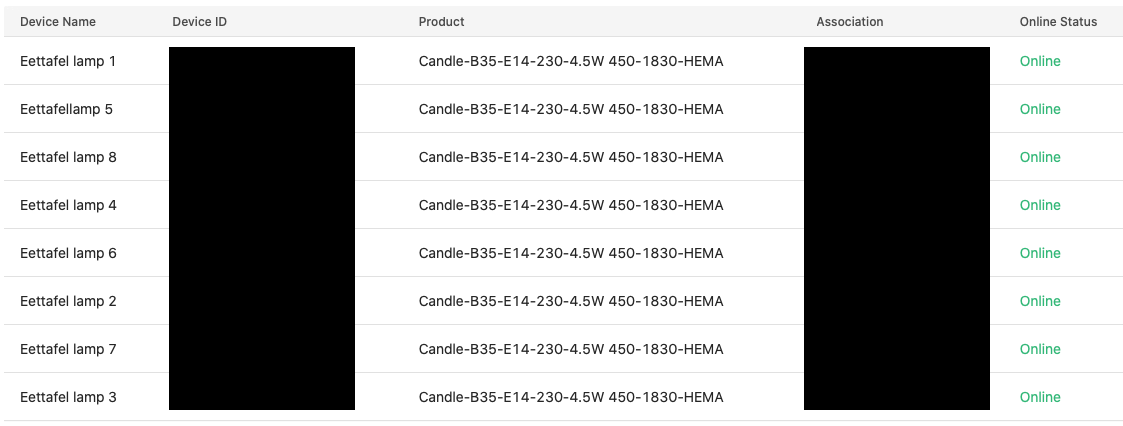
In the IoT Platform I see all the lamps. If I then look under 'Debug device → Device logs, I also see no command for brightnes coming in (except ‘Eettafel lamp 7’). With ‘Eettafel lamp 7’ those commands are visible under device logs.
Which I haven’t tried yet. Remove the lamps in the official Tuya standalone App, add them again, add them to the project in IoT. And then add them to Homey again.
I made a diagnostic rapport again: d5717046-ce9d-4591-aaae-7ee3e3a1c6f6
@kalpik, strange that worked after restart of app/homey. According documentation of Tuya it should other commands then for lights. The light command(instead of switch command, which is needed and not implemented yet in this app by me) is send to the API.
@Grim, with new API it’s possible to add more device types, but it cost time and it’s hard to do without the devices. Every Tuya device has it’s own set of commands and values. Only for lights there already 8 different ways. For now I want first the app stable for existing devices, then I will look which device can be added. Of course someone can contribute to the code. According login, the app should give an error when pressing save on the settingspage. I have to look if there is something wrong why error is not shown. But when one of the values are not good, it’s only giving an authenticated or not authenticated back, and not which value is correct.
@Sjoerd1, I have to look at the log whats wrong, didn’t have the time yet.
No problem, take your time. I keep testing and trying also when I have time .
I have removed all the lamps again. If I then reinstall the first lamp, I can dim it. If I then also add the others, dimming with those lamps does not work.
So it seems that I can only dim the first lamp that was added.
@Sjoerd1 Can you restart the app and create a new diagnostic report after 10 minutes. I see errors in your log about data which should be initialized on start of the app and/or add new device. Your log didn’t contain the init logs. maybe your device is an unknown type or there is an error in initialization.
Again the rapport. Eettafel lamp 1 is working correctly. All the others are not. I tried again with Eettafel lamp 3, dim level not working. I can turn it on/off or change the white colour.
@Sjoerd1 , I see the issue but don’t know solution yet. Your device type should use version 1 commands and ranges according definition. But some of your lights with same type are using version 2 commands and not the expected V1 commands and are failing now to set dim level. There are multiple commands and ranges for lights and dimmers. The device type is now used to determine the right command and ranges, which is failing in this case.

 , so get well soon!
 .
.