Thanks, this clears it up. your thinking is completely logical, but I have build in “anti-bounce” code that prevents code that is being send to reflect back immediate. This prevents for example the slider being automatically pushed to a previous value when the user is still sliding to a value. I have to think about a good solution, because what you want should be possible.
1 Like
Started testing with it today and my first impression is great!
Gives a lot of flexibility and possibilities, so will defenitely try it out more often.
Great work in developing!
Made a first donation, cheers!
@Satoer Would it be technically possible to generate an (animated) graph with an SVG, using data from Homey, and display it in Dashboard Studio?
Already did some fun stuff with the Studio!
Things I missed so far:
- The number 0 disapears. (so every night solar power is blank, as is actual energy consumption from time to time)
- Would there be an option to have ‘labels’ visible that are not connected to a device? I use some scripts to fetch data. I have to gatter that data en copy it into a variabel now. Would be great without that extra step. Similar for temperatures => would be great if we could define the number of decimals behind the comma.
- Is there a way to fetch the image from the Google TV streamer? I already looked into the solution provided by other, but the image refers to the URL of the provider (VRT MAX, Youtube,..) so would not update automatically and difficult to fetch the right URL each time…
- Shelly Plug status is not updated the right way if altered throught the dashboard.
Thanks! 
Technically is it possible. But how would it animate? Draw the line in?
Can you be more descriptive about this problem? What widget are you using?
Why cant you send that data directly to the dashboard? There is a THEN card to send data directly to the dashboard (no need for a variable)

I have the impression you are using a label to display data? The label is more to display just text. I think the gauge widget is more suitable to show numerical data. You can configure the gauge just to show the number (with or without the unit). There is an option to set the number of decimals behind the comma, and you can even enable “auto scale” that changes values like 1200 to 1.2k

I have read another user having problems with shelly plugs. I do not have a Shelly plug to test, but I did test this with a Ikea plug. This seems to work just fine. Connect a buttons “output topic” and “state” to the same on/off capability of the plug. And I can hammer the button as fast as I like and the Ikea plug is updating without any delay. Can you tell me what happens if you do it indirectly with a IF dashboard studio card?

Animate the creation of a graph with SVG is for fun, of course, but so is a dashboard. Animation is not “necessary”.
I use an SVG (non-animated) in my homemade web dashboard, which I now want to replace with Dashboard Studio. For example: I want to display the Stedin e-klok in the dashboard using an api, but Quickchart can’t manage this kind of graph combined with number of data points. I ended up creating the chart below with SVG.
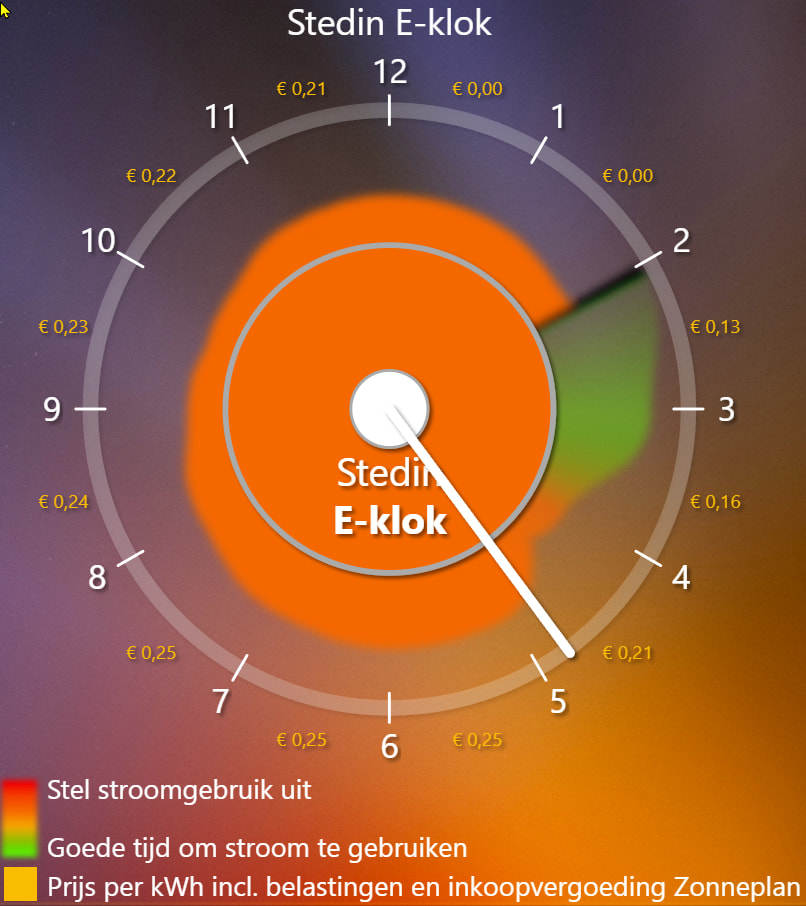
Animated SVG:

@Satoer Thanks for your fast answer. I’m indeed using a label to display the value’s because with the gauge I do not succeed in getting the text in the same layout. Seems to be always in ‘bold’ and I don’t find the option to disable it.
Thanks for the tip of the ‘then’ card. Didin’t think about that, but seems to work perfectly without the use of a variabel !
It seems to work fine for the Ikea plug (Inspelning), indeed.
As for your workaround… giving a unique name on the output….Seems to work better…
BTW: I’m not a developper or similar, I just like to play around with it. I know more skilled people can do a lot better and nicer things with it. Please don’t shoot me if I missed some obvious tweak 
Ah, I’m almost ready to push a new version, and I can squeeze in a solution for this 
I do not blame you at all. I’m more amazed by the things the users already make with it. There are so many customisable options that you could easily get drown by it. (And even with all the options already the users still seem to want more  )
)
1 Like
Yes, there is always room for more functionality, but I see it as a great compliment to your graphic and development skills, which is why I try to replace a tailor-made application with Dashboard Studio because of its many settings and flexibility.
Hi guys, I just pushed a new version (1.1.4) of Dashboard Studio.  I changed a lot based on your requests for fonts, but I apologise in advance, it might cause some breaking changes on your existing dashboards. I added a migration script to auto-update older dashboards when they’re imported (you’ll need to save again to make it permanent), but some things just couldn’t be automated. Mainly, all label text will default to uppercase now. If you don’t want that, you’ll have to manually change the “case” setting to “none” in the “label & text” section of the widget:

@Amersfoort I added a text wrapper inside the list widget, use this to wrap long text to the next line:

@Yann_Liqueur , @Amersfoort, @Johan_Huisman I put in an option for custom Google fonts. Just a heads-up in case you didn’t know, but the label/text widget already handles basic formatting like bold, italic, and underline.

@Johan_Huisman The button label can now be aligned left, right, top, or bottom relative to the icon.

@Amersfoort I renamed the scaling of the button settings to “Overall Scale Multiplier” and “Icon Size” to try and make it less confusing, though it really only makes sense when the text is outside the button.
@Yann_Liqueur added more battery styling. You can now tweak the outer line thickness, inner padding, and the terminal side.

@Amersfoort, @Bert_Onraedt fixed that bug where labels wouldn’t show “false” or “0” when using dynamic text.
@Amersfoort also fixed the issue where changes weren’t updating across other dashboards.
@zakraket, @Amersfoort I added customizable grid lines for the graph (base, top, bottom, fill, and vertical). There’s also an option for X-axis time labels now if you send an insight graph to it. You can set them to hours, minutes, dates, etc. Plus, I added a “smooth” visual type if you want a curved line graph. Also moved the decimal setting for the Y axis to a more logical location (Axes & Labels). It was already possible but the location of the setting was a bit illogical.

@Martijn_C , @Vierlijner added a button to move multiple widgets to a different page. It’s handy after duplicating a bunch of stuff. Keep in mind a single widget can exist on multiple pages (like 1, 2, and 5), so only use this if you actually need to move and change them. I also added a “delete page” button (only works if the page is empty) and an “insert page” button to shift widgets over. It also updates all buttons that link to pages to re-link to the correct page.

@Bert_Onraedt the gauge now has a toggle to disable the bold value (but the label now also shows “0”).

I think I’ve managed to implement most of your requests. Still haven’t had the time to build a proper drop-down widget yet, though. You can check out the full changelog here:
(covers version 1.1.2 and up)
The next update will likely be a security-focused one for anyone wanting to use this outside their local network.
9 Likes
Just pushed version 1.1.5. 
Discovered a bug in the graph with negative values.
Also added a Hide scrollbars option in the “Canvas Environment”:

1 Like
hello, the ‘add’ google fonts is a very nice improvement, thanks so much
I’m gonna play with the new features in the next days - for sure 

Maybe it’s better to rename move to duplicate.
I also would like to duplicate it to another dashboard. Thanks for the effort.
Awesome app! When I was messing around with it earlier, I’m sure I saw in the settings that the gauge widget had a warning/alert threshold, where going above it could change the color of the icon and make it blink. But I can’t find this anymore. Has it been removed?
I’m also experiencing a possible bug, where a recently added gauge shows an old value. I have linked the device capability in the app settings, in this case it’s pickup_next_days (although pickup_next_fractions could also be wrong, it updates less frequently):

I have also linked it to the gauge value (although it doesn’t show so well here):

It does show a number:

But it’s not the correct number. It shows 2, when it should show 1:

Other gauge values I have tried update correctly, it seems to be this one (possibly others from the same device, I don’t know, but if I leave it for a couple of days I will know if pickup_next_fractions also isn’t updating). Could it possibly be related to the non-ascii device name characters? Or that the capability has no UI component? Just guessing here.
You have probably have seen the demo dashboard with the animated glowing nuclear sign.

The gauge widget has no warning animation. This is a normal gauge widget and on top of it a icon widget with the same icon and icon size but “filled” and with the animated blink on active. So these are actually two widgets on top of each other.

If you want to layer widgets on top of each other you can disable the background of the widget in the “container style”.
You can make the visibility dynamic (on or off) to control if the animated icon overlay should be visible or not.
This is likely because the device hasn’t sent a value to the new dashboard version yet. Dashboard Studio caches the latest values in memory to update the dashboard instantly when it reloads. However, when you install a new version or restart Homey, this cache starts fresh.
Try disabling and re-enabling the device capability; this should force it to send its current value to the dashboard.
1 Like
Thanks! This worked. A slight downside is that if you set it to blink, it effectively alternates between the overlay icon color and the original color. Not a very big deal, but maybe something like what I thought I remembered is something to consider? A similar functionality to the gauge icon, with a threshold value. Preferably invertable, because sometimes you want to alert when it gets high (e.g. power usage) and sometimes when it gets low (e.g. battery level).
This didn’t work though. But restarting the Dashboard Studio app worked.
No there are two buttons, a move button, and a duplicate button. (not a single function duplicate and move) If you want to duplicate and move a bunch of widgets, you need to first duplicate the widgets, and then use the move button to move them to another page.

If you want the original icon to be hidden, you could just remove the icon in the gauge and replace it completely by overlaying the icon widget. (and then make the “Blink on Active” dynamic).
maybe. I am a bit afraid to overcomplicate every widget. there are already so many settings.
And a lot of complicated things are perfectly doable by just layering items and a bit of simple Homey logic.
1 Like
Nice improvements in version 1.1.5!
Things that I noticed (only now?):
-
In a gauge, font seems to apply only to the text, but not to the value and unit text. The gauge, button and graph text value (not numeric value) lack basic font formatting options (currently always bold).
-
After manually loading a Dashboard file, the original URL of the previous dashboard remains visible in the browser, which is confusing and error-prone.
-
in a graph the x-axis can show hours and the y-axis now has a consistant scale (nice!), but the hour differ +1 hour compared with the Homey Insight. How can I manage to show rounded dynamic numbers on the y-axis?
-
Some kind of structure or sorting would be nice using all these variabeles (just starting, see scrollbar). Could only one entry be shown; now a lot of variabeles have a name entry AND a path entry. Would it be an idea to offer the option to “send variable to one (name) or all dashboards” when sending variables from a Homey flow to the dashboard?:

Ah, when I overhauled the font system I cleaned up all the label and font settings. I probably accidentally decoupled the font from the value and unit. A separate font choise would be preferable for these items I think. You now can disable the bold setting for the value though:

agree.
Ah, I thought I solved this already in the first version. The raw data that the Homey insight is giving me headaches . The time-stamp attached to the values is in UTC format. I did convert this to the user timezone, but apparently there are still problems. The custom “Today” export setting seems to give the right hour right?
I added the option for users to use the name directly without the path. Did not realise it would also populate the dropdownbox with it. Note: did you know the dropdown is an search box as well? When you type in a couple of letters of the variable you search for it filters the list. This way you do not have to scroll the whole list to find it.
