Which app version are you using?
v2.3.1
It seems the app could not create the API. Can you please:
- restart the app, then create a diagnostics report
- then send a command, then create a second diagnostics report
Thanks.
After restart: cbae82d5-4e92-4be9-a82f-0adf588335c9
After command: 06c746eb-bd6d-4a42-ada5-5014a73fba4c
It seems, there is no public/private key stored in the app.
The public key file is existing (used for adding to the car), but the app internal keys are missing.
Did something fail during pairing?
Did you repair an existing car device or did you pair a new one?
Did you perhaps add another client_id (or change it in pair/repair view) after pairing the device?
This will clear the app certificate.
Please try:
- Remove the car key in your car.
- Start a new repair process, set client_id and client_secret, proceed to oAuth popup (if you did not clear cookies, this will be passed).
- Now the app should have a new certificate. Pair your car again.

Not that I can recall, a while since I paired it for the first time.
I only tried repair the existing
No, these have been the same all along.
Yepp, this did the trick!  At first I wasn’t able to add the virtual key back when trying a few times, but after the car had gone to sleep it worked
Thanks so much for the help and work you’ve done with this app!
Hi,
I have the following error after creating the App (I have tried with 5 different apps, so I think is not the Tesla config, and I have changed the password but the error is a different one):
422 Unprocessable Entity: {“response”:null,“error”:“Validation failed: Domain has already been taken”,“error_description”:“”,“txid”:“e77f6e…e4”}

Can anyone help me, please? Thanks in advance! 
This error means: The domain where the public key for your client_id is stored is already assigned to another client_id.
Did you try to use a second client_id for the app now? That won’t work.
The domain is Homey specific. So your Homey has it’s own virtual (sub) domain. And it seems this was already registered to another client_id.
You can now only switch back to the client_id you used first for Homey.
And the client_id/domain is app/Homey specific. It’s not possible to use different client_id’s for different cars in one Homey (if you tried that ). If you want to use more than one car in Homey, they have to share the usage limit.
Thanks for anwering that fast!
I can’t use the previous app because I did it with another Tesla account (I was testing  ), do you know how can I reset it or if it’s even possible? thanks again!
With “another app” you mean another client_id?
If it your (second) Tesla account? That’s ok. You don’t need to use your car account for the developer account. You only have to clear browser cookies for tesla.com before start pairing/repair to login with your car account if you was logged in with your developer account before.
And no, there is currently no way to deregister a domain. I requested it at Tesla but got no answer yet.
I have same problem. Data reading OK, but not able to send commands. Does anyone have any tips?
Did you add the app as car key? You can use the repair view to add the key. You are forwarded to the Tesla all to allow the access.
Ys, I have done that twice.

Hi,
I have the same problem. I can send commands from homey, for example open trunk. But If I want to stop charging or change the charge amps I get an error in the flow. Then it says: Session info hmac invalid.
Please help
It seems your car key and the app key are not in sync.
That happens if a pair/repair process is started, and the client_id/secret is changed. Then a new ley is created in the app. This must be linked to the car again.
Please try these steps:
- remove the app key in your car.
- start repair process, select 2nd button (car key) and add the key to your car.
If that doesn’t help, try to do the complete repair process:
Hi copiis,
I’m trying to build this flow as well. Can you share a complete screenshot?
Thanks!
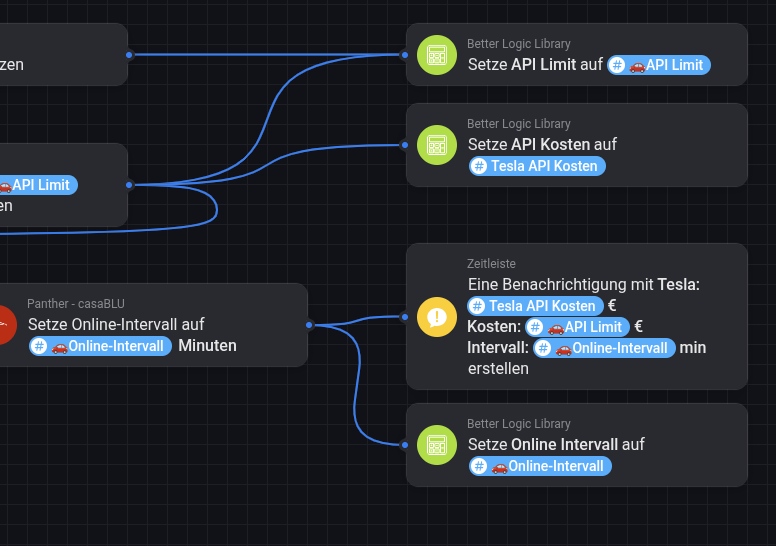
Hi Ronny,
thanks for you swift response. You were exactly right. It was indeed this issue. I did create a new app in the development environment because I had errors. Then I archived one (I think the old one, but maybe I made a mistake there. )Then I installed the app on homey again and later made the registration of the key in the car. In the process I must have made a mistake or mixed api keys or so.
Now I deinstalled theTesla app in homey and reinstalled everything again incl. registration of the key on the car. Now it all works fine. Thanks!