Well, I don’t think the reported power usage is very reliable  :
:
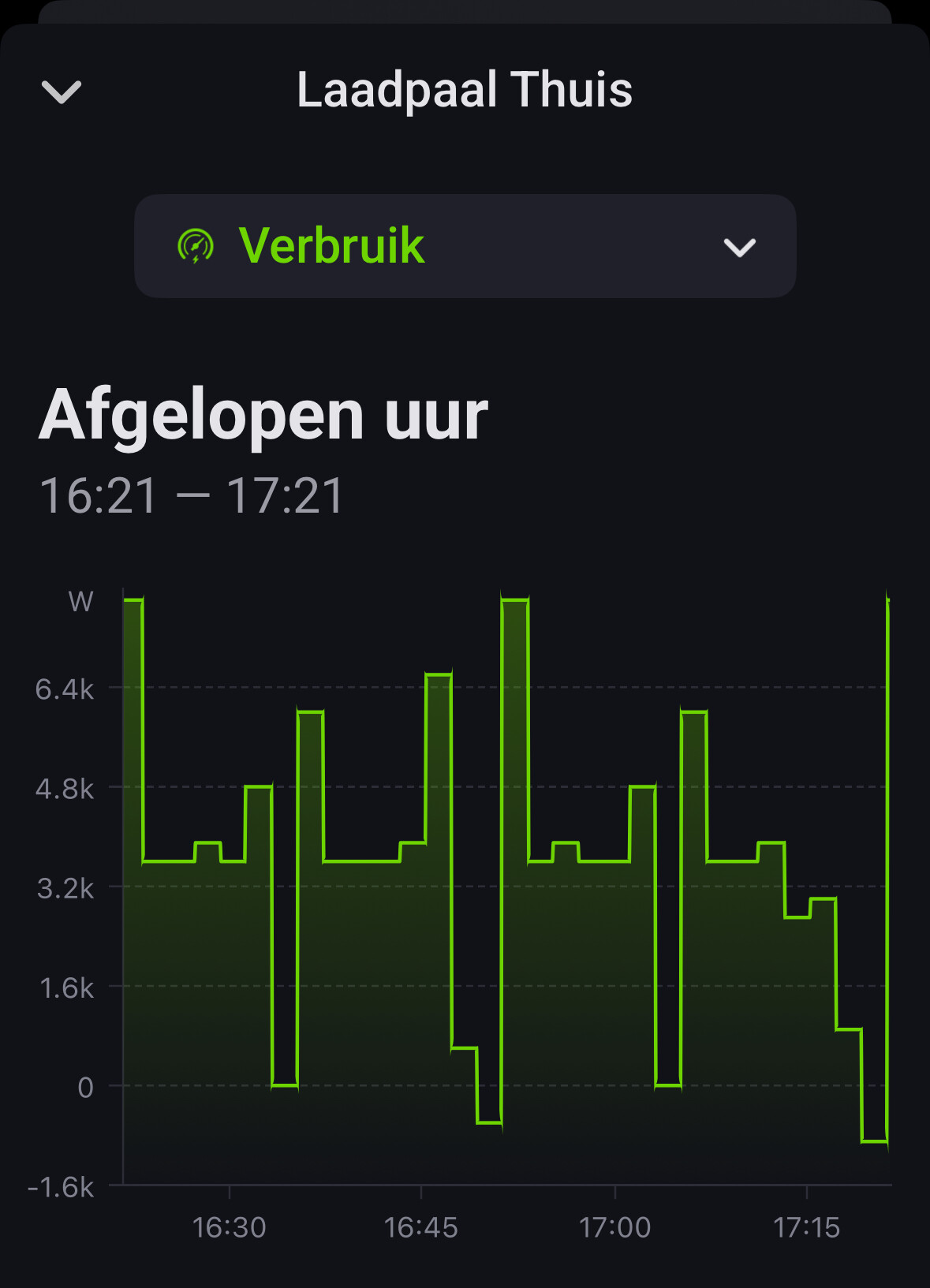
Should be around 3450 all the time.
Can you share the details from the 50five portal of this session?
Isn’t it like with the old app? If you set it to 11KW it’s either 11KW or 0.
You mean something like this?
First lines:
Last lines:
There are a lot of lines in between. Some way to export them?
These (Vermogen kW) figures look reliable.
Edit: when taking a closer look at the log lines, not all are sequential (for instance see the line for 17:45 between 17:47 and 17:49… when I scroll through all lines this happens more) or double (see 15:07, 15:09, 15:11, 15:13)
@Rudi_Hendrix no, the power usage is reported in the portal. see this post of Kaoh above: [APP][Pro] Shell Recharge and 50five - Smart charging at home for you electric vehicle - #353 by Kaoh
Nice! That would then be an improvement over the old API
Is it possible to use the app with a Belgian 50five account? (With Shell this app worked for me but after the migration I can’t login anymore). I have to use the following URL: …-sbelux.evc… instead of …-snl.evc…
Was working great before an update or two ago. It still sees my charger and is able to activate etc but now the KW’s used are not updated unfortunately.
Your log is weird though, sometimes you have empty lines with status Laden and sometimes you have Laden (vol) while it is still changing the total amount.
What I do is: If status is laden, use the power used - power used in previous update results in a delta power increase devide over the time between the two updates to get the ‘current power used’.
The Vermogen section is a moment in time, so it wont add up in case people change the speed of charging during the updates.
So in your case, it goes wrong because of the empty lines while status Laden, and I miss the Laden vol ones since I dont expect it to deliver power in that state.
In my case the Vermogen is always 0 for example. I might need to rethink this part.
If the vermogen part is filled use that else do my calc…
A new version that should solve the last session, month total and uses the reported power in case it is reported and uses avg calculated if it is not.
If you do the calc trick to calculate power, also check if the date time stamp of the new line is higher than the previous one. Else you get negative power and next time too high power (dts is lower) or zero power (dts is same) as I got in my example.
For me the reported power in the log is ok. But also only if dts is higher than previous one.
Somehow a running charging session cannot be stopped.
At 5:00 this night i stopped the session (well my automations did using the “stop active charging session”), but the session wasn’t stopped.
I saw an error message (“remote stop transactie geweigerd) in the log:
debug report: e7ffeb22-664f-49de-a2b0-4a50da0856ee
any idea what could be causing this?
Feature request:
could you add the reported session energy (column “Energie (kWh)” in the log lines) as new entity? This way I can calculate the SOC for the car.
(Only use if reported value is higher than previous one))
The current entity for “energy for last charging session” is updated when the cable is disconnected.
Since the decline is logged by them the command send was correct. Not sure why they would decline it. Could be a backplane issue occurred, point did not respond or they had a problem themselves.
I know the last session value gets updated once the session is finished, in practice when the cable is released. That is by design and how it worked before. The other Active charging is false means session is active but no power delivered (mostly when the car doesn’t want any like full). But a session is also billed like that, so it matches what will be in your invoice.
Would be possible now to add a current session total, that would be nice.
I’ll work on that one 
Yes, but this was the second time I did observe this. It’s just to let you know. Not a very big issue for me.
Yes I know, it was just an extra argument to implement the session energy entity, to keep an eye on energy usage during charging session and before unplugging. Great you want to look into that.
@Kaoh still something not ok in power calculation.
I think it has something to do with the empty log line at 8:26, so the calculation at 8:28 goes wrong?
Maybe ignore empty log lines, or don’t report power below zero?
When I look at my total power usage around that time, there is no dip, so I suppose the charging power wasn’t zero, so I suggest to just ignore the empty log lines.
I also can’t login using a belgian account. Is it possible to change the URL by including a country picker or something?
Great work to make it work with fifty-five!
Basic functionality works using default card details.
However, i noticed that when the loader is not active it does not seem to update it”s status -
So when you plugin without starting a session the device status stays the same instead of now saying cable connected?
The portal doesn’t show a state there as far as I can tell, so can not detect it if 55 doesn’t show it


