Yes, thanks for clarifying that point.
I also have a Q10 S5+ and it’s not working on that one. And when I enabled the map under advanced settings I keep getting a this error message very time I open the robot.
Error: connect ECONNREFUSED
IP address:58867
I still have my old S6 MaxV and the map works perfectly on that one and can clean specific rooms.
Hey @Seb_Seb
The Q7 and Q10 series don’t have local connectivity. If you face errors with it, it is best to disable the local connectivity for these devices explicitly.
Additionally the map is not yet supported for Q7 and Q10 series either.
Kind regards,
Hello guys,
I’ve just pushed v3.9.0 towards test, available using Roborock Cloud | Homey
This version has support for parsing the map on Q7 and Q10 series, it does not support rendering the map yet.
However, this should make it possible for room-based cleaning for these devices. Let me know if it works, I was unable to test it.
Kind regards,
Hi Kenny,
I very much appreciate the effort you are putting into this. For my Q10 S5+, it is unfortunately the same and I am not able to load specific rooms to select in a flow for cleaning, nor does it work to type them in.
For Maps however, selecting a maps and running the flow card is working. I personally was already able to load maps and clean from v3.6.0 until now. The issue which has not changed in 3.9.0, is that you cannot load one map and then run a different flow that loads another map without first restarting the Roborock Cloud app. That is how I was successful in version 3.6.0, and that hasn’t changed.
If you have access to a robot Q10 (and probably it behaves the same for Q7) you can see this behavior by pressing enter on a blank [map] field of a “Load the map [map]” action card. If Roborock cloud is freshly loaded, or has been restarted a least 4 seconds earlier, you can press enter on a blank map selection field or clear the field to get the drop-down menu with all available maps to choose from. However, if you test the card to load the map you just selected and then return to the map selection field and clear the preveious selection, no drop-down to select a differnt map will appear. Once you reload the Roborock Cloud app and wait about 4 seconds before attempting to select a map on the “Load the map [map]” action card, you will once again get the drop-down to select another map to use.
IMPORTANT: There is a caveat you should be aware of when testing the selection of maps in the “Load the map [map]” action card. You need around a 4 second deley after restarting the Roborock Cloud app in the test case mentioned above, but when you run a test flow such as shown below, the app can switch between maps after restarting with only a 2 second delay.
This test flow works consistently, and you can watch the rooms change in the app.

In daily use, this is an example of two differnt flows that work reliably. I have the identical flows for two other maps that I am using to circumvent my inability to select invidual rooms for cleaning.

Hope this is helpful information.
Kind regards,
Doug
Still not working for me neither, can’t choose a specific room, no room is showing up in the list.
Thanks for the feedback already!
@SmartHomePrimer - sadly I only have access to a Q7 device right now. I don’t have access to a Q10 device, I know that copystring (who develops the iobroker integration) has reverese engineered the Q7 map, I hoped it was the same for Q10 series, but it might not be… If you would be able to share your device with my development account I can dig deeper into it.
@Seb_Seb - are you on a Q7 or a Q10 series device?
Kind regards,
Hi
Enjoying the app very much, and recently upgraded from Q7 to Qrevo Edge, and it seems to be missing a flow card for water mode
When trying to set the mop intensity to intense, I get the error “The water mode must be defined”.
46fc6084-1a50-431d-8e87-d437595944fb

46fc6084-1a50-431d-8e87-d437595944fb
Hey @LeisWeb
That should not occur. I have an idea where the problem might come from, and pushed a patch as v3.9.1 towards test, you can get it from Roborock Cloud | Homey.
Could you let me know if this helps?
Thanks,
@KennyMoens Thanks for the quick reply and patch
Installed v3.10.0 and it worked great


I’m on a Q10 S5+
Let me know if you want me to share my Q10 with you.
Hi All
Not sure if anyone find it useful.
But I have managed to create a Dashboard widget that allow for room selecting by toggle switch.
I thought others might like it 
It requires two other apps, Device Capabilities & Enhanced Device Widget.
Dashboard:
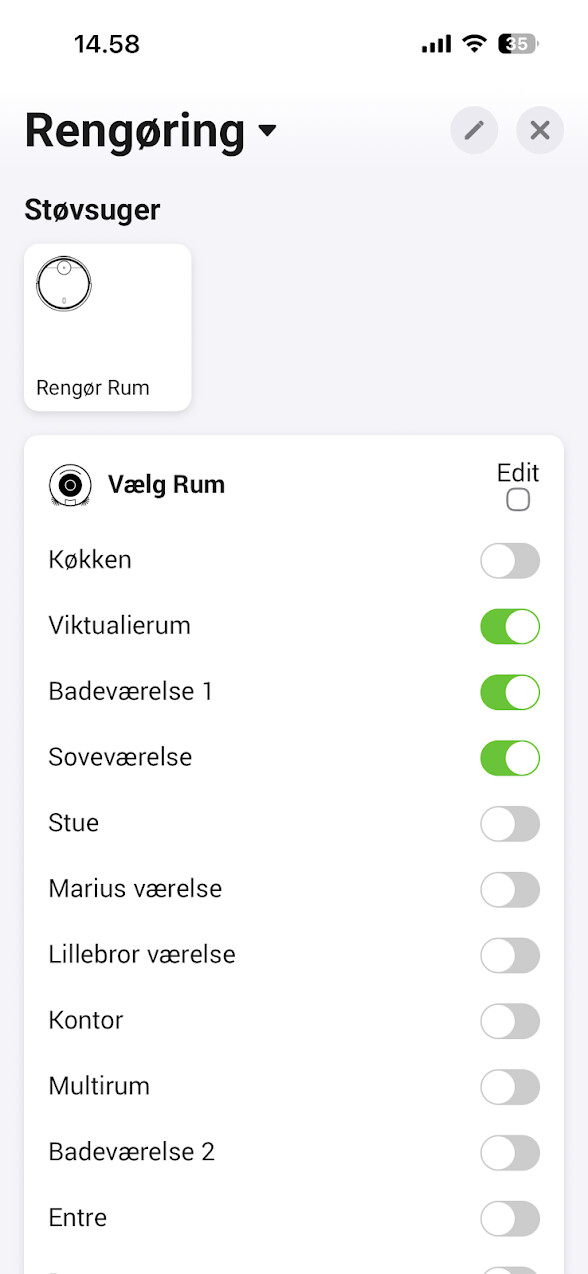
I am not able to post more then one photo. But let me know if anyone find it interesting.
Then I will share the flow logic and the setup for the other two apps.
Hi @KennyMoens
I have the Roborock Qrevo Edge (S5A) Series Dock with a Roborock A187 (S8 Pro Ultra) vacuum.
Your app is working great and I can make flows (for special notifications to family members that don’t have access to the Roborock App).
What I’m missing is the notification when the clean water tank is empty and needs to be refilled or when the dirty water tank needs to be emptied. Can also the notifications be added when the vacuum bag needs to be emptied and when the mops “dock plate” needs to be cleaned?
I hope you can add these notifications to Homey.
Hey @KSBahorie ,
Probably it is possible yes.
Normally an alarm should be already generated for these cases:
- Robot is stuck.
- Battery is low.
- The dust bin is full.
- The clean water tank is empty
Any other alarm signals should trigger the generic alarm.
Can you confirm that you at least get the generic alarm in those cases? If that is the case, it is only a matter of figuring out the right error codes.
Kind regards,
Hi @KennyMoens ,
From Homey I get the notifications when the robot is started and when it’s finished. These (below) notifications work fine.

I also created some error notifications, but I didn’t received them yet, because the robot was never stuck and there was never a battery warning. The general alarm notification (“er is een probleem gedetecteerd”), is not triggered yet and I didn’t receive a notification from Homey.

The message that I received from the Roborock App and not from Homey is the:
- Clean water tank is empty
I didn’t receive a dust bin full notification from Roborock App and Homey, because it isn’t full yet  . Also the notification to clean the mops “dock plate” is not received from Roborock App and Homey, because the robot is new (I just have it for 2 weeks).
I hope you can help.
Thank you in advance.
Hello @Seb_Seb and @SmartHomePrimer ,
First of all thanks for sharing your devices to try to figure it out. I took some time over the past days to dig into it, but I currently have bad news …
The format which contains the map information (and also the room information) is totally different in the Q10 series compared to the Q7 series and all other devices. This implies that we have to reverse engineer it completely… I’ve just checked with my peers at IOBroker and Home Assistant and they didn’t figure it out yet either.
This implies that it will cost more time to analyse it and implement it. I’ll keep you guys posted!
Thanks,
 Well go figure. I used to own an older model Ecovacs Deebot, and one of the few that wasn’t supported by Home Assistant, but some of the features did work on Homey. Just before Christmas it died and I replaced it with th Q10 S5+.
I was excited that I would finally have a fully supported robot, but of all the vacuums one can buy, it turns out I managed to buy myself into almost the same situation as before. Only difference is this isn’t an older and less popular model, so I’m confident that the great developers behind these efforts will inevitably find a solution. I just find it funny that I went from one partially supported robot to another. I really know how to pick them. 
Thank you so much for you continued efforts Kenny!
I have shared my Q10 S5+ with Kenny so hopefully there will be a fix to this soon!
