@Gruijter
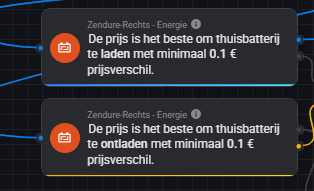
Flow settings are both set to 10 cents, and as you can see, charging has started:
However, the chart displays in grey, and the price difference within the upcoming hour is not 10 cents:
Here are the setting on the virtual device settings currently applied.

It’s an LFP battery; the last percentage can take up to an hour to charge.
Can you fix the issue so that the flow matches the strategy it represents on the chart?
FYI; I restarted the app, and refreshed the chart a couple of times. The SOC for past 6 hours;
And now for discharging;
The chart has changed and shows a grey hour, yet it has still started discharging, as shown above.
You are using the wrong flow card. You need the ‘smart’ ROI card where you can set a minimum profit per kWh.
Thank you for your response!
That makes sense, but I need to input the charge and discharge wattage in a different section, both positive values. How can I go about doing that? I tried using the calculated Smart ROI power and assigning it to a variable.
However, when I try to use that result in a different flow, it doesn’t seem to work. Let me show you what I mean:
But when I try to use that in a different flow i cant try it, and let me show;
It worked on my side, Ria. Did the trigger work?
@Peter_Kawa the flow now triggers but The SolarEdge invertor does not do anything. I think I give up on this. Thanks for all of your help here
I see. It’s quite a challenge sometimes.
So it’s a Solaredge control issue? Let’s continue in that app topic in that case. When you’re up for it some day of course.
Can someone help me get the battery monitoring system working correctly?
I let it calculate the strategy, but when I select the “if new smart ROI power available” option, it doesn’t allow me to test it. The calculated values are not populated, which seems to be why the option isn’t usable.
However, when I click “Start” to test manually, it lets me enter my own figures.
Am I missing a step, or is there something I’m doing wrong?
Edit->
Made a step forward: but now when I run the flow I’m getting this error:
The power token is just; - (no number)
Fixed! Turns out I just had to wait for it to update. 
Thank you @Gruijter.
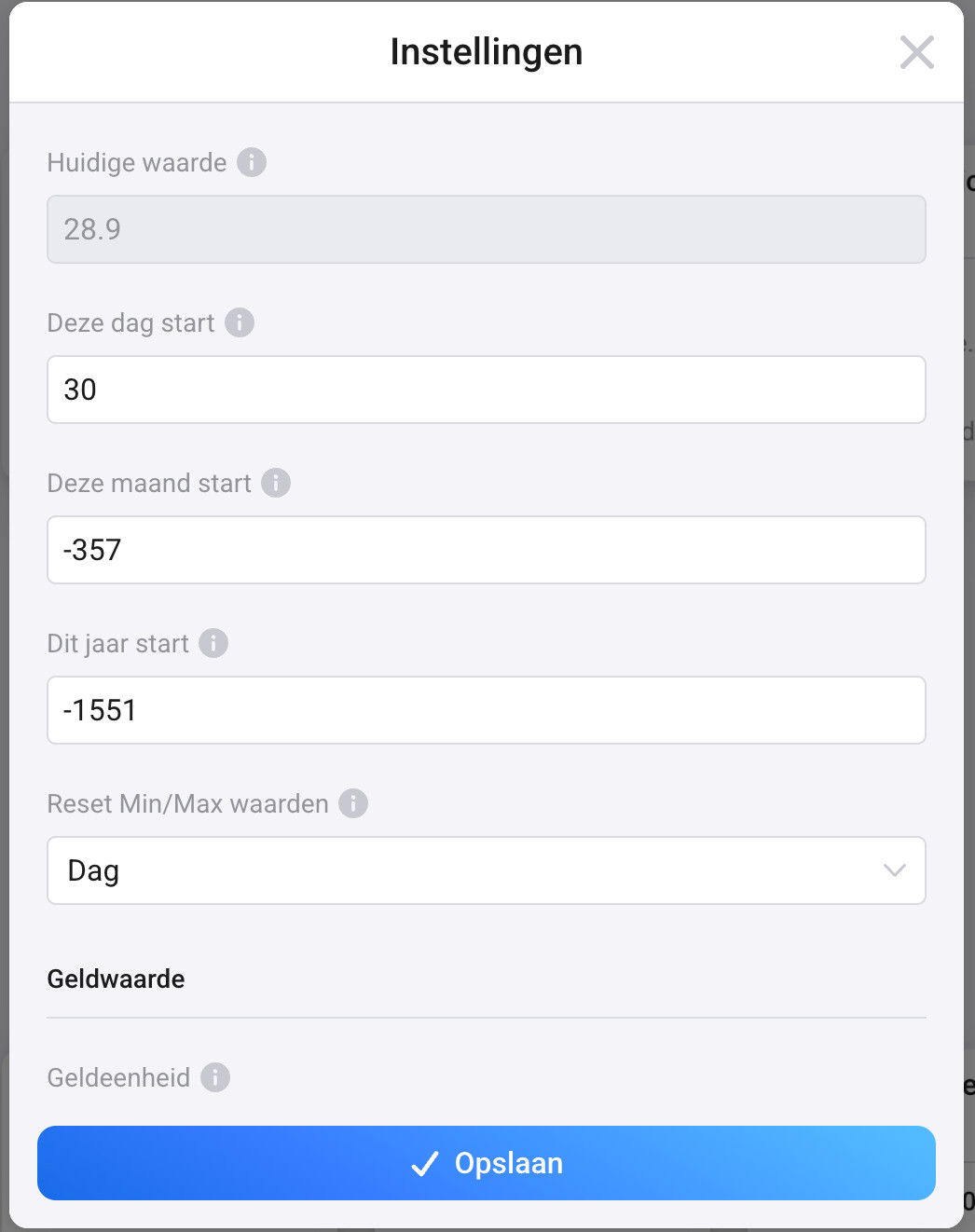
I am trying to configure the PBTH for my Solax Inverter properly, but nomatter what values I enter into the day start, month start and year start, I keep getting wrong (negative) values for the kWh this month and kWh this year. I even re-installed the entire app and put the month start and year start to a negative value matching the amount of energy produced this month and this year:
My Solax does seem to reset the daily power usage:
So I have set the reset daily to yes:
Solar power makes the counters go backwards.
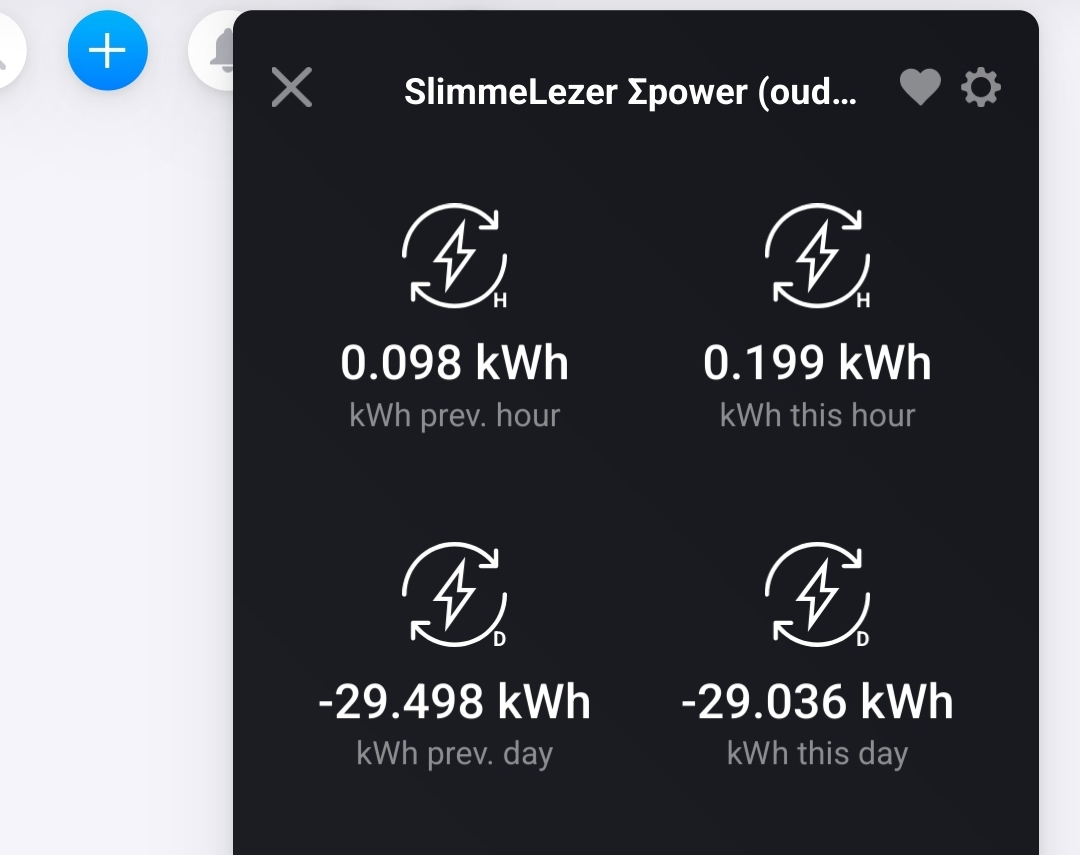
When the Energy production is higher than the consumption, the kWh counter counts back, and becomes negative:
As you can see at [kWh prev. hour] and [kWh this hour], they’re now counting up, because the solar production is less than my power consumption.
How convert solar power Energy values to positive kWh readings:
You can add an advanced virtual device (AVD) in between, which converts solar energy to ‘normal’ energy
Settings:
As you can see, at [Device] I selected my Growatt inverter, and at [Property] I selected it’s capability “Energy today”.
This now feeds the AVD automatically!
Now change the source for the PbtH Power summarizer, by using the “Repair” function.
Select your recently created AVD instead of your solax inverter here:
Yesterday it was decided that the introduction of 15 minute pricing will be delayed in EU until 30 September.
I do not fully understand why I need to add another virtual device (and for that another app), since my Solax Solar power already has an Energy today and an Energy Total value as you can see in the snapshot below.
So basically I would like to understand how the set the two values below to get a proper reading for the kWh this month and kWh this year:
Hi, How can I most easily retrieve an array/list of all 24 hourly prices for tomorrow from the DAP device for use in HomeyScript? Is it possible?
There is a flow card to get a JSON with prices
Hi all PBTH experts 
I’m trying to get my total electricity cost correctly calculated in Power by the Hour.
I already have the spot price coming in, but I also pay a transfer fee per kWh to my grid company. So, in my case:
SpotPrice + TransferPrice = TotalPrice per kWh
Unfortunately, I can’t see a built-in way in PBTH to add that per-kWh fee on top of the spot price. The “fixed cost per day/month” option is useful – but I really need this dynamic hourly cost to reflect reality.
 Is there a way to adjust the tariff every hour with a custom value (spot + transfer)?
How have you solved this in your setup?
Any flow examples or workarounds would be greatly appreciated! 
Thanks in advance – I’m sure I’m not the only one trying to solve this!
//Wagis
If you use the PBTH DAP driver for this, simply go to the device settings and add any fixed or % markup there.
Thanks for your reply!
Not sure I understand what you mean.
Should I add my transfer fee here manually?
In my case, it’s 0.307 kr extra per kWh on top of the spot price, and I’d like PBTH to calculate with that total.
That is the summarizer device. You need the Day-Ahead (=spotprice) device 
Sorry, I’m not quite following. 
I’m getting my prices from Tibber, but I don’t see any settings there for adding a transfer fee or setting a group number.
Is this something I can do with Tibber, or do I need to use a different app like Day-Ahead Pricing instead?
Thanks in advance for clarifying!