[APP][Pro] Power by the Hour: Insights per hour, day, month and year

Thanks. So we’re sure the incoming data is correct. I’m afraid only dev Robin can help.
I assume you tried the standard “fixes” like app restart & Homey PtP actions already?

Alternative way:

Disadvantage / good to know: it fires the action card(s) every hour (if the price actually changed) , as long as the price is greater than 0.15

Thanks. Tried those “fixes” but for now your suggested alternative way seems to work corretly. :+1:

1 Like

Nothing I can do. The cards ‘became higher/lower’ are automatically generated by Homey.

I understand Robin. I meant ‘help’ in a way maybe the app logs or diag can reveal anything, “users” can’t access that.

Luckily there’s a 2nd way to accomplish a similar price trigger.

1 Like

@Gruijter I ran into this again now a few times, the last time was pretty soon after a reboot and I didn’t even install any dev apps in the meantime. I submitted a PR which should fix the behavior to calculates the interval to the next full hour on every run of the job. I would appreciate if you could take a look at the PR whenever you find time :slight_smile:

If price is already over 0,15 cents when the flow is triggered, then it doesn’t become over 0,15. You would need to use “new price hour starts” trigger. Not sure if this is the problem, but could be.

@madpet Many thx for your kind donation! Much appreciated :heavy_heart_exclamation:

v6.6.0 is ready for testing: Power by the Hour App for Homey | Homey

  • Fixed internal hourly trigger drift (thx @staeff !)
  • Stability improvements.
  • homey-api@3.6.3
1 Like

I do like to use the PbtH app for some logic actions.
But I have the idea I do not understand all cards correct.

What I want to do is, in this example, switching off and on based on the changes in de hour price.


In this example, I like to switch off 6:00 and switch on 8:00. Again switch of 18:00 and switch on 21:00


In this example, I like to switch off 17:00 and switch on 22:00.

But right now I am not able to configure this right with the ussage of the cards. Maybe I do understand the cards not correctly. Perhaps my mind is not following the same lines and guides as from the developer.

Is it possible to switch dynamic with hour prices. I think that I use the % card, I can solve this for the rising, because higher as average.

For going down, the card is price come below x% of average this day.
I do wish and like a turn arround of the first card
So my idea is
The price become lower than average this day + 10% Than I do have the opposite of the rising one.
Do I miss a logic thinking or is there any other solution for my idea?

If I am not clear enough, please ask for more details.

Thanks in advance and regards Steven

High @sschot ,
that is an easy one.
Here are two solutions:


Cards are in German, but don’t worry:
The relevant cards in English are:
If price gets high
If price gets low
When price has changed
Price is high
Hope that helps. :grinning:

1 Like

Thanks! If I do add a simply card in between when the Boiler is on or when the boiler is off, there are not so many command to the smart plug.

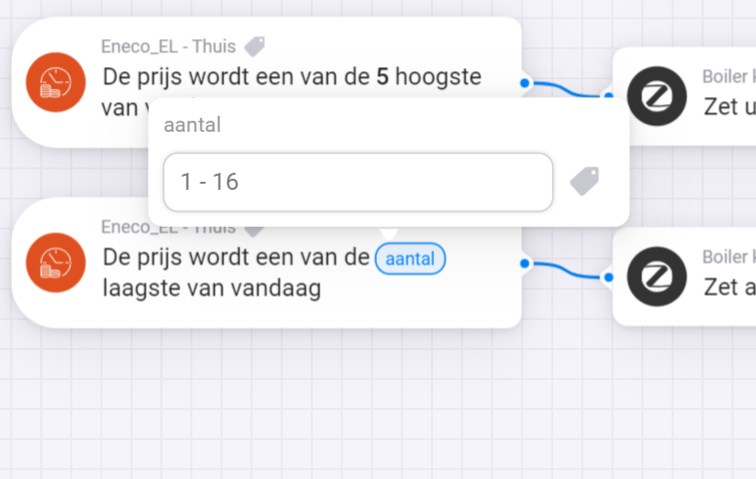
I was confused about this because for my idea I could only put a number 1 and 16. And 16+5 was not enough.


And with your information, I can switch now as well when the level become above or below a certain level!

Thanks this was very helpfull!

2 Likes

Got the new update today and electricity prices won’t update anymore. Restarting won’t help. Anyway to go back to the previous version or other advice?

1 Like

I have the same problem. Since yesterday’s update, the prices are not updating. Restarting the app didn’t help.

obrazek

1 Like

I cannot reproduce the issue. For me (NL) all is working good. Did you check if the source data is available? Data view

Yes, data is normally available.

I tried adding NL device and also no prices.
obrazek

Homey I restarted the app as well. Nothing helped. Last price change before installing the last update. Thank you

For me the same issue (NL). Also when I try to update the fixed fee I get this error:

Yesterday the app was not working at all. When I tried to restart I got the message that the app was not installed. I reinstalled the app, and now I get this message.

Can you create an app diagnostics report for me?

cf5f6454-78ae-40e0-93ec-8e8622dfc076

90f180b0-88a2-427b-96ec-f93254aaa2b6

Seems to work again.

No price data available (FI)

96a230bb-e0e8-4df6-88c6-c6ba53f62f70

1 Like