Thanks - will do!
Looking forward to it! 
Are you referring to the PB event log page? I meant a history of configurations.
Or is there some more woodoo I’m ignorant about? 
Thanks - will do!
Looking forward to it!
Are you referring to the PB event log page? I meant a history of configurations.
Or is there some more woodoo I’m ignorant about?
Sorry, there will be a slight delay. Having some minor issues with finalizing the car-charger code that will come in the same version.
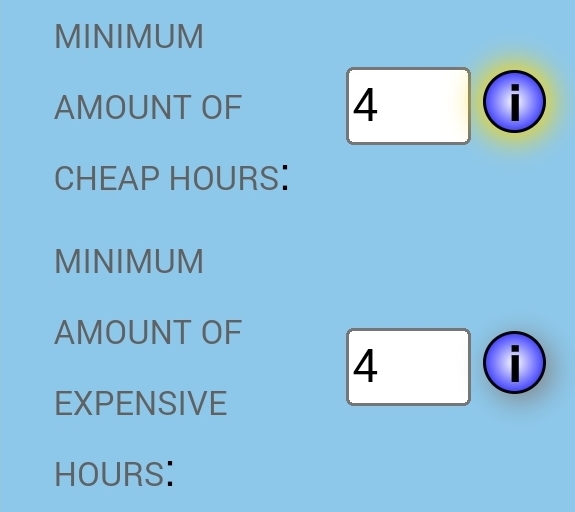
It’s cheap/expensive with dirt cheap/extreme contained. (although the likelihood of getting a dirt cheap hour when the rest of the hours had to be forced down to cheap is extremely unlikely. The same goes for the extremely expensive hours)
Hallo. Håper det går greit og skrive på norsk?
er det noen mulighet og kunne endre pris med flows, det vil kunne gi oss en mulighet for og kunne tweake litt selv.
har satt opp flows for og endre prispunkt men hadde vært greit og kunne se prisene i appen og eventuelt ka man har spart ved og bruke strømm på di forskjellige pris tidspunktene. og prisene kan bli sortert etter hvilket prispunkt man har satt i flowen.
håper noe av dette gir mening
Ellers en veldig bra jobb du/dere har lagt ned for denne appen
(Please use English in the forum, Norwegian is ok in personal messages)
What you’re asking for is already possible.
Under the menu “Units → Price control” Select Mode equal to “Manually from flow card”
Then you can use the flow card action “Change Piggy bank price point to …” found under the app Piggy Bank (not the insights device)
Install the insights device, go to advanced settings for the device and enable experimental features, this will allow you to see how much money you saved. (although, I’m not sure if it will work for price points from flows. It may be that it only works for the built in options for now, after all it’s experimental  )
)
Thank you
Version 0.17.9 is now out for testing:
Note: This version will not work for Easee car chargers with the stable version of the Easee home app. The test version 1.4.9 is required. When installed set the new capability for the Easee charger to locked to prevent charging to start when you connect the car. Time control of charging can be done with price points or operating modes for now.
Both relays acting as car chargers and Easee car chargers should be supported so I would need someone for both options to verify that this is indeed working.
Due to the two bug fixes in this release I will probably push this version to stable ahead of time (even before the Easee home app get out of its test phase. Please be aware of this if you are affected.
Will this app become available for Homey Bridge?
Unfortunately I have to pay 99 euro on a regular basis (not sure if it is per month or year, it doesn’t say) in order to publish apps to Homey bridge which makes it utterly unacceptable at my side as I don’t have any income from this app. Then again, if I get a sponsor you never know, or if the homey bridge users would fancy a subscription deal acceptable, would they? Making this app for free is one thing, but I don’t want to loose money on making it…
Some of you might have experienced this:
The bug manifest itself in 3 ways.
I thought I fixed this in version 0.18.11 but apparently, there are still some issues. This have top priority for me, so rest assured there will be a fix very soon.
Ok, so after having the app run through the night with some extended logging I think I now have a fix that works. I’ll let it run for a few hours on testing and push it to stable before the end of the day (if it works)
Ok, the bug fix is out. It will have a follow up fix tomorrow that will remove the broken data from the history. In all cases the broken data should show higher daily max than what you actually used so that’s on the good side, but still, it’s a bit embarrassing and unfortunate. If you really want to check if you crossed over the power tariff for the time affected you need to check elhub.no. I’m sorry for the inconvenience.
Thanks! The Elvia app also has virtually the same plot (for those who are customers).
I use a (virtual) charging relay device. Does the app now start charging only when enough power is available? (And thus avoiding toggling, I assume.)
How does the managed charging interact with the rest of PB (modes/actions)?
My car device has a capability indicating the current cable connection and actual charging state (albeit often a few minutes delayed). Would this be useful to pass to PB via a flow card? I e if the cable is disconnected, no need to even consider turning on charging.
Hi. Where can I find PB insights?
I did add a threshold to try to avoid toggling too much, but I think I will do some more changes this evening, it could have been easier.
It’s not any different than any other actions. Does it have to? It responds to price-point control and mode control. Meaning that if you want to time the charging you need to use a mode for it. Not sure if this is ideal, but it’s a start. If you want it differently I have to think out something.
Maybe. What is the device btw? I could probably do something similar that I’m doing with Easee, reading these things directly.
Yes, when the app is restarted (new version) the variable that keep track of when the flow was last called is reset. I can make it more persistent so it is less confusing.
After installing the app you have to install a device associated with the app.
You will find it by starting the normal install device procedure then clicking the app, then clicking the only device that pops up.
But you use the configured min/max charge power for this threshold, right? I assumed that was the purpose of these values.
I’m not sure if I need changes. I use a Virtual Devices mode device as a facade for charging my car. This works quite well without being selected as a car charging device in PB. My only gripe is that PB turns it on whenever it’s next in the mode priority, ignoring the configured power draw.
This virtual device can be configured with power draw when on (and another draw when off). If PB understood this potential draw (when the device is on) it could deduce that it is not worth it to turn it on, e.g. if my water boiler is already running, and I’m close to the configured tariff level.
Further, PB does not know whether the charging cable is connected or not (which could also avoid spending time trying to start charging). I could pass this state with a flow card. If you’d like to consider direct support, I use the “Kia & Hyundai” app.
I guess you can use zone control for that right now. Just turn off the “charging zone” when there is no car connected.
Which device Bluelink (Hyundai) or UVO (Kia) ? Can you please click the missing device link on the help menu and try to report the charger as a missing device. This would simplify adding direct support.
I see from the source code for the Kia & Hyundai app that the states are Not connected, On (Slow), On(Fast), Off (Slow) and Off (Fast)
I suppose the On (Slow) and On (Fast) will charge at two different rates? Are these rates known / similar regardless of which car is connected?
Also what is the difference between Off (Slow) and Off (Fast)? The state they jump to whenever charging is complete?
Excellent point - I’ll try that out!
Bluelink for me. I’ll report.
No, they just correspond to AC (slow home/in-car) and DC (fast/super external) chargers. The actual rates can vary greatly for both, but DC is usually almost a magnitude more powerful than AC.
It just reflects the kind of charger connected (as above) without actually currently charging.
If I were you, though, I’d focus on more general PB strengths rather than individual car brands!  Depending on a bunch of other apps also complicates and adds risk to your maintenance.