Hi Peter. That’s what i was missing ! Thank you for your help.
Hi. Since a couple of days I’m getting this error:
Invalid API key. Please see Frequently Asked Questions - OpenWeatherMap for more info.
I’ve already created a new API key, but doesn’t fix the issue.
Any thoughts?
Re-adding the devices fixed the issue.
I created an account today and entered my credit card details, but I still can’t add the device. I get a Device Setup Error saying I need to enter a valid code. I’ve already generated a new key.
It can take some time until the key is active. But within a hour it should work.
Thx it works after some time


The tool tip only shows examples for the tags. You will see the correct values only if you print the tags into the timeline (if the flow is started by a capability change.
The coordinates in device settings sre the ones from the selected location/city at pairing. If you did not select a city, the Homey coordinates are used.
Hello, I don’t really understand how this works!!! Is there a manual to install and use this application? I just want homey to know if it has rained in the afternoon so that my watering programmer can trigger a watering session in the evening (or not if it has rained) …
When you’re finished reading post # 1, read post # 2 as well 
google translate
Good afternoon,
First of all, thanks for making this app. I am new to Homey (with the result that I let myself sleep along) and have tested a few things, such as the Belgian KMI app, but that was way off.
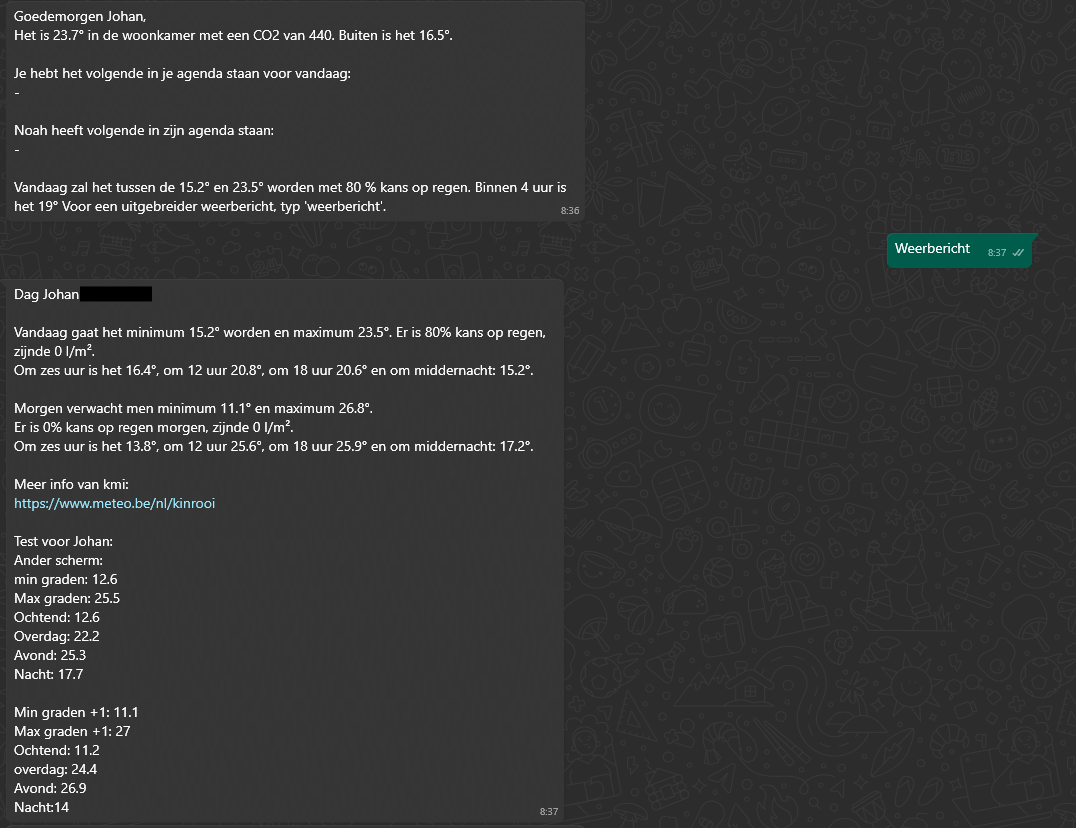
I am playing around with this app now and can compare the data with real data from my weather station. In my test setup I also have two weather day summaries. However, this data differs from the daily forecast and, by extension, from the hourly forecast.
I read that the purpose of the weather daily summary is historical data and up to 4 days ahead, is this the reason that the data also differs?
In attachment, for convenience, my two flows. One when I wake up and one when I give a whatsapp command. The bottom data in the last message comes from weather daily summary.

Hi,
the historical data can be used to check the amount of rain for last day for example, to make a watering flow.
You can use also the forcast data from this device, but I think it’s better to create a daily forecast device (+1 day ahead).
I haven’t compared the data yet.
About data itself: OWM provides data for many countries. The data itself comes from various weather services. It depends on your country. But I haven’t details about it, you have to ask OWM directly if you need to know 
I have exactly the same issue. Generated a new code, I waited more than 1 hour, but still getting the same error. I have read the first posts. Are there other reasons why it doesn’t work?
Can somewone advice I just deleted my old apps key, doe je subscription on open weather site en made a new key, but when I use it it always says invalid key.
It can take a while until the key gets active. You also added a subscription (credit card)?
Yes wait a day then?
It should be active within an hour.
You can also try OWM API with your browser just to be sure you inserted the correct key.
https://api.openweathermap.org/data/3.0/onecall?lat=33.44&lon=-94.04&exclude=hourly,daily&appid={API key}
Being a newbee to Homey, I tried to setup the devices for OpenWeather for current weather and forecasts. Current weather works well with tha API key, but I didn’t suceed in setting up the forecasts. Which devices I have to use in OpenWeatherApp in Homey (I tried hourly and daily forecasts, but it didn’t work)? It says that the forecasts require a separate subscription. I only have the free access API Key which (according to OpenWeather website) includes “Current Weather API, 3-hour forecast for 5 days API)”. Thx
Did you read all info in post 1 of this topic already? That should get you going.
I did that already - the first device does not seem to work (requires separate subscription). The child devices can sucessfully be set up, but they provide no data (after a few minutes it says “device not available. The location is not available”).
I have to use device 8. in the OpenWeather App for the free calls to receive the current weather, although this doesn’t work to set up child devices for the forecasts.


