Hi, I’ve configured today’s forecast and tomorrow’s forecast. I noticed Probability of precipitation & volume as well wind speed showing same values for today and tomorrow. I’ve just queried the open weather API for my location manually. looks like tomorrow’s values are the same, but today is showing tomorrow’s value for precipitation etc. Temperature for today is correct though. Have you observed similar behaviour before?
The today forecast (daily forecast with 0 days offset) is not showinh correct values every time.
Many users recognized changes during the day as if the forecastbis adjusted to the current weather during the late morning.
But it also depends on the local weather provider whose data is used by OWM.
A possible solution could be:
add a new current weahter device (location) with deactivated interval.
add the 0day forecast
create a flow somewhen in the morning to read weather data (e.g. 6:00)
So you get a today forecast witb onetime reading in the morning.
You can check the data in insights to find a good time to read the data.
So you can prevent the data updates during the day.
I hope this helps a bit
Is the error still present? If yes, please send me a diagnostic log from app details. I would say there is a missing field in API responde that’s causing an error.
Thanks in advance.
Thanks. There are no errors in the log.
Only some changes for dew point, temperature, humidity…
Can you please try the URL directly?
You can copy the Lat/Lon values and API key from device settings of your current weather device and insert them into the URL.
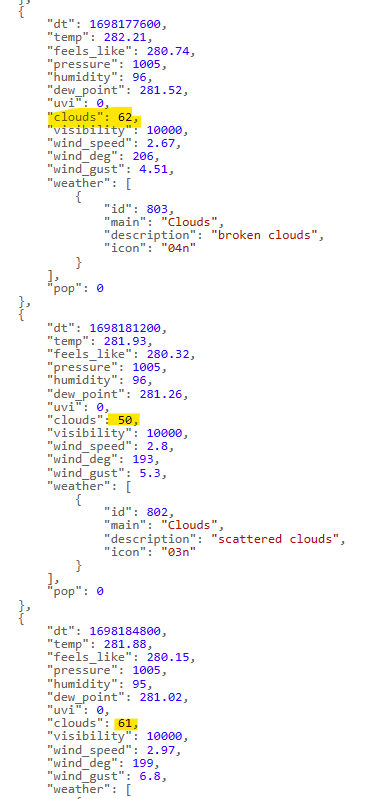
Ylou should get a large JSON text and inside the hourly list, every hour one set of {…} including hourly data:
Please check if there is a “clouds” value. If not, then perhaps your weather provider doesn’t provide the data. Did it work in the past, because there is 50% set for every hour?
But the 41% values are still wrong. The others are correct at the moment. about 40 minutes ago all values were at 41%. Now some are correct.
I’m using a new API-Key and i changed my location (just 4 places behind the point)
Does the app needs a lot of perfomance? What refresh intervalll should i use?
At this moment the values for 1h to 3h changed again… all with 59%.
Wow, that was fast … Thanks.
I’ve installed the test version 1.5.2 and added a few new devices.
Well, cloudiness for all devices from +10h to +20h are at 100%.
BUT: yes, it’s bad weather here. The URL is given back the same values! Tomorrow seems to be the same bad weather.
So, it shows the correct values at the moment.
I’m offline the whole day and back late. I’ll take a look at the app, today and tomorrow and give you a feedback.
@RonnyW , thanks for the great support.
The bug is fixed. The cloudiness is shown correctly at the cards now. I’ve checked it yesterday and today with the URL of OpenWeather and my location. PERFECT!
For this bug I can give you a release. But of course, I can’t do a complete quality assurance, because I don’t know (yet) all functions and the cross effects of your change. But the repoprted bug is fixed. And I don’t have other issues at the moment.
If there’s anything else I can do to support you, just please get in touch.
Thanks again! Osty
Great app.
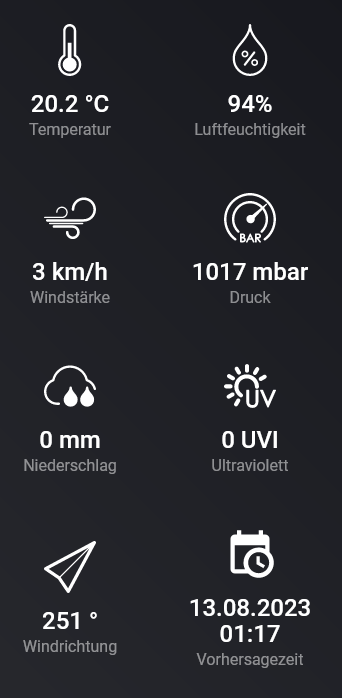
I have a question: Why is the order of the information in the overview different in each case?
I always have to search for something.
Wouldn’t it make sense if it was the same everywhere?
And the categories (rain, wind, name) arranged next to each other?
With “overview” you mean the capability/sensor list in device details?
The app/device is designed to show the sensors in a “nice” order. It’s defined in device definition.
HomeyPro19 is showing all capabilitites in defined order.
HomeyPro23 is showing standard capabilities first, and custom (app specific) capabilities later. So you get a mixed sensor list.
Examples:
HP19: “most used” information first
HP23: Standard capabilities first, then custom capabilities (starting with the last one showing date/time)
Thank you for the information.
I thought it was due to the engineering.
It’s a pity that this is displayed like this, for me it’s a mess.
But I’ll live with it