I tried an incognito browser, same result. I have no idea.
But I am experiencing more issues since a few days. My first dashboard refuses to update most of the time. I can see the variables in Homey being correct, but in the dashboard nothing is changed. When I push the variable again it sometimes takes several tries before the dashboard updates it.. At least on my side things are not going well these last days.
I assume you have already performed a Homey device reboot, which can help quite a bit with vague automation issues.
How is the memory usage on Homey (storage and internal memory); is there still plenty of free space?
Between 1.4.2 and 1.6.0, the logic that turns Logic variable updates on Homey into updates for the dashboard did not change. Those updates still go out over the same live connection to the app (a WebSocket-style link using Socket.IO), so there is nothing new in that path between those versions that would explain the dashboard falling behind what you see in Homey.
Don’t think it should make a noticeable difference. Every connected dashboard gets the same live updates from the app, each screen only shows the ones its widgets are bound to.
One more thing I can think of is that Wifi and Ethernet are enabled. So, maybe Homey communicates on WiFi sometimes, which doesn’t reach the dashboard since it’s on the ethernet IP. But I guess I’m not the only one with WiFi and ethernet?
I don’t think Homey jumps between networks like a telephone does. (I would also disable the wifi, why would you ever want to use that if you have ethernet connected)
Lets do a test. Reset the canvas and put just a graph on it:
Then go inside Homey create a flow with a Homeyscript (run [code] and return text-tag).
Does it update every second?
You can lower the “NUM_POINTS “ if it struggles. It is now set to 20000 data points. That is totally insane. That’s a massive data stream pushing every second. That is almost a Megabyte of data every second.
I did test the script myself, and eventually it crashed homeyscript and dashboard studio haha. But when it was running it was pretty stable over here updating the graph every second.
Wow, what a lot of nice new options in the Menu widget! And what a lot of work and time you must have put into it. Thank you!
Questions arising from the first use:
glow around dropdown visible in preview/design mode, but not in user mode
every page has its own dashboard for me. If I go to another dashboard via the menu, it seems practical to highlight the active main menu. But if I want a different submenu from the same main menu, that is not possible because that option in the main menu is already enabled, without the submenu being shown.
how do I distinguish between the active main menu and the selected but not yet activated main menu?
how do I display the SVG code itself using the “Image url” field (so not a URL to the SVG, but the SVG code)?
How can I give a menu item a name (identification) without showing it in the menu? I have currently entered large offset values for x and y. But also the other way around: can I place the menu name centered below the (main, horizontal) menu icon?
Can you provide a practical example of the “Output status topic” option in a dropdown menu?
Do you advise to copy and paste the main en sub menu to all 30 dashboards (all menu components grouped) , or could this be done a little smarter (also for maintenance)?
The new image selector is also a major improvement!
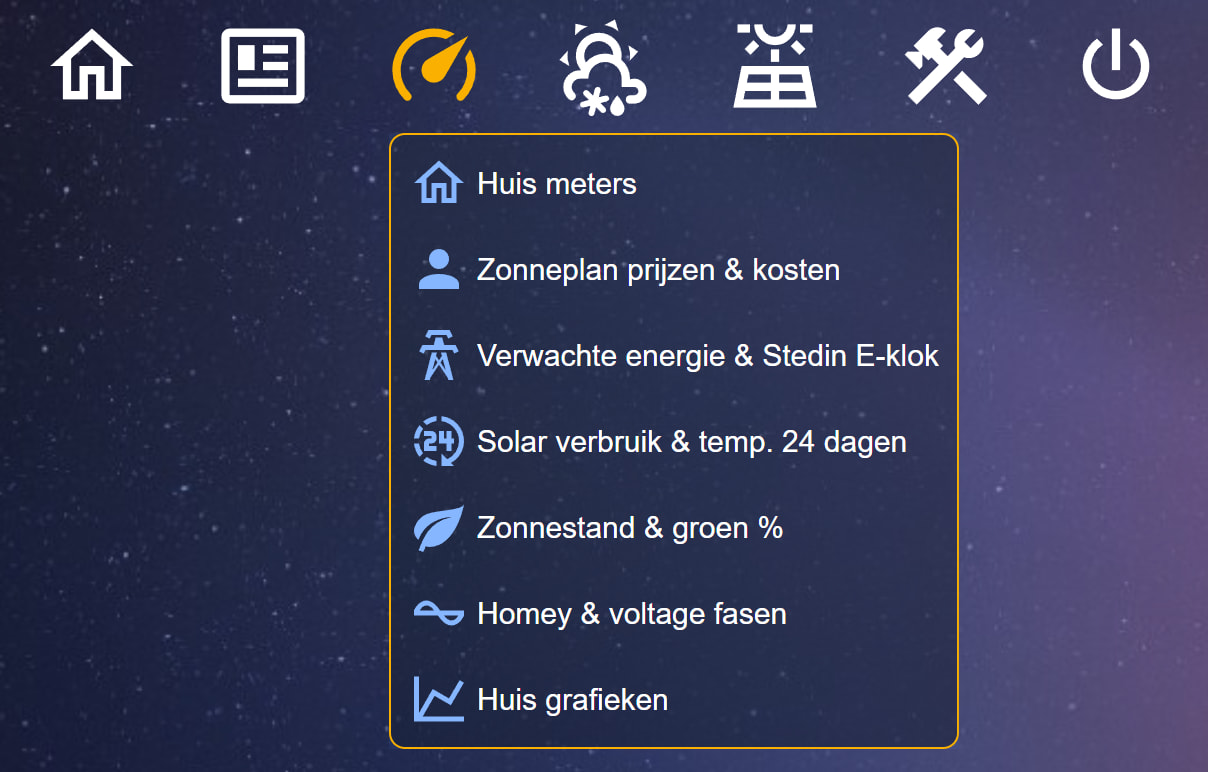
First menu prototype using one horizontal menu and multiple vertical menus:
Ah, ill add a “state” setting for every menu item just like the button.
I don’t understand this one, please elaborate.
You want an textual svg field inside the icons? Why? I understand the usefulness in the image widget, but why in the icon of a menu?
I do not understand this one either. You want to give each item a name? Offset values on what? Are you referring to the container label?
I have made a practical example in the demo
Read the appearing text in the demo. When the menu collapses because an item was chosen, the button that activated the menu needs to know that the collapse happened. Otherwise, the button would stay enabled. The “Output status topic” from the menu outputs “false” when it is collapsed. If you bind this to the “state” setting of the button (which should be in toggle switch mode), it turns off automatically.
As of now, I don’t have a solid idea for something like this, but maybe I should introduce a “dynamic” widget. It would be similar to the container widget, but with a text field in its settings that can be made dynamic. In this field, the user could paste regular Dashboard Studio snippets, which would then materialize into the widget at runtime. This way, you could easily broadcast the same widget over multiple dashboards.
I don’t know, it’s just an idea that popped up while I was writing this! It might be a nice topic to discuss with the community here. It sounds a bit niche, but perhaps it could bring other interesting use cases to Dashboard Studio?
I did not even think of that hahaha. Now every menu item needs a “state” setting to turn it off also.
Short: what is my active menu (orange) and what is the main and submenu I am selecting (blue)
I would like to use small svg images/icons that are not available in default icon library but are available as an svg (no url).
Could the following do the job: define an image with a svg and do not use an icon in front of a specific menu option. Hide and show the image (with a size and location of an icon) with the menu status?
Defining a horizontal menu, by default the menu names are visible and use space (see “Nieuwsberichten”). In my example I only use icons without text and I want the icons to be equally spaced.
Several workarounds: define font size 1, or shorten the icon names and set the font opacity of the menu item to 0. What is the best solution for only showing Icons in a horizontal menu?
Which comes to another question: can I center the menu names under the icon, which is not uncommon.
Would you define buttons as a main menu and use the menu widget for submenus? That’s why I struggle with these menu item texts I think…
I can think of even more options, but it has to remain workable. I admit: there are already a lot of options, and it takes quite a bit of time to figure out how it works (already).
If the screen position is 0.4, then the icon must get the status off (=screen is open) and position 0 is closed (icon on). Or do I need to define a Homey flow for this?
Ah, yes. This will be solved if every menu item has a state option which you can turn of with the menu. Seeing this, every menu item should also have a “Send Off When Turned Off by Group” Otherwise the dropdown menu would not collapse.
But why aren’t you uploading these svg images in the gallery to use them?
Ill add it to the list
That’s an option that would work right now. Like I said, I did not even think of using a menu to show sub-menus. I just had a menu that can be made in to a dropdown menu in mind. If you make the “main menu” buttons a member of the same “Selection Group ID” and turn “Send Off When Turned Off by Group” also on, only one sub menu will be visible at the time.
…. ahh shoot. I just fixed a “bug” that one item from the selection group should be enabled. I knew this would bite me in the ass some time. I shall look if I can make this optional.
Oh, no sorry. Did not have the time to debug that one. Should be possible, don’t know what the problem is (but have not tested it). Have not dived in the code. It is on the list.
I don’t know what the problem is, but it works like a charm over here? I suspected the 0 might be interpreted as a boolean “false” or something, but that does not seem to be the case. The values converted fine and my blinds are moving as expected.
Thanks for testing, I will reverse the settings and colors.
Changing a color in the Switch wizard happens digit by digit when you enter the RGB code. After typing one digit the color setup popup closes.
@Satoer wat is supergave en handige app heb je gemaakt. Een kleine donatie gedaan aan je harde werk. Het is voor een leek makkelijk te gebruiken. Maar vaak wel voldoende om ook moeilijke dingen te doen.
Nu zou ik graag een overzicht hebben van de stroomprijzen in Tibber. Ik krijg alleen niet bedacht hoe ik dat moet gaan doen. Zou je me daarmee willen helpen?


 So, as a fallback. But I disabled it now. Thanks, I’ll try this and report back.