[APP][PRO] Mode Switch

Mode Switch for Homey

Want your home to react intelligently without having to build separate flows everywhere?
With this app, you configure your rules once — after that, everything works automatically.

:backhand_index_pointing_right: View and test the app: Mode Switch | Homey

What makes this app different?
You no longer need extensive flows for basic automations.

For example:

  • Motion detected → light automatically turns on

  • No motion → light automatically turns off again

  • Everything configurable per zone

  • Works instantly, without complex Flow logic

Mode-based automation
Your home automatically adapts to your situation:

  • Home / Away / Sleeping / Vacation

Can be changed manually

Or fully automated:

Automatic examples:

  • Everyone leaves → Away mode

  • Nobody home for X hours → Vacation mode

  • Everyone asleep → Sleeping mode

  • Someone wakes up or comes home → Home mode

No separate flows needed — everything is managed centrally in the settings.

Smart lighting without the hassle

  • Configure lights per zone

  • Automatically turn on with motion

  • Automatically turn off when no motion is detected

  • Adjustable dim levels

Temperature rules

  • Automations based on temperature

  • For example: control heating or cooling per mode

  • Smart combinations with presence and time schedules

Device monitoring (without complicated flows)
Monitor devices such as:

  • Washing machine

  • Dryer

  • Dishwasher

As soon as a device starts or finishes:

  • Instant triggers available

  • Notifications possible

  • Ready to use in Flows

Scheduling & smart time schedules
Let your home automatically react based on time:

  • Turn lights on at a specific time

  • Only active within a specific mode

  • Automatically turn off again after X time

  • Random times possible

  • Work with time windows

  • Support for sunrise and sunset

Screenshots

Modes — Configure which devices turn on or off when the mode changes to Home, Away, Sleeping, or Vacation

Zones & Sensors — Configure rules such as: pantry door open → light on, door closed → light off. Or motion in the hallway → hallway light on. No motion for 20 seconds → light off.

Temperature Rules — Set temperatures per mode, for example: Vacation mode → temperature set to 17 degrees.

Monitoring — Monitor appliances. For example, when a dishwasher starts, a trigger is sent which can be used in a Flow card for notifications. Or when it finishes, another Flow card can announce that the dishwasher is done.

Scheduling — Configure lights on schedules or after sunset, and automatically turn them off again after a set number of hours.

Automatic Mode Switching — Automatically switch all modes. For example, when everyone is away, the mode automatically changes to Away.

Widgets:

Support
Enjoying the app and want to support development? :raising_hands:

:backhand_index_pointing_right: Please support me via PayPal.

All support is greatly appreciated!

Mode Switch
Perhaps it would be good to add the link to this topic in the Homey App Store, @Erikje.
Didn’t fint this topic earlier.
Very interesting app, thx!

Thanks for your advice, I will definitely add it. Nice to hear that you like it, greatly appreciated.

I just put V2.7.0 into testing.

Made some adjustments for the Homey App Store so it can also get approved.

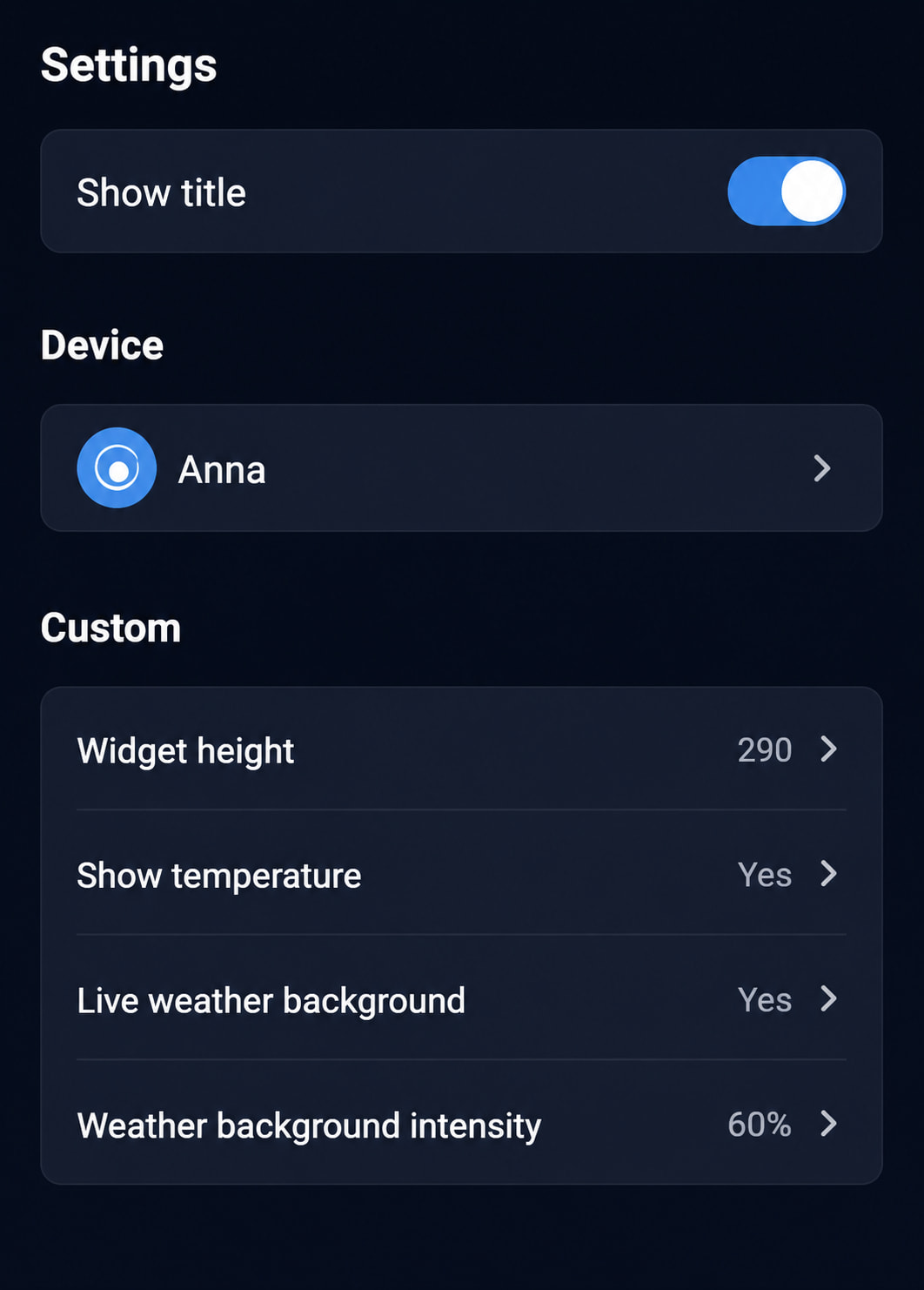
I also made an update for the “Mode” widget, so you can display a device with temperature measurement. You can now also enable the weather image as the background and choose how visible you want it to be:

And with the “Monitoring” widget, you can now see how many kWh the device has used and how long it has been running:

Also created tokens so they can be used in flows as well :slightly_smiling_face:

V2.7.1 has now been moved to testing due to an error on the settings page. This issue has been fixed, and new weather background images have also been added.

Hi

When I select “invert” in advanced flow on AND card “Current mode is..”, it does not change text from “is” to “is not”, making it difficult to know what is configured. Mode Switch version 2.7.1. Thanks.

Is it possible to have the option to make “Active mode” as default in the Homey Pro app on the mode switch device instead of “Sub mode”. Thanks. Great and awaited app!

Hi Sanu,

Thank you so much for wanting to use my app. I did notice that I forgot to include that, so I’ll definitely update the text when the card is flipped. I’ll also take a look at whether I can make it a configurable setting.

It’s truly great to hear you say that this is an app you’ve been waiting for. Feedback like that really means a lot and motivates me to keep improving it! :blush:

Thank you for the great app, it’s appreciated!

Could you also add something around water management? For example, support for indicating whether a shower or bath is currently in use, or options related to managing an irrigation/sprinkler system.

Hi TammeMagal,

Thank you so much for your donation, I truly appreciate it.

That’s actually a great idea to see if I can add support for that as well. It would probably need to be able to detect something like a water meter or a boiler/heating system that indicates when there is a heat demand.

I’m just not sure yet how I could reliably detect an irrigation/sprinkler system, mainly because I don’t have one myself to test with or base the implementation on.

But I’ll definitely give it some thought and see what the best way would be to add this.

Hi Sanu,

I have now deployed version 2.7.2 for testing. With this version, you can select the default list for the Device Mode Controller in the device settings. After making the change, please restart the app for it to take effect.

Hi TammeMagal,

I’m also still working in the background on adding a kind of activity system, such as Showering and Irrigation. Unfortunately, my current implementation keeps crashing all the time.

Just so you know, I haven’t given up on it — I’m still actively working on it because I think it’s a fantastic idea and would be a great addition to the app.

I’ve just put version 2.8.1 into testing. With the help of AI, I’ve added support for French, German, and Spanish.

Is there anyone in this group who speaks one of these languages and would be willing to test it? I’d really appreciate it if you could check whether everything works correctly and whether the translations make sense and are accurate. Thanks in advance! :blush:

It works :slight_smile: I got version 2.8.1 and it works fine. I donated as thanks.

Thank you so much for the donation! I’m glad the option is working. Enjoy using the app! :blush:

Could you take a look at version 2.9.0? It’s currently available in the test environment.

In this version, I’ve tried adding activities that can be activated using multiple conditions. I hope this is roughly what you had in mind. I still need to work on it further, so it’s not fully complete yet.

I’d really like to know whether this is more or less what you meant, and if you have any suggestions or feedback on how it could be improved.

Could you also let me know if it crashes for you? It still crashes for me sometimes, but that might also be because my Homey’s memory is already quite full.