Hmmm.. I use room sensor to control my Geodan at home and my Ecodan at my other property, is it better to switch to curve?
The room sensors are used when on curve also and is the best to use the curve settings for the max saving and comfort with the app
Thanks for the reply. Sounds great. I haven’t setup my system to use the curve setting. I have only used the indoor transmitter. I don’t really now how to set it up on curve. Do the optimizer do it for me? Or should I learn how to do it before I use this app?
You should run the heat pump on weather compensation (curve mode) – not indoor sensor control.
Melcloud Optimizer doesn’t change the actual curve via the API. It only adjusts the target temperature every hour based on power prices, forecasts, and your home’s response.
So the pump keeps its normal curve setting, and Optimizer simply shifts it up or down to “boost” or “slow down” heating when needed.
Leave the pump in curve mode, and let the Optimizer handle the rest.
Yes
Hi, I have a Hero (LN35) are support for air to air heatpumps in the plan for the future?
As it is really hard to optimise a air to air heatpump as it is totalt different system i would say no sadly.
Understand, I am using flows that follows weather, electricity prices and temperature sensors all around the house to adjust the temperature of the heatpump, this looked like a smart and simple replacement 
Hi Kjetil,
Sorry, it’s me again, I’ve got a problem.
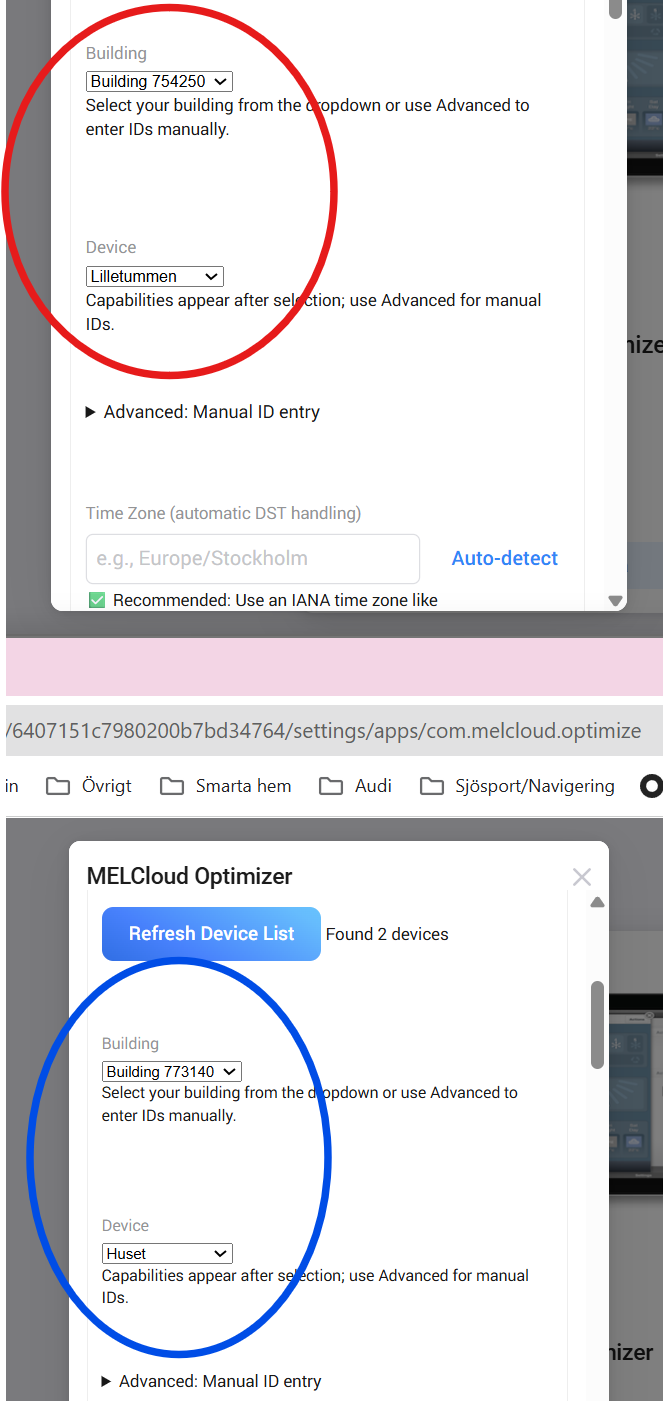
I have two heat pumps in two different locations with both pumps in the same Melcloud account. When I set Away mode (range 18-19.5 C) on the pump “Lilletummen”, two things happen: the target temperature drops temporarily for 3-4 minutes and then goes back to the original temperature (21 C). Even more strange is that “Huset” also drops at the Away instruction and remains at the Away temperature

Hi,
Thanks for reporting this — and great that you’re testing with multiple pumps!
Since both heat pumps are currently connected to the same MELCloud account and using the same login session, the Away / Home commands may apply to both devices by default.
I strongly recommend creating a unique MELCloud user for each location / heat pump and then connecting each one individually in Homey.
This ensures:
-
Each device gets independent Away / Home / temperature control
-
Commands are correctly isolated per location
-
No spill-over behavior like the one you’re seeing now
Once you have separate accounts, please reconnect both devices in Homey and test again — the Away mode should then stay active on the selected pump only.
Let me know once you’ve set that up, and if anything still behaves strangely we’ll dig deeper together!

Looking forward to feedback on the savings.
Also I will soon release a update version with even better optimisation and better visualisation of the AI algorithms and how it learns your house over time
I’ll keep you updated! Exciting with the new release 
New Feature: Live Model Confidence in MELCloud Optimizer (v14.0.12)
Hi everyone 
We’ve just rolled out a new section on the Settings page called “Live Model Confidence” — giving you a live snapshot of how reliable your optimizer’s learning models currently are.
This feature makes it easier to understand how the optimizer “feels” about its own data, how much it trusts its predictions, and why certain heating or hot-water decisions are made.
 What you’ll see
| Section | Meaning |
|---|---|
| Confidence | The overall reliability of the optimizer’s internal models — shown as a percentage and a simple text rating (“Improving”, “Reliable”, etc.). |
| Heating rate / Cooling rate | How quickly your indoor temperature changes when heating or cooling (°C per hour). |
| Thermal mass | How much energy your home can store — higher = slower temperature changes. |
| Learning cycles | Number of adaptive updates since the model started learning. More = smarter and more stable decisions. |
 System Learning Overview
This part summarizes how well each internal model is performing:
-
Temperature model: how accurately your home’s thermal behavior is tracked.
-
Price strategy: how well the optimizer identifies cheap vs. expensive hours from your chosen price source (Tibber or ENTSO-E).
-
Hot-water forecast: confidence in your daily/weekly hot-water usage pattern.
Each one can be Improving, Reliable, or Highly reliable — depending on how much real-world data the system has analyzed.
 Estimated Smart Savings
At the bottom you’ll see your live estimated energy savings vs. a traditional heat pump setup — calculated from actual runtime data.
Example:
Today:      7.94 SEK saved
Last 7 days: 25.17 SEK saved
Projection:  ~251.7 SEK/month
These values are based on:
-
Current and historical electricity prices
-
Measured COPs (heating + hot water)
-
Learned behavior of your building’s thermal model
 How to interpret the Confidence level
| Confidence | Description | Typical behavior |
|---|---|---|
| <40% (Learning) | Model still calibrating. | Conservative adjustments. |
| 40–70% (Reliable) | Stable model, good data quality. | Normal optimization. |
| >70% (Highly reliable) | Strong learning and consistent performance. | Aggressive price optimization. |
Confidence improves automatically as your system gathers more data over time — no manual tuning required.
 Where to find it
Homey → MELCloud Optimizer → Settings → Live Model Confidence
If you don’t see it, restart the app and check that you’re on version 14.0.12 or newer.
 Feedback welcome!
This is still early in its lifecycle, and we’d love to know:
-
What confidence levels you typically see
-
How quickly your system stabilizes
-
Whether the “Reliable” or “Highly reliable” tags feel accurate for your home
Screenshots like the one above (with personal details hidden) are super helpful!
find it here MELCloud Optimizer | Homey
I still only following this topic and I’m not using the app just yet, mostly because I don’t have time to set up my Ecodan to use the curve setting. Im not home everyday, only weekends for now, and if I mess something up and go traveling my family will not be so kind to me 
One question, I was thinking about to set my pump just to do hot water on night time, shower water. We are getting this tariff costs next year, januari. If I use this app and have it setup like that, will that be a bad thing? I mean, my goal is to have a high temperature at 6 o’clock in the morning before the extra tariff kicks in. Could the app interfere so the pump don’t heat the water as I want it to do?
That’s a really good question — and totally understandable if you want to keep things stable while you’re away. 
Here’s how the MELCloud Optimizer works and how it relates to your Ecodan’s curve mode:
The app doesn’t use fixed schedules — it learns how your home behaves over time. It studies how quickly your house warms up or cools down, how your hot-water tank is used, and how outdoor temperature and price changes affect your system. Based on this, it builds a thermal model of your home and a usage pattern for hot water.
For the optimizer to work as intended, the heat pump should be set to curve mode (weather compensation) rather than a fixed flow temperature. This is because the optimizer adjusts the target room temperature (or offset on the curve) to influence the system’s output — not the flow temperature directly.
When the pump runs in curve mode, the optimizer can dynamically fine-tune the heating curve offset hour by hour based on:
-
Real-time energy prices (for example from ENTSO-E, which supports any “moving tariff” in Europe),
-
Outdoor temperature and weather forecast, and
-
Your home’s actual thermal response.
That means:
-You’ll always reach your desired comfort temperature.
-The optimizer can pre-heat or delay heating to use cheaper hours automatically.
- It builds a virtual adaptive curve — smarter than a fixed one — that continuously adjusts itself.
If you manually limit the system to produce only hot water at night, the optimizer will still work, but you’ll lose most of the benefit from its learning and price optimisation. It’s better to let it manage both heating and hot water together — it guarantees comfort, learns your patterns, and reduces cost automatically.
So yes — the pump needs to be in curve mode for the app to work fully. Once it is, the MELCloud Optimizer essentially becomes your intelligent curve manager — learning, adapting, and optimising for comfort and cost without you having to tune anything manually.
Hi! Should I have the hot water tank hysteresis set to 0 in my Ecodan? At the moment it’s sset to 6 degrees but I guess that is not so effective for your optimization?
Yes you should set it to the temp your would like it to be in the app and after this it will optimise how it get to that temp based data about usage and price optimisation
Hello,
I am trying to integrate my Mitsubishi Electric ducted air conditioning system with my Homey Pro/Bridge using the official MELCloud app for Homey.
My setup:
-
System: Mitsubishi Electric Ducted AC (via the MAC-568IF-E WiFi adapter)
-
Location: Melbourne, Australia
-
iPhone App: “Mitsubishi Electric Wi-Fi Control” app (works perfectly, logs in fine)
-
Homey App: MELCloud (com.mecloud)
The Problem:
When I try to add the device in the Homey app:
-
I select “Air to Air Heat Pump” as the device type.
-
I enter my credentials (email address and password).
The login fails repeatedly. I am receiving an authentication error (not a specific code, just a general “failed to login” message).
Troubleshooting Steps Taken (That Did Not Work):
-
Verified Credentials: The exact same email and password successfully log me into the iPhone app and the MELCloud web portal.
-
Simplified Password: I changed my password to a simple alphanumeric string (no special characters like
!,@, etc.) to rule out encoding issues. The simple password works on my iPhone but still fails in the Homey app setup. -
Correct Device Type: I confirmed I am selecting “Air to Air Heat Pump” and not “Air to Water”.
Request:
Has anyone in Australia/NZ successfully connected recently? Is this a known issue with regional server differences (AU vs. EU API endpoints)?

