Hi.
My devices are back, so this update worked
tir. 16. sep. 2025, 11:09 skrev Heatit via Homey Community Forum <notifications@athom.discoursemail.com>:
Hi.
My devices are back, so this update worked
tir. 16. sep. 2025, 11:09 skrev Heatit via Homey Community Forum <notifications@athom.discoursemail.com>:
Sorry for necro reply on the thread but I couldn’t be arsed to keep trying to connect my thermostat considering summer with warmth and cheap electricity bills was on its way.
Now we’re back to square one though. Pairing still does not work but I will try to have my homey within 10cm and try again.
Is the pairing supposed to happen automatically in the Heatit app or should I try to pair it as a z-wave device?
You need to select the Heatit app within Homey and choose the correct device from the selection.
Hi. Is this intentional or a bug that a Z-TRM6 has no history tab on the device page? All my Z-Temp3 have it, and this one - the most important thermostat - has not.
I’m on app version 4.2.5 and noticed some inconsistency in when the Z-TRM6 turns red (dashboard background or setpoint icon).
When the floor sensor temperature is below the setpoint, it shows red - but the thermostat is still off. Only when I increase the setpoint further does the thermostat actually turn on.
I’d expect the red color to indicate when the thermostat is active, not just when the setpoint is higher than the measured temperature (since hysteresis can cause a gap without switching).
I have also noticed that.
Colour should change only when relay is on/off 
Hi Heatit Controls,
I really appreciate how active you are on the forum and how much effort you put into helping users, especially as a small team.
I’m having trouble connecting a Heatit Z-TRM6 to a friend’s Homey Bridge. The pairing just won’t complete — no matter what I try. I can’t get the first green dot on the screen if you know what i mean.
When I test the same thermostat on my Homey Pro (2023), it connects instantly without any issues.
What I’ve tried:
Bridge placed less than 1 meter from the thermostat.
Verified the device works by pairing it with my own Homey Pro.
On my Pro, pairing works even with about 3 meters and a wall in between.
Is there any known issue or limitation with connecting Z-TRM6 to the Homey Bridge? Or is there something specific that needs to be done differently?
Thanks,
Timothy
This should be a request for change. Should be an easy modification in the app. Red should definitively indicate that the thermostat is active.
Once the first step is complete(1.green), do the pairing again on the thermostat and 2 will be green. Not intuitive but works!
Hi everyone!
I have a Heatit Z-Water 2 and a Heatit TRM3 thermostat, both now connected to a Homey Pro (Early 2023).
I’m having trouble getting the thermostat to communicate with the relay. The setup originally worked perfectly with Futurehome, but I decided to switch to Homey because of the subscription costs with Futurehome.
Now, I can’t get the thermostat to control the relay at all.
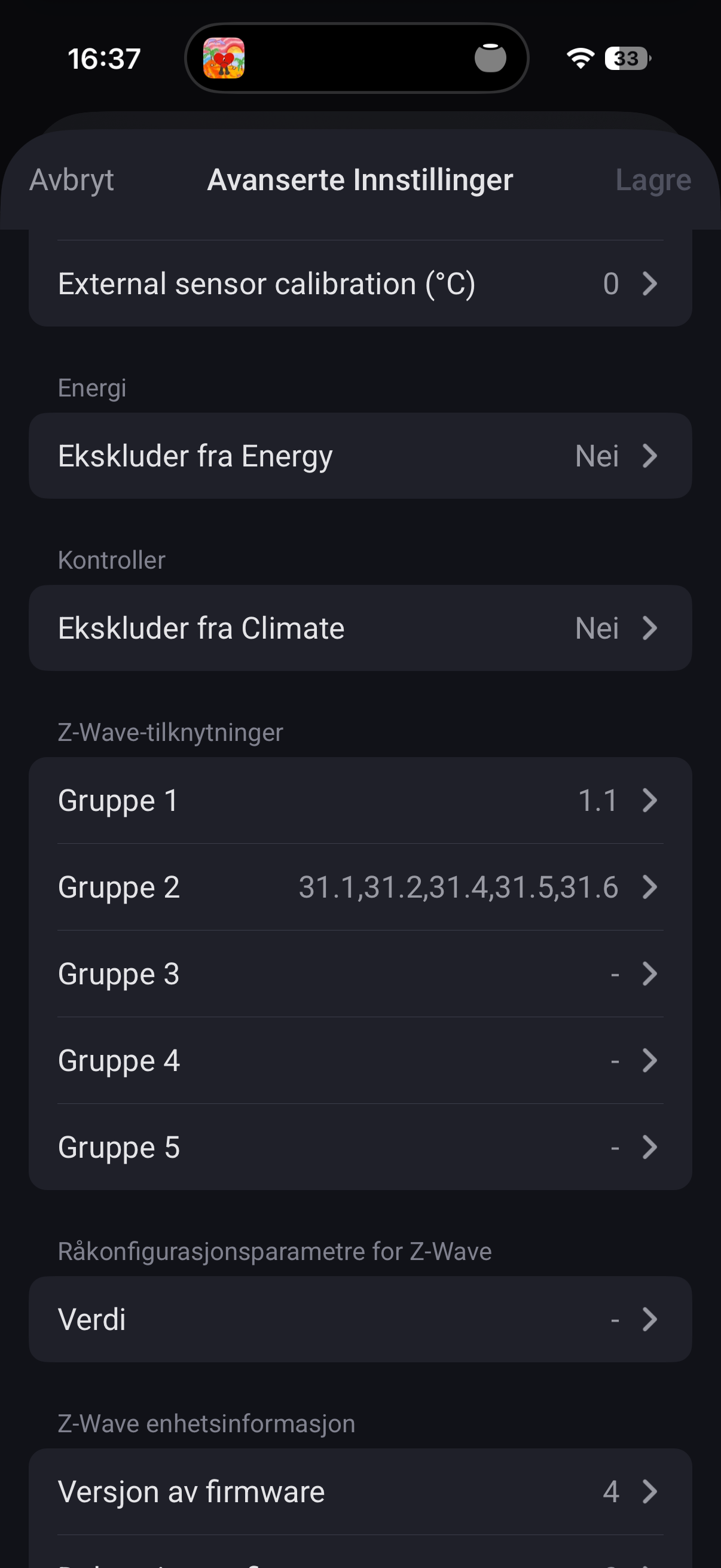
My Node ID for the relay is 16.9, and I’ve entered 16.9 in Group 3 under the advanced settings for the TRM3 in Homey. I’ve also tried using 1 and 1.1 in Group 1, but with no luck.
The relay doesn’t click when I turn the thermostat off, and the actuators don’t respond when I change the temperature.
I would really appreciate any help or suggestions — it’s getting cold here in Norway, and my floor heating isn’t working! 
Thanks in advance!
Use group2 for relay id
Thanks for your reply!
It worked when I changed to Group 2 for the single relay — thank you for that tip!
However, I’m still having a minor issue when trying to control multiple relays from the TRM3 thermostat. The thermostat doesn’t seem to respond or communicate properly with the additional relays.
Has anyone managed to get multiple relays working reliably from one TRM3, or is there something specific that needs to be configured in the association groups?
Thanks again for your help — I really appreciate it!
Do not have a answer for you on this .
But you can connect all of the solenoids to one relay on ztemp2 if you can’t figure it out 
Hi Guys,
I have an installation with 10 thermostats and since last app update the comlplete app is missing from Homey and it is not possible to reinstall it from app store, neither with device add button… Any idea?
Hi, sorry for the late reply, this wasn’t added at first as it was not a priority.
It is on the to-do list.
Hi, if I’m not mistaken, I think we spoke together yesterday? This was fixed by me trying to install the Heatit App from my computer, right?
Does it control any of the outputs when set this way?
This should be correct for associating with multiple devices.
Are you going to fix this issue ? @HeatitControlsAB
Hi!
I’m experiencing that setpoint changes do not take effect on my Z-TRM3 thermostats from Homey.
I can not tell from which version this appeared, noticed the problem now when winter is coming, they were functional 6 months ago.
The thermostats are connected, I can read out various variables like temperature, voltage, current, power etc., but not make setpoint changes, neither from unit-view nor from flow-cards.
Setup: Homey Cloud with Homey Bridge
Heatit Controls App version: 4.2.6
As mentioned above it’s not a new installation, it has been running flawlessly for some years.
We can’t, Capabilities | Homey Apps SDK.
The color for the thermostat capability is not something we can change, this is decided by Homey.