Sure. You can upload it over here: Support & File Upload | Dashboard Studio | Free-Form Dashboards for Homey
I’ll see if I can integrate this into the markdown editor. I was also thinking about making some kind of formula UI. It started as a simple addition to do some simple math, but it’s become more and more complex. (you can still do the simple math of course)
Send


Just make that dynamic, select the topic homey/event/tablet_slaapkamer_batterij add a binding formula: if(value < 100, 1, 0)
When the tablet_slaapkamer_batterij is under 100, the blinking is on. That’s what you want, right? 
Yes, that’s exactly what I want. I’ll try that. It still is some fugring out how everything works.
It works now. Now I get the logic. First you select the correct topic and then you apply a formula  That is so awesome and flexible.

I shall make it unlimited by just be able to specify the color Vincent.
Next version you can do:
[block1:Trash Day] (like it is now)
[block @danger:False Alarm]
[block #e11d48:Pre-heated 220°C]
I am still working on the timer implementation, probably finish it somewhere this weekend.
Defining a color in the markdown would be so awesome. Thx. Looking forward to it.
Bug…?
Firstly, @Satoer Michel, I want to say what a fantastic app you’ve built. The level of documentation, quality, options and configuration, etc., etc. is really amazing; I don’t know how you found the time outside of whatever your day job is, but my hat is well and truly taken off! 
Anyhow, I might have found a slight bug, or it could be something dumb I’ve done. Basically I have built a page which shows a camera image updated every 10 seconds. It has a switch above it to be able to switch to a higher resolution refreshed every 0.5 seconds, so that the page doesn’t consume so much resources, etc. Anyhow, I have a graph showing house temps and the legend is showing through to the higher z-index URL camera image.
See image 1 prior to switching to full res large image:

and then image 2 after switching:

I have set the z-index of the big picture to 11, the others are at 9 or 10.
Let me know if you can replicate it, but if not, I’ll provide further details as required. Thanks!
Ah, yes that is indeed a bug. Thanks Gray. It will be solved coming version (I expect to release it this weekend)
EDIT: Quick fix for now: Set the Z-index of the image widget above 20.
EDIT2: Extra tip: If you have a motion sensor outside or a doorbell button hooked up to Homey, you can send a message to Dashboard studio to show the big camera view automatically.
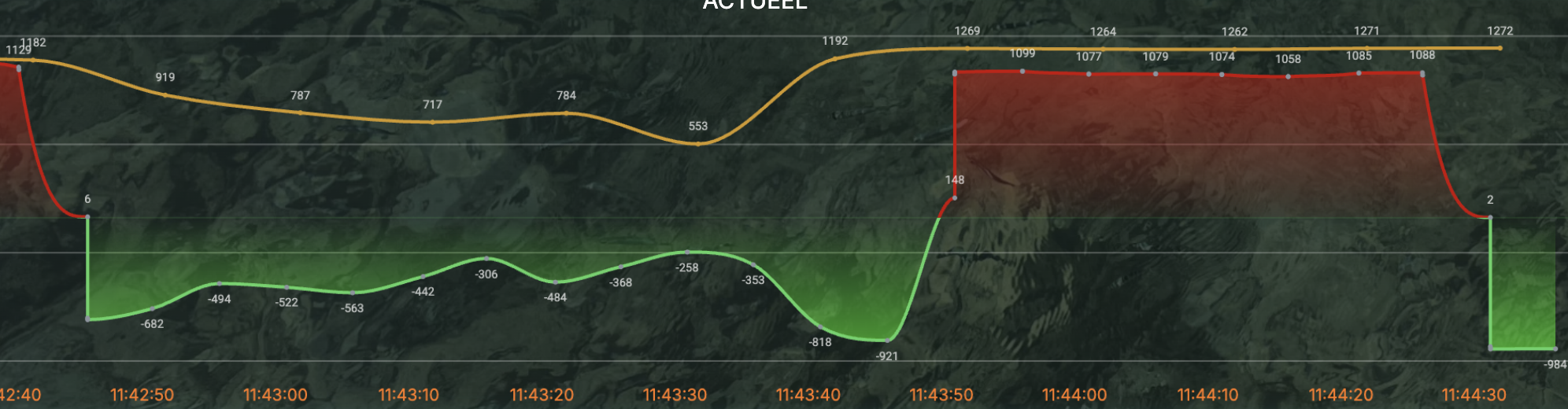

Hi Marcel,
I need a bit more info to solve this. Does this data come from a Dashboard studio Insight flowcard?
What sensor has produced this (brand and type)
Can you post the raw data from this graph in a message over here (put it in a code block please). You can get the raw value from the topic that produced the graph in the Data Stream Explorer:

Look up the topic and press the
{ } button.

Does somebody has an example on how to use countdown? eg. Press a button and a predefined number of minutes starts counting down in a label or text widget. Can’t seem to get it working.
This is not released yet Vincent. This will be a feature for the coming 4.3.0 version.
Ah ok, I’ve read about it in documentation. That’s the countdown timer you were refering too earlier then.
@Satoer thanks a lot, the high z-index does the job temporarily, per your edit. Also, a good point about the doorbell button push, i might look into something like that, although my display is an old Samsung tablet and the screen is usually off, so I’m not sure how far I’ll get with controlling the screen on side of things, not a major.
I did have a question though about the approach i have taken here, which is to use ‘Visibility’ to try to control the amount of resource being used by the fairly-rapid redisplay of the camera feed. Does this actually work in the way I have controlled it, or is the hidden image widget still pulling the image every .5 second behind the scenes, but just not displaying it? If it is, what approach should I take instead to prevent this?
Yeah, visibility is the right approach. If the image widget isn’t visible or isn’t on the same page, it won’t update. Opacity still keeps updating it though if it’s set to 0% (and you’re on the same page), so don’t hide it by setting the opacity to 0%

